
Provincial Tax Excel Template – Free (2026)
6
Free download
Track farm fuel purchases, exempt litres, tax rates, and exemption summary for Canadian records and filing support.
Download template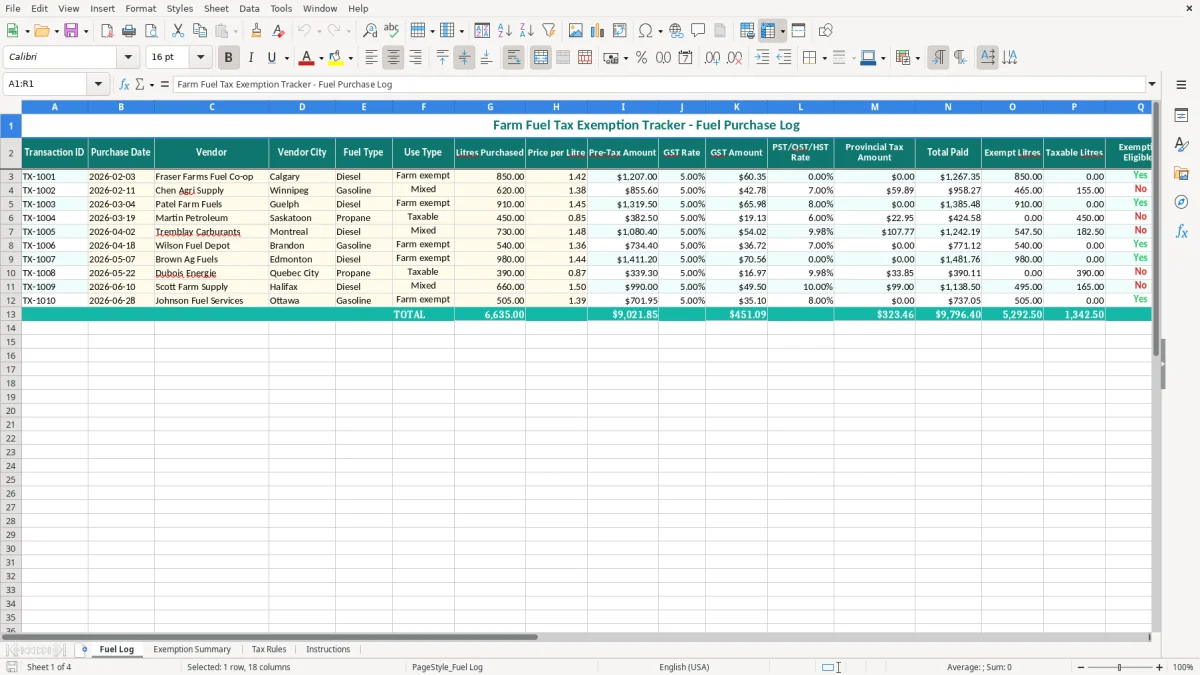
This farm fuel tax exemption Excel spreadsheet tracks fuel purchases, exempt litres, taxable litres, and the tax amounts tied to each transaction. It includes four sheets: Fuel Log, Exemption Summary, Tax Rules, and Instructions.
You use it to separate farm-use fuel from taxable fuel, keep a clean record for CRA support, and total the numbers in one place. The log is built for real purchase entries such as diesel, gasoline, and propane, with rates and totals shown beside each row.
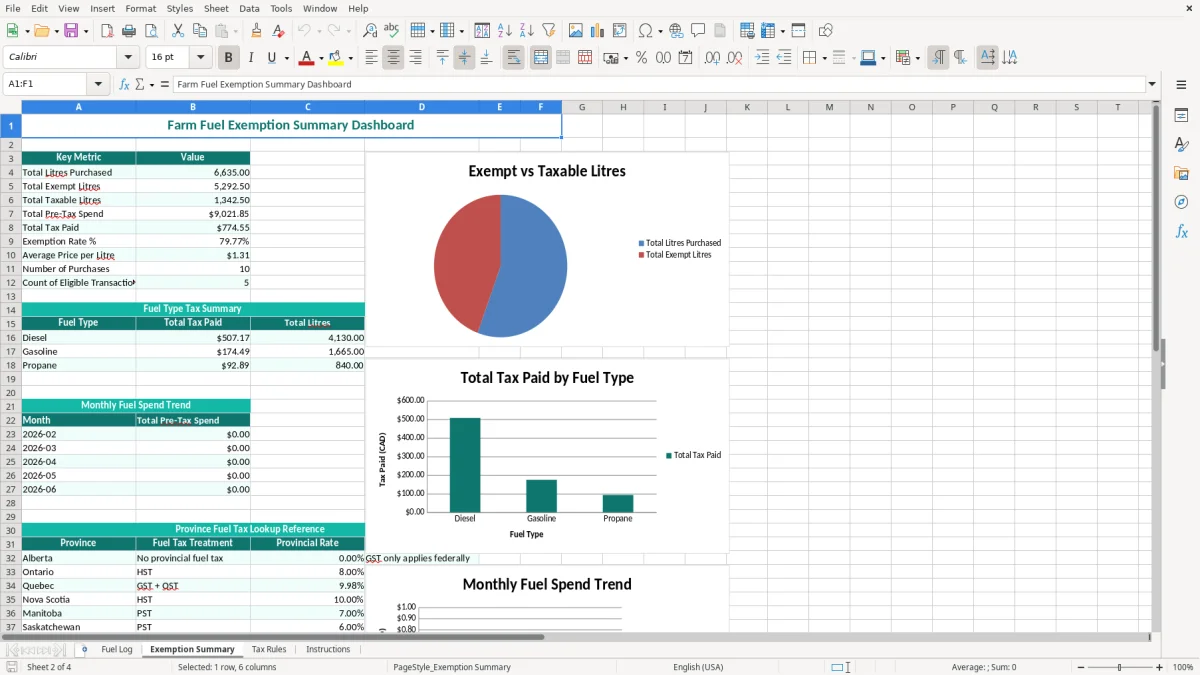
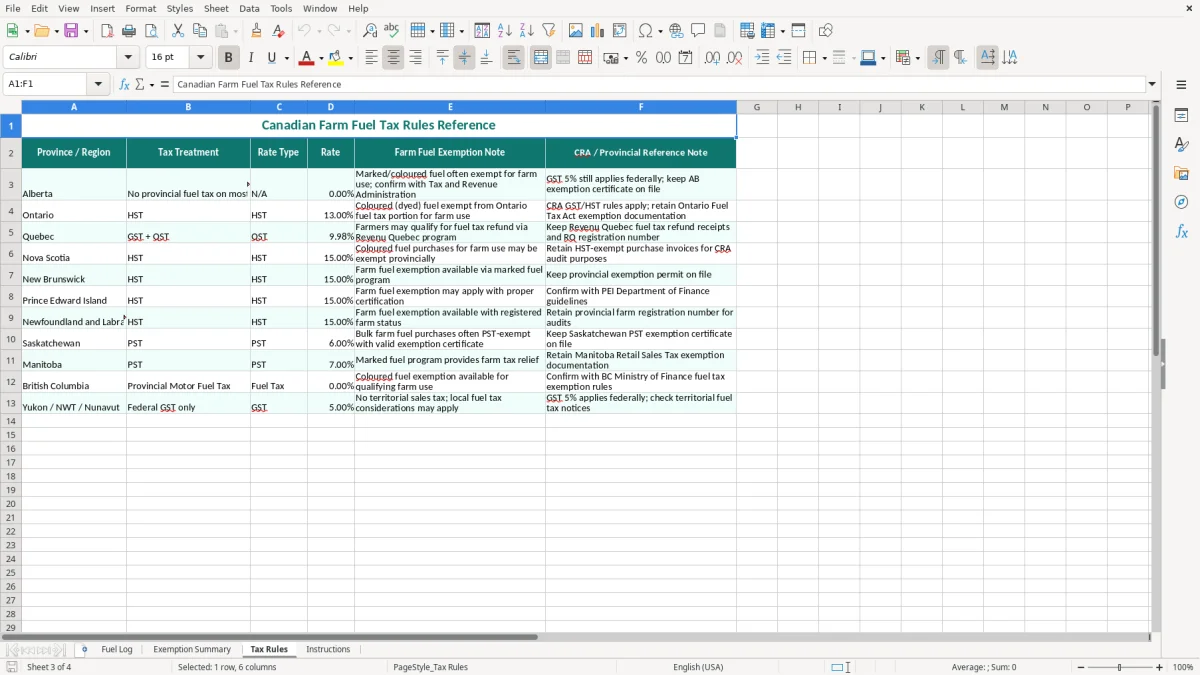
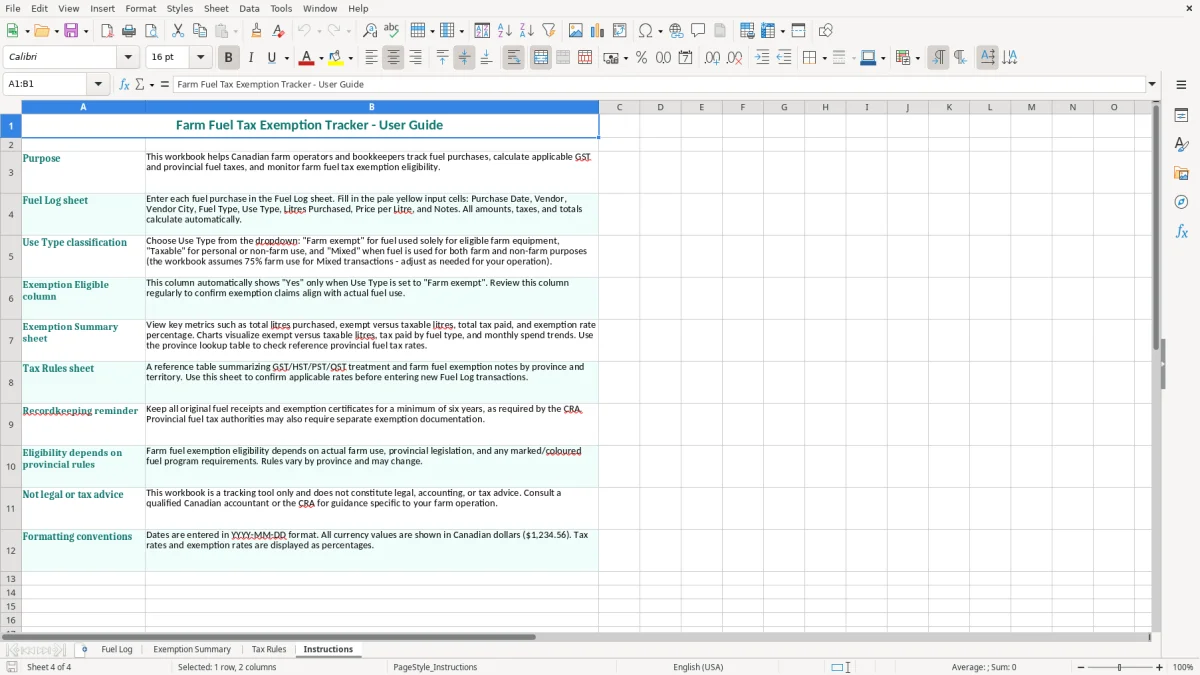
The layout is practical for a sole proprietor, an incorporated farm, or a bookkeeper preparing year-end support. Image 1 shows the Fuel Log, image 2 shows the summary, image 3 shows the rules sheet, and image 4 shows the instructions tab.
If you are a sole proprietor, family farm, or incorporated operation, this workbook helps you record fuel receipts as you buy them instead of sorting them at tax time. A spring seeding run with 12 diesel receipts, or a fall harvest month with 40 entries, is much easier to manage when the details are already in one sheet.
The Fuel Log sheet is the working tab. You enter purchase date, vendor, city, fuel type, use type, litres purchased, price per litre, and the tax lines, then review the exempt and taxable litre split before the month gets away from you.
The Exemption Summary sheet is the part you check before year-end or before handing records to your bookkeeper. If you have 18,000 litres of diesel for the year and 11,700 litres are farm exempt, the summary gives you the split without rebuilding it from receipts.
This is the kind of file a farm owner uses after fuel delivery, a bookkeeper uses during a GST review, or a spouse who helps with the books uses once a week. It is also useful when you have mixed-use purchases, such as a 620-litre gasoline buy where only part of the fuel is tied to exempt farm use.
The workbook is built for record support, not for guessing. The CRA expects you to keep enough detail to show what was purchased, when it was purchased, who sold it, and how the fuel was used, and you should keep those records for six years.
The Tax Rules sheet reflects the Canadian structure you actually deal with: GST at 5% federally, plus provincial sales tax where it applies. In Ontario, that means 13% HST; in the Atlantic provinces, 15% HST; in Quebec, QST applies separately; and in provinces with PST, the provincial line is tracked on its own.
If you buy 850 litres of diesel at $1.42 per litre, the pre-tax amount is $1,207.00. If 80% is exempt farm use, you would tag 680 litres as exempt and 170 litres as taxable, which makes the record far more defensible than a single vague note like “farm fuel”.
For most farms, the cleanest approach is to keep the workbook aligned with your GST/HST filing period and your fiscal year. That way, the log supports the return, the input tax credit review, and any discussion of mixed-use fuel without forcing you to rebuild the numbers from scratch.
That same period-by-period tracking lines up neatly with a GST/HST remittance record, so the fuel log feeds the return instead of sitting apart from it.
The biggest problem is not the tax rate; it is the missing detail. A receipt with no vendor city, no use type, and no exempt-litre split is hard to defend, and a stack of 30 such receipts can turn into hours of rework when you are trying to finish the books.
If you claim the whole purchase as exempt without support, the error can show up as an overstated farm-use amount or an overstated tax claim. On a $9,600 annual fuel spend, a 10% classification mistake is $960 of fuel misallocated, and that is before anyone starts rechecking the tax lines.
Mixed-use fuel is where people drift. A 620-litre gas purchase that should be split 70/30 but is entered as 100% exempt gives you a neat spreadsheet and a bad record, which is exactly the kind of problem that slows a review and creates unnecessary follow-up.
Another common issue is not reconciling the fuel log to the actual receipts. If you bought 4,500 litres during harvest and the workbook only shows 3,900, you lose confidence in the whole file and spend another evening hunting through emailed invoices and paper slips.
The workbook works best when you touch it on a fixed day, not when you “get around to it”. Many farms do the update right after the fuel delivery, or every Friday after the bank and cheque run, which keeps the log current without turning it into a weekend project.
If you are processing hundreds of fuel lines a year, buying from multiple sites, and trying to match inventory, payroll, and job costing at the same time, you may have outgrown a manual spreadsheet. At that point, a farm accounting system or a stronger AP workflow is usually the better move.