
Lobster Trap Tracker Excel Template – Free (2026)
2
Free download
Track grain receipts, bin balances, moisture, dockage, fees, and net value across multiple Canadian facilities.
Download template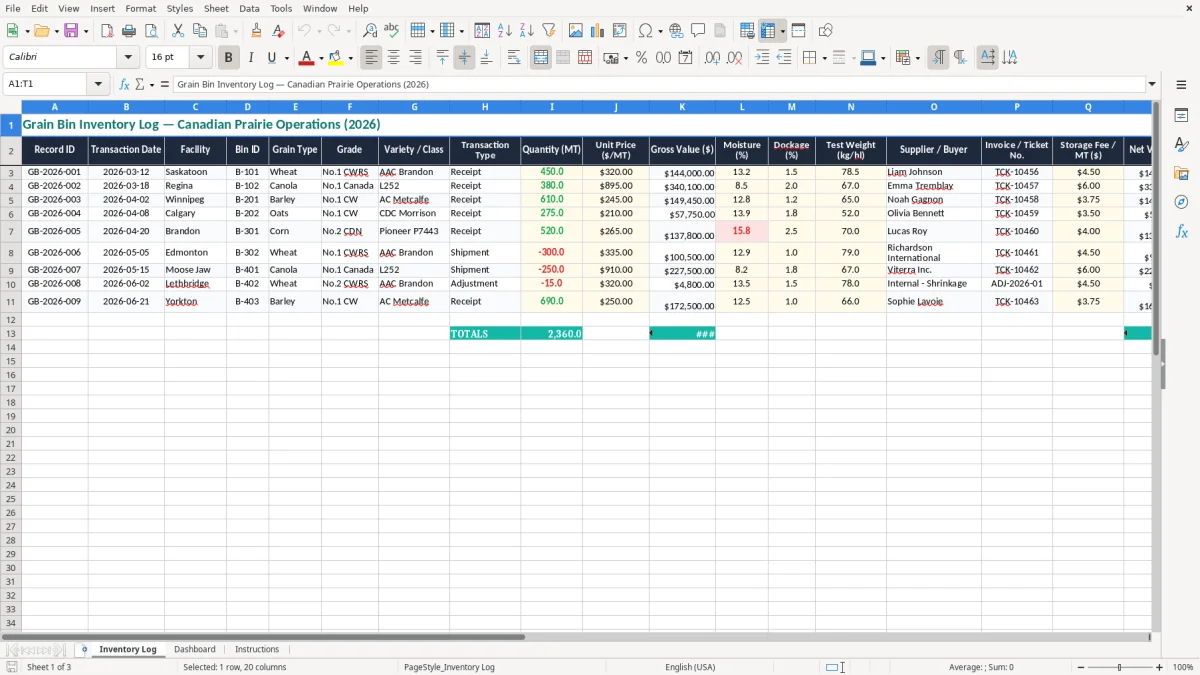
This Excel template tracks grain in storage by bin, facility, crop, grade, and transaction type. It gives you one place to record receipts, moisture, dockage, storage fees, and net value across your Canadian grain operation.
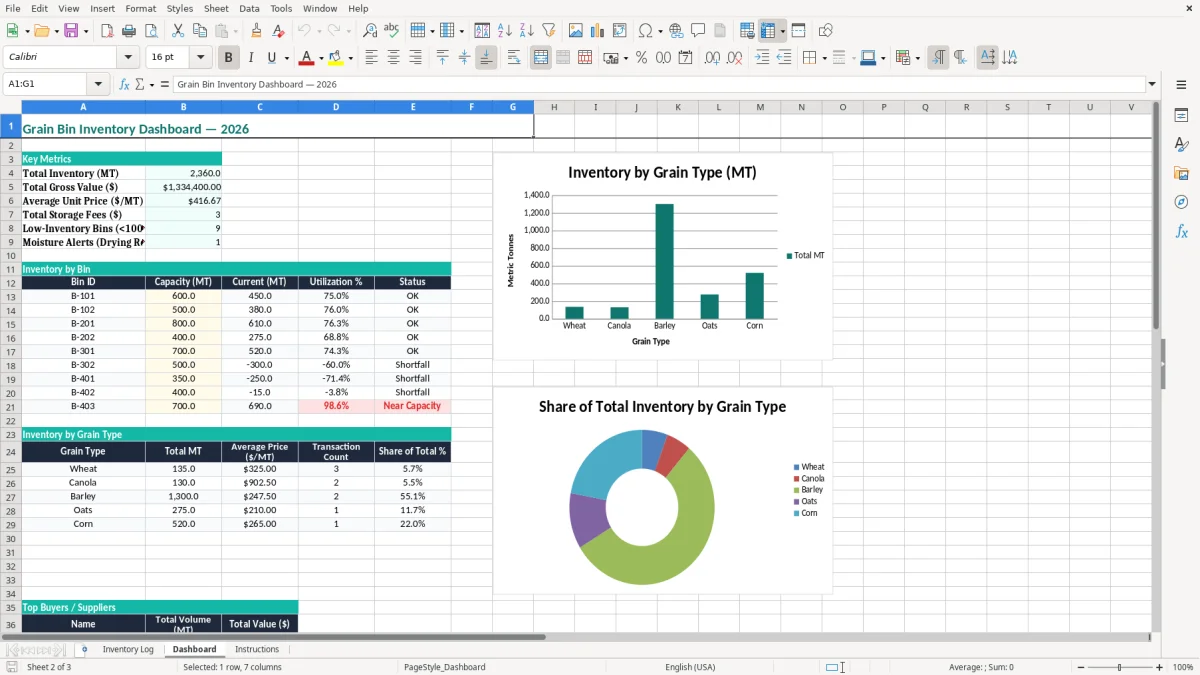
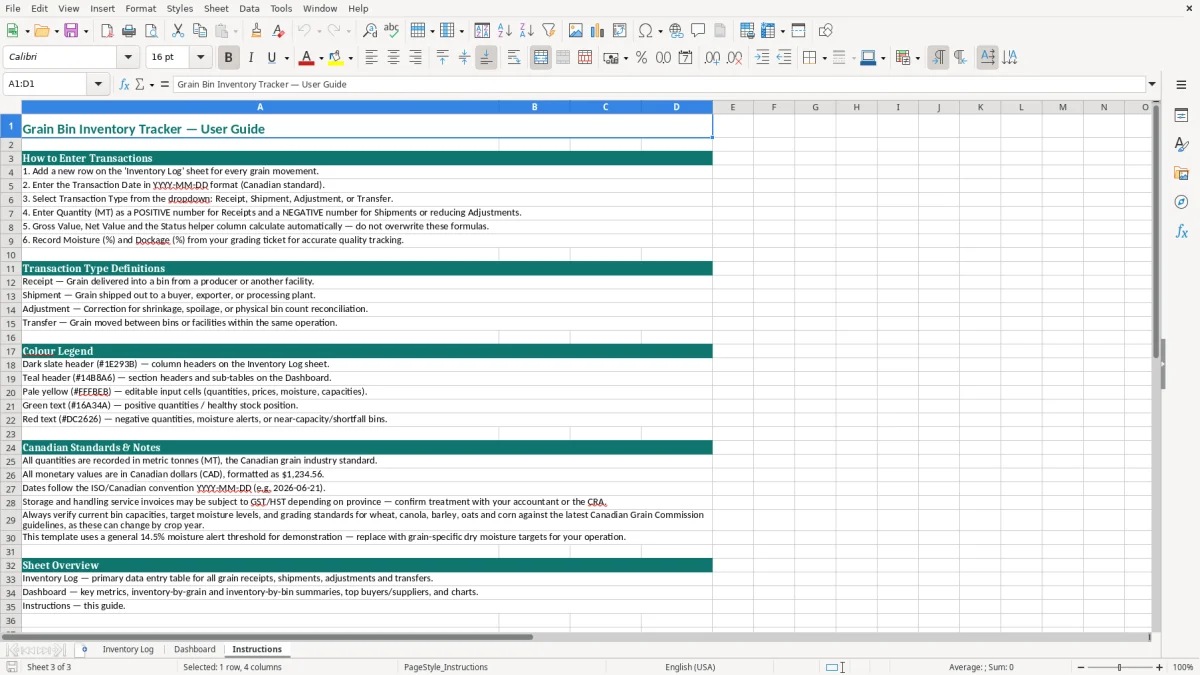
The workbook contains three sheets: Inventory Log, Dashboard, and Instructions. The log sheet is set up for line-by-line entries, while the dashboard turns those entries into a quick management view.
Use it when you are reconciling bins after harvest, checking buyer tickets, or updating stored tonnes before a sale. The layout matches the kind of records you actually need on the yard: ticket numbers, facility names, and quality fields that affect payout.
This workbook is for the person who has to know what is in each bin before the truck shows up. In practice, that is often a farm operator, an elevator clerk, a grain buyer, or the bookkeeper who checks settlement tickets at the end of the week.
The Inventory Log sheet (image 1) is laid out for that job: record ID, transaction date, facility, bin ID, grain type, grade, variety or class, quantity in MT, unit price, gross value, moisture, dockage, test weight, supplier or buyer, invoice or ticket number, storage fee per MT, net value, notes, and a helper status column. If you receive 450 MT of wheat at $320.00 per MT, you can see the gross value, then compare the moisture and dockage to the buyer ticket without rebuilding the math elsewhere.
A farm with 6 bins might update this after every delivery or bin movement. A commercial operation with 300 tickets a month uses the file to keep receipts and sales from drifting apart, especially when one facility is in Saskatoon and another is in Regina.
You need the quality fields beside the value fields because grade deductions affect the payout immediately. If a load of canola comes in at 380 MT with a $895.00 per MT price, 2.0% dockage and 67.0 kg/hl test weight tell you more about final value than a plain list of tonnes ever will.
This is not just an internal yard sheet. Once you are using grain sales in a business, the records support your GST/HST reporting, your income tax file, and any later review of settlement income or storage charges. The CRA expects you to keep business records for six years from the end of the last tax year they relate to.
If you are a sole proprietor, the grain income normally flows into T2125 with your personal return. If you are incorporated, the same records support the corporate balance sheet, the income statement, and year-end inventory valuation.
Suppose you sell 1,200 MT over a month at an average $315.00 per MT. That is $378,000 in revenue before freight, storage, and quality deductions. If your records are missing ticket numbers or bin IDs, you lose the trail needed to explain why one load settled at a different net value than another.
Keep the invoice or ticket number, buyer or supplier name, facility, and the date in the file. If you later need to match a grain cheque to the books, the combination of bin ID, transaction type, and net value makes the reconciliation far easier than a stack of loose slips.
The first problem is partial recording. Someone enters the receipt, but not the later sale or shrink adjustment, so the bin total is wrong by 20 MT or 30 MT by month-end. At $320.00 per MT, a 25 MT error is an $8,000 inventory mistake before you even talk about grade deductions.
The second problem is ignoring quality fields. A load with 1.5% dockage and 78.5 kg/hl test weight is not the same as one with 4.0% dockage and lower density, yet many files capture only tonnes and price. That leaves you with a neat-looking spreadsheet and a wrong payout estimate.
If you miss the storage fee field on 200 MT at $4.50 per MT, that is $900 that never shows up in the file. If the buyer ticket says 380 MT and your sheet says 385 MT, you can spend an hour or more untangling the difference during settlement review.
A note like “good load” does not help when you are checking six months later. You need the actual ticket number, buyer name, and date so the record can stand on its own when the grain cheque, settlement statement, or year-end review comes up.
The file works best when you update it at the same point in the day every time. For most operations, that is after the scale ticket is issued or at the end of the afternoon yard check, not a week later when you are trying to remember which bin changed.
If you are handling more than 500 rows a season, or you need live links to accounting and grain settlement software, a spreadsheet may become too small. At that point, you should move to a dedicated inventory or grain accounting system and keep this workbook as a control file rather than the main ledger.