
Lobster Trap Tracker Excel Template – Free (2026)
2
Free download
Track tags, health checks, weights, feed costs, and herd value for a Canadian cattle operation in one workbook.
Download template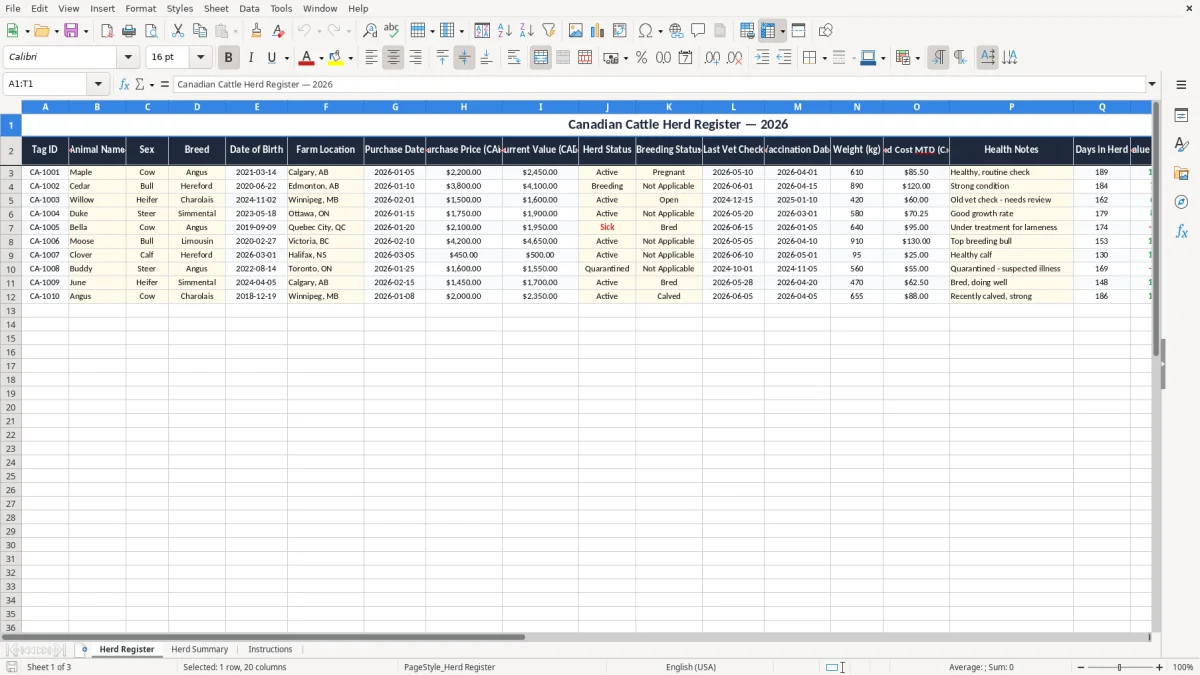
This cattle herd record Excel spreadsheet is a simple way to track each animal’s tag ID, breed, dates, weight, health notes, and estimated value in one place. It includes a Herd Register sheet, a Herd Summary sheet, and an Instructions sheet for day-to-day farm use.
You use it when you need a clear herd list for breeding, vet follow-up, purchases, or year-end review. The workbook gives you a practical record of 20 fields per animal, plus summary numbers that help you see herd value and status at a glance.
On a Canadian cattle farm, this is the file you reach for when you are handling calving, breeding, vaccinations, and fall sales at the same time. A sole operator with 18 head, or a family farm running 60 to 120 animals, can keep each animal in view without digging through notebooks.
Image 1 shows the Herd Register sheet with a single title row and a wide table of 20 columns. You can see fields for tag ID, animal name, sex, breed, dates, purchase price, current value, weight, feed cost MTD, health notes, and a status flag.
The layout is built for real farm use. If you buy 4 replacement heifers at $1,500 each, you can record the purchase price, current value, and herd status right away, then compare them later at the first breeding cycle or after winter feeding.
The best time to update it is after the vet visit, after a purchase, or after a group weighing. If you are managing 35 cows and 2 bulls, one missed row is enough to lose track of a health issue or a value change worth several hundred dollars.
This workbook is for herd tracking, not for GST or payroll reporting. You are still responsible for your own farm records, but the practical expectation is simple: keep enough detail to support purchases, sales, animal care, and ownership history for at least the CRA six-year record-retention period if the file supports your books.
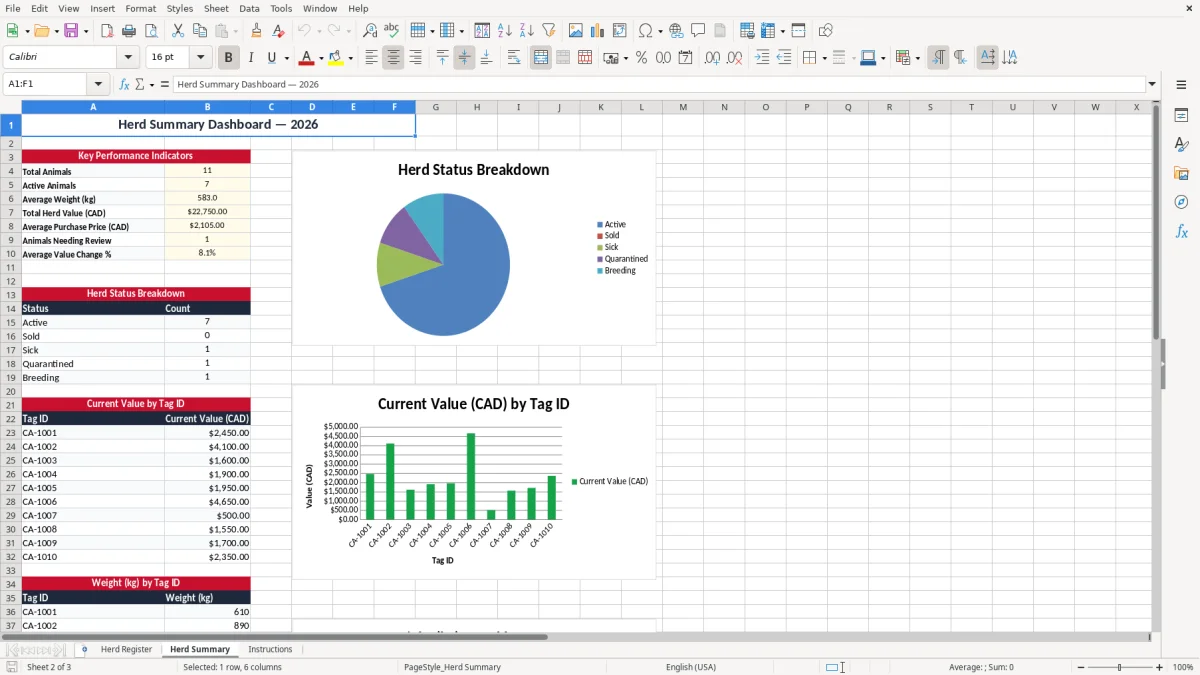
Image 2 shows the Herd Summary sheet, which is meant to turn the register into a quick management view. It gives you a place to check the herd at a glance instead of reading line by line through every animal record.
The birth date, purchase date, vet check date, and vaccination date are the fields that keep the record useful when you are selling, breeding, or reviewing losses. If one calf was bought for $900 and later revalued at $1,100, the file gives you a simple audit trail for that $200 increase.
Keep the wording consistent for herd status and breeding status. If you call one animal “Active,” another “In herd,” and a third “Keeping,” your summary will be harder to read and your counts will drift.
The first failure point is stale information. A vaccination date left unchanged for 14 months, or a weight that has not been updated since spring, makes the register look complete when it is not.
If 6 animals are overdue for a health check and you miss a problem on just one bull, the cost is not the spreadsheet time — it is the breeding loss and the vet bill. A missed issue can easily mean $150 to $300 in extra treatment or a lost service window worth far more.
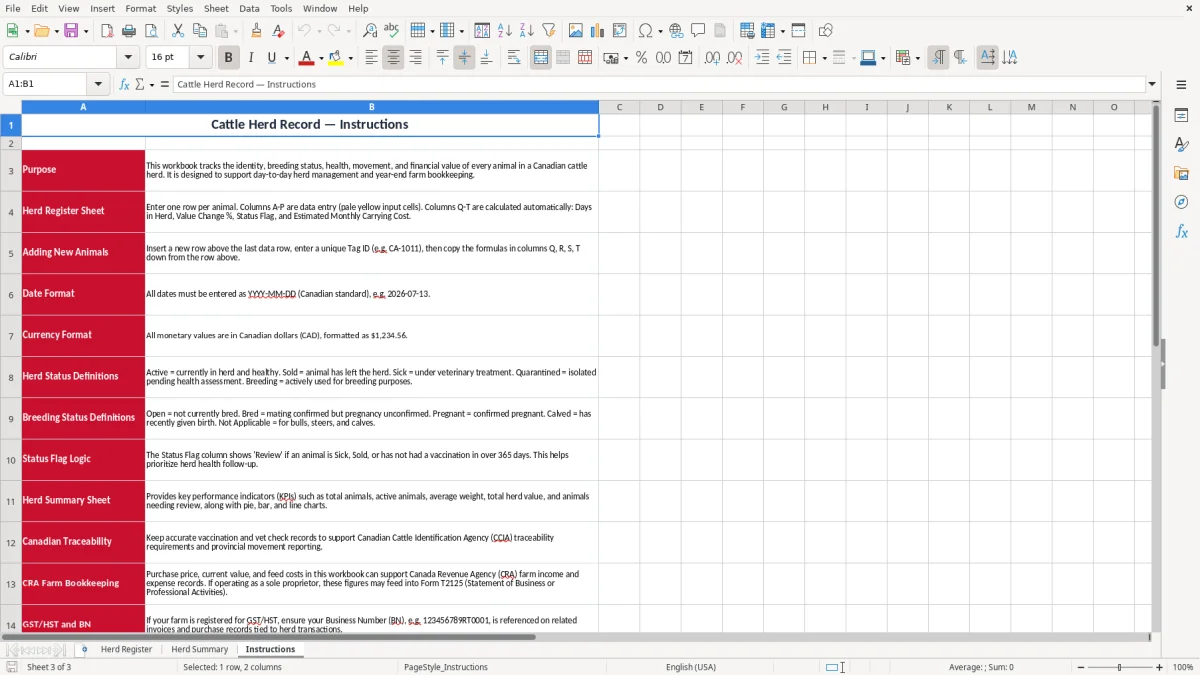
Image 3 shows the Instructions sheet. That matters because most herd spreadsheets fail when only one person understands the labels and the next person starts entering dates in a different style.
Another problem is inconsistent values. If current value is entered in some rows and left blank in others, the herd total becomes useless. The same thing happens when feed cost MTD is entered once a month instead of after each purchase, because a $85.50 record and a $120.00 record are not enough to tell you whether carrying cost is rising.
The easiest way to keep this file alive is to link it to a fixed farm habit. Update the sheet on the same day you do the vet walk, the weight check, or the monthly feed run, so it becomes part of the job instead of a separate admin task.
If your herd grows to several hundred head, or if multiple people need live access and edit control, you are probably past spreadsheet territory. At that point a dedicated herd management system is easier to control than a workbook passed around by email.