
Lobster Trap Tracker Excel Template – Free (2026)
2
Free download
Track 2026 maple syrup batches, sap volume, syrup output, grades, revenue, boil time and yield per tap across Canadian sugar bush blocks.
Download template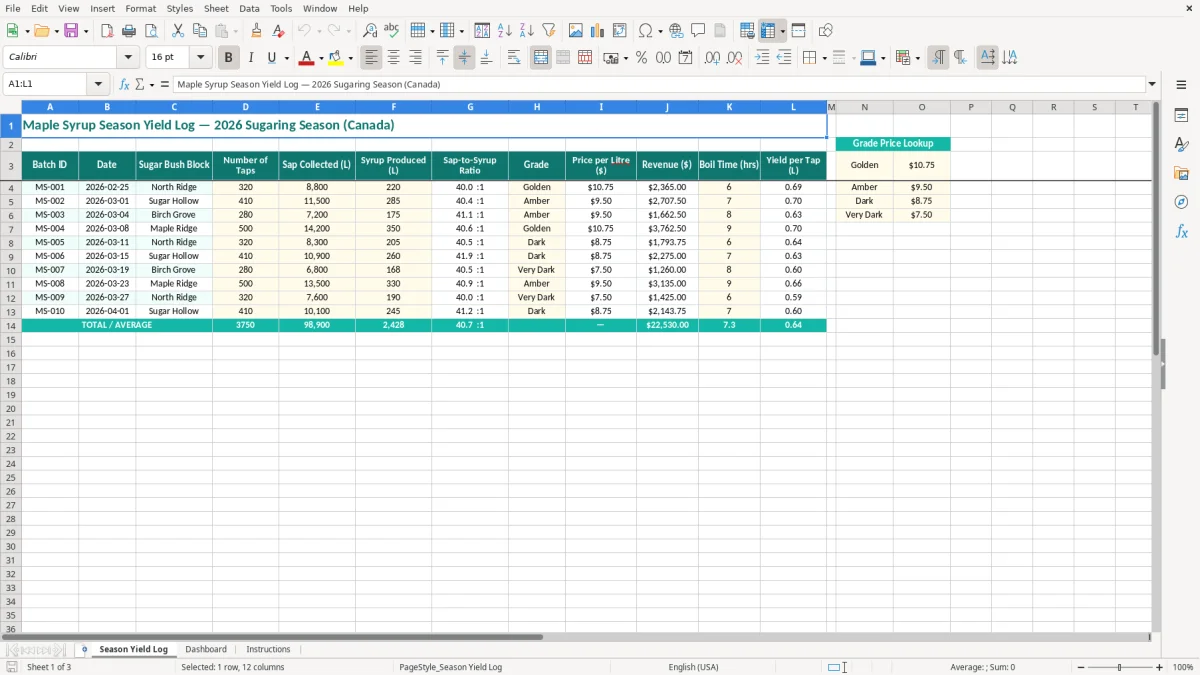
This maple syrup season yield Excel template records each 2026 batch from sap collection through finished syrup. It includes the Season Yield Log for taps, litres, grade, price, revenue, boil time and yield per tap, plus a Dashboard and Instructions sheet.
Use it during the Canadian sugaring season to compare sugar bush blocks, spot weak yields and keep production figures together. The sample log shows eight batch IDs, dates from 2026-02-25 onward, and blocks such as North Ridge, Sugar Hollow, Birch Grove and Maple Ridge.
Maple producers use this type of log at the sugar shack, not just at the end of the season. A family operation may have one person checking vacuum lines and another boiling while a third records the tank volume. Entering the batch immediately prevents a 4,000 L sap load from becoming an untraceable number in a notebook.
A small producer with four bush blocks can use the Sugar Bush Block column to compare North Ridge with Sugar Hollow over several weather changes. For example, 320 taps producing 220 L gives 0.69 L per tap, while 500 taps producing 350 L gives 0.70 L per tap. Total litres alone would make the larger block look better, but yield per tap gives the fairer comparison.
The best time to enter the date, block and sap volume is when the tank is measured. Add finished syrup, grade, price and boil time when the batch is drawn off and packaged. This is particularly useful during a fast March week when three boils can happen before you have time to update a paper ledger.
Image 1 shows the Season Yield Log. Its 12 columns run from Batch ID and Date through Sugar Bush Block, Number of Taps, Sap Collected (L), Syrup Produced (L), Sap-to-Syrup Ratio, Grade, Price per Litre ($), Revenue ($), Boil Time (hrs) and Yield per Tap (L). The dark teal header row wraps the longer labels so the sheet remains usable on a normal laptop.
A farm-gate seller can use the revenue column to estimate what a 285 L Amber batch is worth at $18.00 per litre: $5,130 before costs and taxes. A commercial operator can compare that value with fuel, labour and packaging recorded elsewhere, while a volunteer treasurer at a maple association can use the batch totals to support a season report.
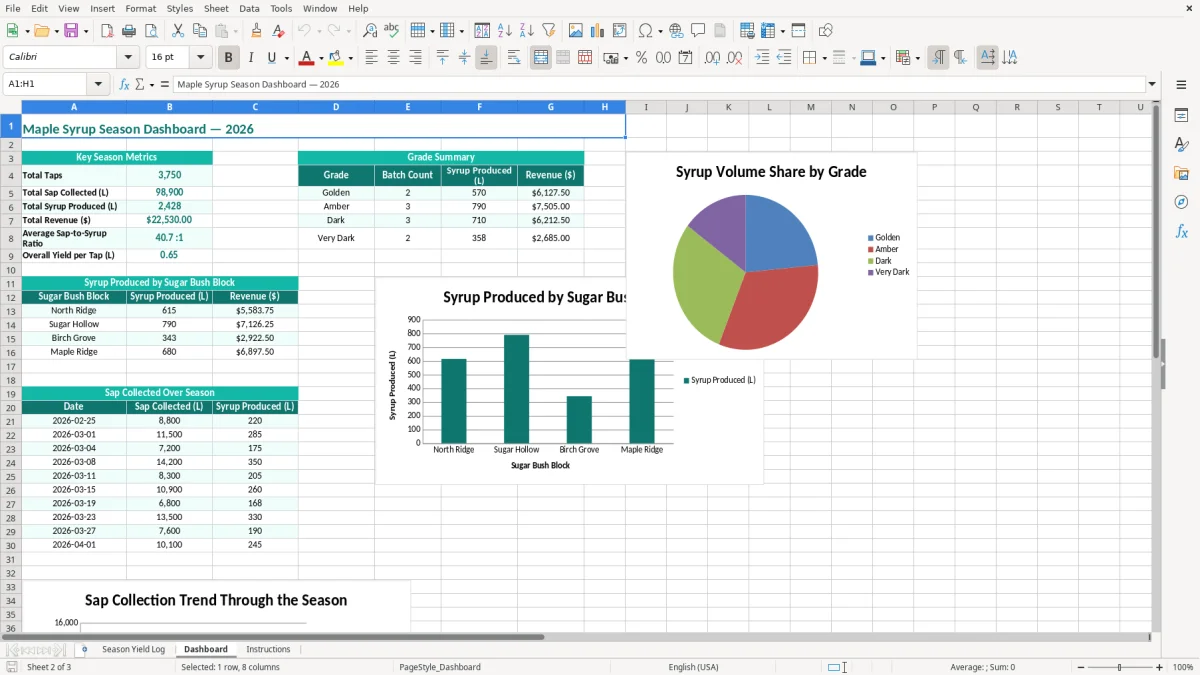
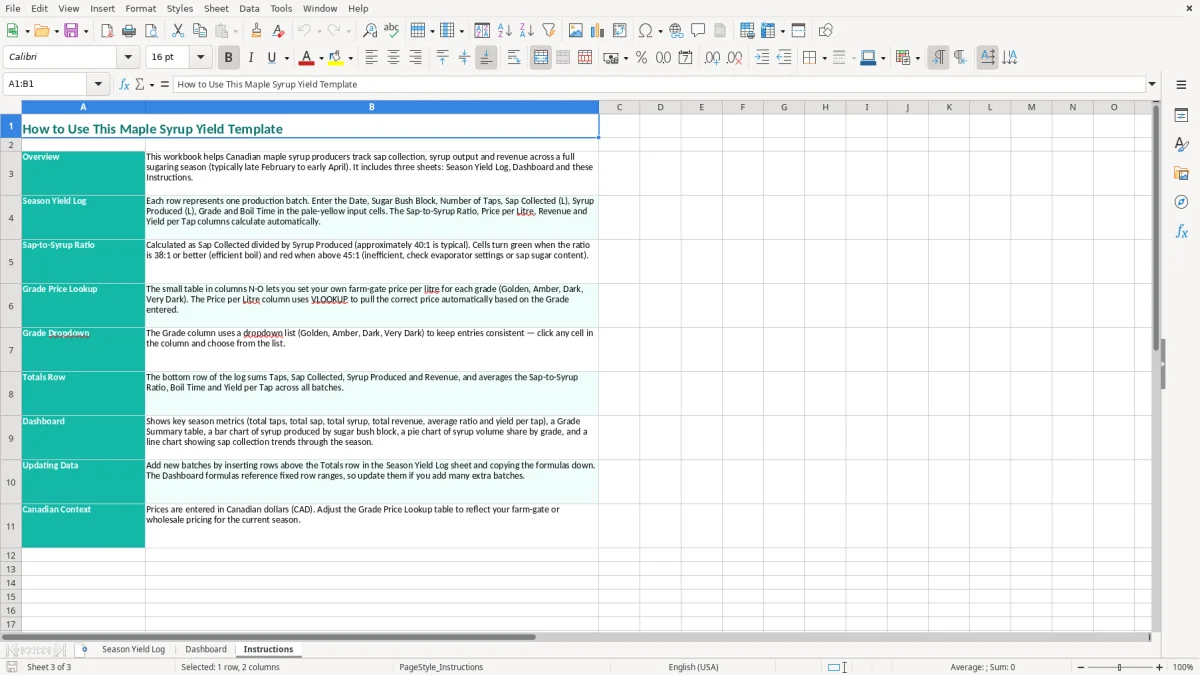
Image 2 presents the Dashboard, where you can review the recorded season rather than scan every row. Image 3 contains the Instructions sheet, which is useful when another family member or seasonal worker takes over data entry.
Maple syrup records serve both production control and Canadian tax work. A sole proprietor generally reports maple syrup business income and expenses on Form T2125 with the personal T1 return. An incorporated producer reports the activity through the corporation's records and T2 return. The spreadsheet is a production log, not a replacement for invoices, expense receipts or the accounting file.
GST is 5% federally. HST is 13% in Ontario and 15% in New Brunswick, Nova Scotia, Prince Edward Island, and Newfoundland and Labrador; PST or QST may also apply depending on the province and sale. Mandatory GST/HST registration generally begins when worldwide taxable revenue exceeds $30,000 over four consecutive calendar quarters. Track taxable sales separately from the price field if you are registered.
For a registered producer, a $5,130 taxable sale in Ontario would normally show $5,130 of selling price and $666.90 of 13% HST on the customer invoice, for $5,796.90 collected. The Revenue ($) column should be defined consistently: use the pre-tax selling value if that is what your books use, and keep HST in the GST/HST account rather than treating it as revenue.
CRA records generally must be retained for six years from the end of the relevant tax year. Keep the workbook with weigh slips, tank readings, sales invoices, payment records and receipts for fuel, containers and repairs. Use a business number (BN) and the RT program account for GST/HST where applicable; payroll activity uses RP, while a corporation's income tax account uses RC.
Canadian maple syrup is commonly sold under Canada Grade A colour classes: Golden, Amber, Dark and Very Dark. The Grade column helps you identify the product, but it does not prove compliance with federal, provincial or customer labelling requirements. A producer selling across provincial borders should check the Safe Food for Canadians Regulations, while Quebec producers must also account for Quebec's regulated maple marketing framework and applicable provincial requirements.
Image 1 is useful evidence of production quantities, but it does not replace a proper sales invoice showing the seller, date, sequential invoice number, product, price and GST/HST number when required. My practical preference is to use the log for operational quantities and accounting software or a ledger for tax transactions.
The most expensive error I see is a batch that cannot be reconciled. Someone writes 11,500 L on a tank board, 285 L in a sales notebook and 260 L in a text message. At $18.00 per litre, the difference between 285 L and 260 L is $450 of product value before tax, and the producer cannot tell whether the loss was a measurement error, a spill or an unrecorded sale.
Another problem is mixing block totals with boil totals. If a 410-tap block feeds two separate boils, entering the full tap count on both rows makes yield per tap appear half as strong as it really is. The remedy is to decide whether each row represents a boil or a block-day and apply that rule for every batch.
Producers sometimes compare sap-to-syrup ratios without recording the sap's starting sugar concentration. A run of 40:1 and a run of 50:1 may reflect different weather and sap sweetness, not poor boiling. Do not alter the measured litres to make the ratio look normal; record what the tanks and finished containers actually show.
Price errors create a second kind of trouble. If a 220 L Golden batch is entered at $16.00 per litre instead of $18.00, the revenue difference is $440. If the wrong grade is used on a customer invoice as well, correcting labels, invoices and inventory can take longer than entering the original batch correctly.
A missing date makes it difficult to match production to weather notes, fuel purchases or a customer order. A missing block prevents a useful comparison. A blank boil time removes the only simple measure of energy and labour intensity from this file.
Image 1 uses shaded input cells and bordered headings, but formatting cannot correct a wrong unit or duplicate Batch ID. Before the season report, filter or scan for duplicate IDs, zero taps, syrup greater than sap, and revenue that does not equal litres multiplied by price. Keep the correction visible in your source records instead of silently overwriting a disputed number.
Do not claim a tax deduction from the yield log alone. CRA can require receipts and other supporting records, and an unsupported expense or sale can lead to reassessed tax, interest and extra bookkeeping work.
That same source record should also keep the herd inventory clean, where a livestock tracking sheet preserves each animal’s ID, movement, and sale history for the season file.
Give the workbook one owner and one update time. In a typical operation, the person checking the evaporator records the batch quantities before leaving the sugar shack, while the owner reviews price and revenue every Sunday evening. A five-minute entry after each boil is more reliable than a two-hour reconstruction at season-end.
For example, six batches averaging 240 L produce 1,440 L for the week. If the Dashboard shows 1,380 L, stop and find the missing 60 L before you invoice customers or promise stock to a retailer. That simple weekly tie-out is more valuable than a polished chart that nobody checks.
Keep the Instructions sheet beside the log when a seasonal helper enters data. Use a consistent spelling for blocks and grades; North Ridge, north ridge and North-Ridge should not become three separate categories in your review. Save a copy such as maple-season-2026-week-03.xlsx after the weekly check, preferably in a location backed up away from the sugar shack.
Image 2 gives you a quick review point, while image 3 explains the intended entry structure. My preference is to keep this file for one season and start a clean copy for the next, rather than letting old batches distort current comparisons.
Move to production or accounting software when several people edit simultaneously, you manage more than roughly 10,000 rows, inventory must track individual lots, or sales need automatic invoices and payment matching. Until then, a disciplined weekly log is usually faster than maintaining a complex system nobody updates.