
Lobster Trap Tracker Excel Template – Free (2026)
2
Free download
Track commercial fishing trips, species, landed kilograms, quota use, value, buyers and DFO licence details in a Canada-ready Excel workbook.
Download template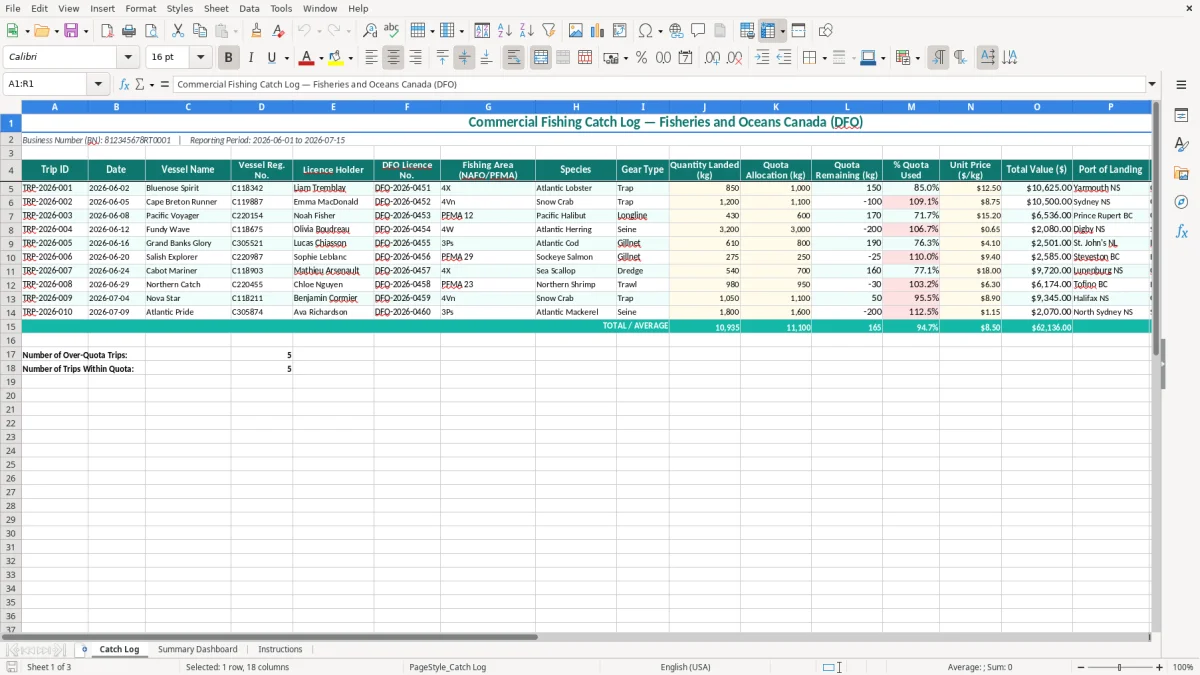
A commercial fishing catch log Excel template records each trip, landing date, vessel, DFO licence, fishing area, species, gear, kilograms landed, quota, price, buyer and port. The workbook contains a Catch Log, Summary Dashboard and Instructions sheet for organizing Canadian fishing records.
Image 1 shows the Catch Log with 18 columns, including Trip ID, Date, Vessel Name, Vessel Reg. No., Licence Holder, DFO Licence No., Fishing Area, Species, Gear Type and Quantity Landed (kg). It also includes quota, value, port and buyer fields, with yellow input cells and teal headers.
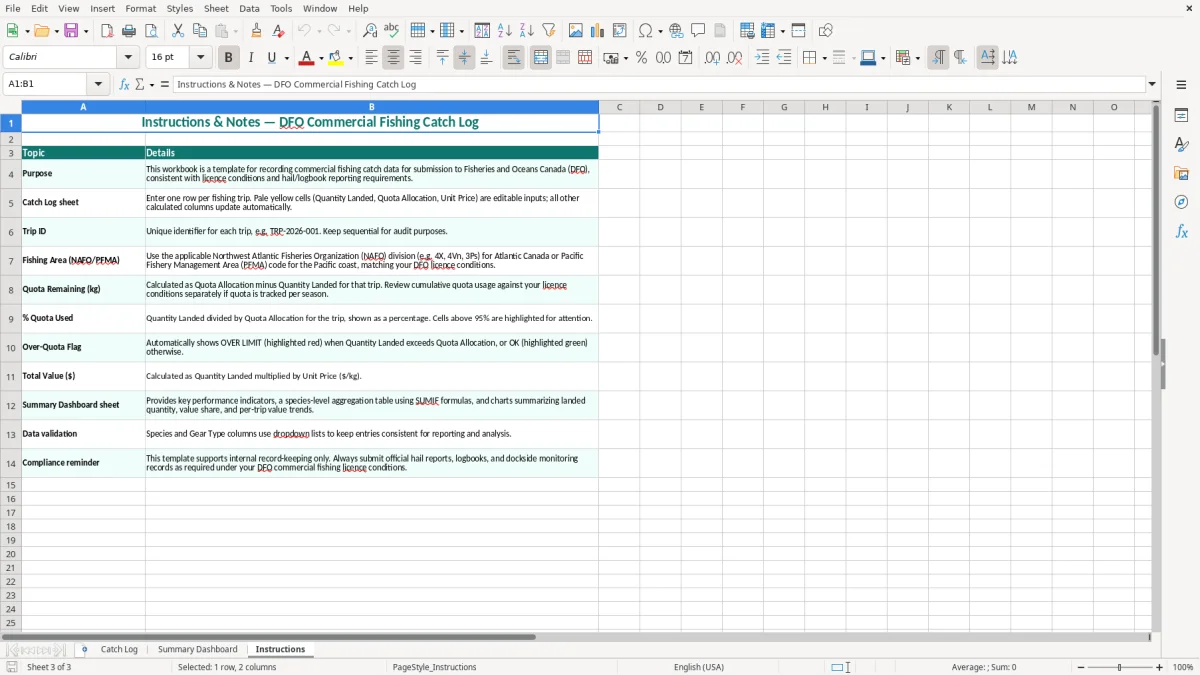
Use the workbook as an internal operating record alongside the official reporting method required by your licence and fishery. The second sheet gives you a management view, while image 3 provides the instructions for entering consistent records.
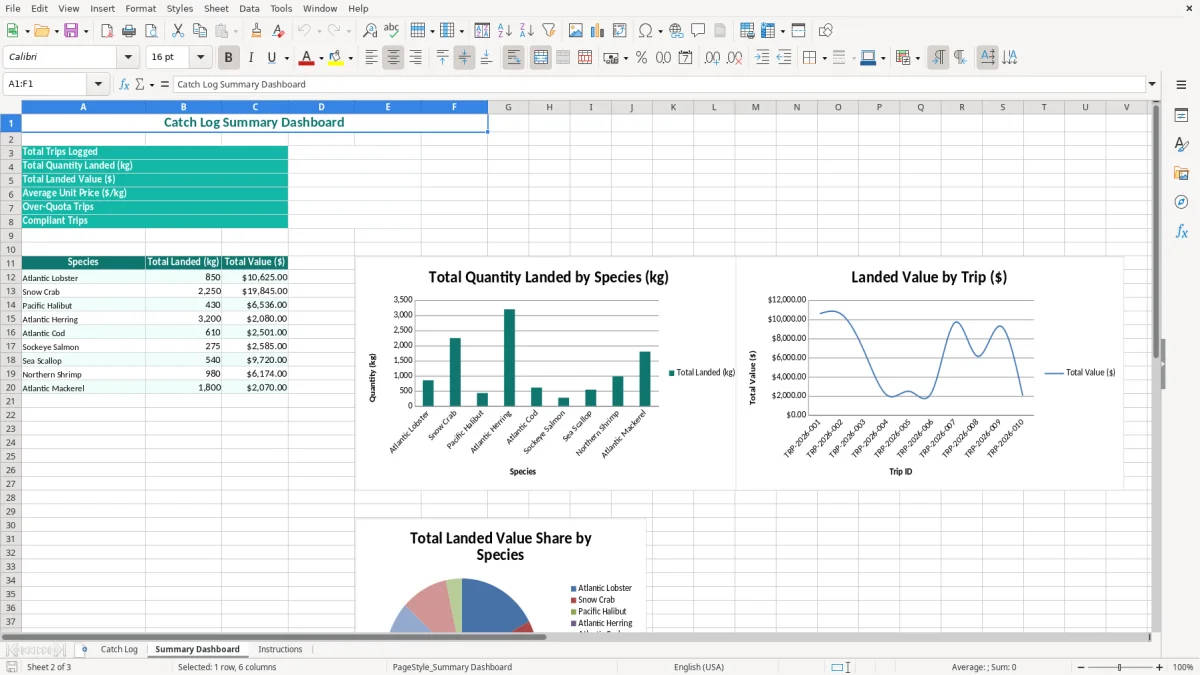
A commercial fishing catch log is most useful when several people touch the same landing record. A licence holder may enter the trip after weighing the catch, a shore manager may check the buyer and port, and a bookkeeper may use the value column to post sales. The file gives each person the same row-level reference instead of leaving details across notebooks, text messages and weigh tickets.
Consider a lobster operator with two vessels and 18 trips during June. The crew lands 850 kg on one trip at $12.50 per kilogram, producing a recorded value of $10,625. A second vessel may fish a different NAFO/PFMA area, use another gear type and sell to another buyer; those details belong on a separate row even when the landing occurs on the same day.
The Catch Log sheet is designed around that distinction. Image 1 shows Trip ID, Date, Vessel Name, Vessel Reg. No., Licence Holder, DFO Licence No., Fishing Area (NAFO/PFMA), Species and Gear Type before the quantity and financial columns. That order follows the way you normally verify a landing: identify the trip, confirm where and how it was fished, then record the weight and sale.
Enter the row immediately after the landing or at the end of each fishing day, while the ticket is in front of you. A shore office handling 60 landings in a month can then filter by buyer or vessel before paying suppliers, preparing sales invoices or checking an internal quota report.
For an incorporated fishing company, the bookkeeper can use the Total Value ($) column as a control total against buyer settlement statements. For a sole proprietor, the same record supports the revenue side of the income statement and makes the fiscal year-end file easier to assemble. A non-profit harbour association could use a simplified copy to monitor member landings, but it should not represent the members' official catch reports.
This workbook is a management spreadsheet, not a replacement for the reporting process attached to a commercial fishing licence. Fisheries and Oceans Canada (DFO) may require a logbook, hail report, electronic submission, dockside monitoring record or other information under the applicable conditions of licence. The DFO licence number, vessel registration number, species, area and landed weight in this file should agree with those official records.
Quota is fishery-specific and may be expressed by species, area, vessel, licence or season. The practical control is simple: if the allocation is 1,000 kg and the landed amount is 850 kg, 85% has been used and 150 kg remains. Do not treat the spreadsheet's Over-Quota Flag as permission to land more; stop and compare the entry with the current licence conditions and official DFO information.
Keep the reporting period visible. The sample heading shows 2026-06-01 to 2026-07-15, which lets you distinguish a seasonal report from a calendar-year tax file. Preserve source documents for at least the CRA's six-year record-retention period, measured from the end of the relevant tax year, unless a longer period is required for a particular record or dispute.
A registered business must account for applicable GST at 5% and, where applicable, HST at 13% in Ontario or 15% in New Brunswick, Nova Scotia, Prince Edward Island, and Newfoundland and Labrador. The $30,000 small-supplier threshold is based on worldwide taxable supplies over the relevant four consecutive calendar quarters; once mandatory registration applies, the business needs a CRA business number with an RT program account.
For example, $10,625 of taxable sales in one landing would generate $531.25 of GST at 5% before considering any other tax treatment. Post the catch value from the log to your sales records, reconcile buyer statements and retain the weigh ticket. A sole proprietor generally reports business income on T2125; an incorporated company reports it through its corporate records and return. The log does not decide whether a particular seafood sale is taxable, exempt or zero-rated, so use the invoice and supply classification that applies to the transaction.
The expensive mistakes I see are rarely caused by arithmetic. They come from mixing landings, copying the wrong licence number or entering a weight from memory after the ticket has disappeared. Once a row cannot be tied to a vessel, area and buyer, correcting a DFO query or reconciling a settlement becomes a search through incomplete evidence.
Suppose a vessel makes three landings of 400 kg, 275 kg and 175 kg, but the operator enters one total of 850 kg under the last trip ID. The total is unchanged, yet the timing, port and buyer trail is lost. If the first two loads sold at $12.50 per kilogram and the last at $11.75, the combined value should be $10,431.25, not the $10,625 produced by applying one price to all 850 kg. That is a $193.75 revenue error before tax.
Species and area mistakes are more serious than a rounding difference. Entering Atlantic lobster under the wrong NAFO/PFMA area can make a quota review appear inconsistent, while a transposed DFO licence number can attach a legitimate landing to the wrong account. Correct the source row; do not quietly overwrite the original ticket or conceal the adjustment in a new total.
A quota allocation of 1,000 kg with entries of 600 kg, 250 kg and 200 kg is 1,050 kg, or 105% used. If the last 200 kg is typed as 20 kg, the sheet appears to show 87% used and 130 kg remaining. That false comfort can lead to an operational decision based on bad data and may require time-consuming reconstruction from dockside records.
Another common failure is treating Total Value ($) as cash received. A buyer statement may deduct freight, ice, commission or grading adjustments. A $10,625 landing can therefore produce a different cheque. Keep the landing value and settlement amount distinct in the accounting records, and reconcile them before posting revenue or calculating cash flow.
The spreadsheet works when entering it is part of the landing process, not a month-end memory exercise. Set a fixed review time after the last weigh ticket of each fishing day. For a vessel making four landings a week, a 15-minute Friday check can confirm four trip IDs, four weights and four buyer records before the paperwork is filed.
Keep one master file and save a dated copy at the end of each reporting period. A file named with the vessel and period, such as CatchLog_BluenoseSpirit_2026-07-15.xlsx, is easier to retrieve than a succession of files called final, final2 and latest.
Use the same spelling for each species, buyer, vessel and gear type. Do not alternate between Lobster, lobster and Atlantic Lobster if you expect the Summary Dashboard to group records cleanly. If you add Excel data validation or conditional formatting to a working copy, document the change on the Instructions sheet so a replacement operator knows what the warning colours mean.
The workbook is a good fit while the fleet has a manageable number of trips and one person can review the source documents. Move to dedicated fishery or accounting software when several users need simultaneous entry, official electronic reporting, audit history, automated buyer settlements or more than roughly 10,000 rows. Export the spreadsheet and retain it as a supporting record during the transition rather than abandoning the historical trail.