
Maternity Top-Up Excel Template – Free (2026)
2
Free download
Tracks eligible dividends, gross-up, tax credits, and estimated net tax for Canadian investors in 2026.
Download template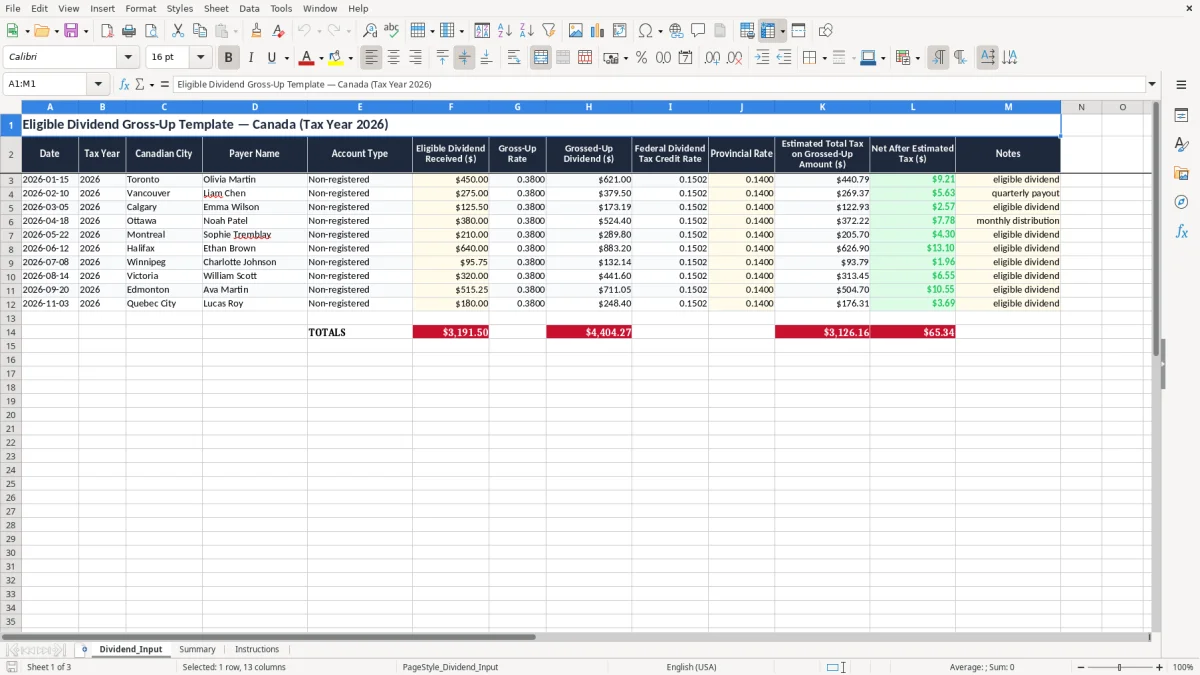
This Excel template calculates the gross-up and estimated tax on eligible dividends for Canadian investors in 2026. It gives you a single place to enter each dividend, then shows the grossed-up amount, dividend tax credit rates, and estimated net after tax.
Use it for personal planning, shareholder estimates, or year-end tax prep when you want a quick check before you enter figures on your return. The workbook contains Dividend_Input, Summary, and Instructions sheets, so you can record payments, review totals, and follow the setup steps in one file.
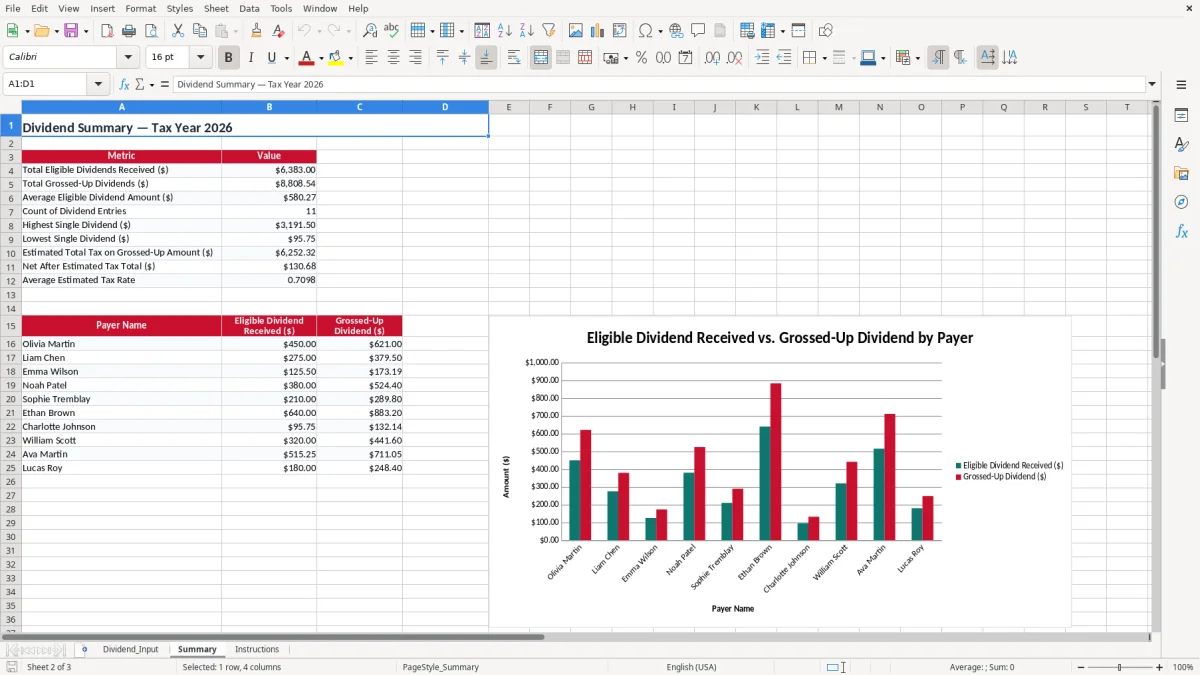
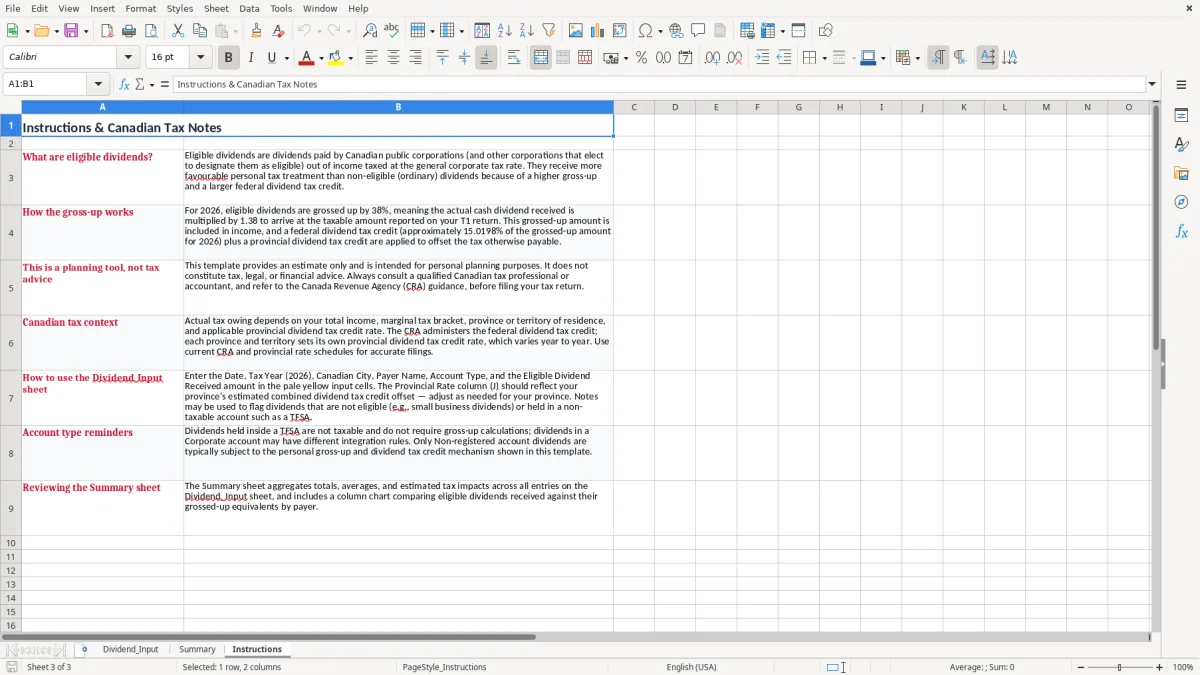
The layout is built for practical tracking, not theory. Image 1 shows the entry sheet with columns for date, payer, city, account type, and tax calculations; image 2 shows the summary view; image 3 gives the instructions.
This sheet is for the person who actually needs the numbers before filing season: a sole shareholder pulling money from a small corporation, a retiree with brokerage dividends, or a bookkeeper helping a family-owned company owner estimate personal tax. Image 1 shows the Dividend_Input tab with columns for Date, Tax Year, Canadian City, Payer Name, Account Type, and the dividend calculation fields.
A practical example makes the layout useful fast. If you enter five eligible dividends of $450.00, $275.00, $125.50, $380.00, and $640.00, you can see the grossed-up amounts and estimated net after tax on one screen instead of hunting through slips and notes.
You use this at year-end, when you want a clean estimate before you assemble slips and statements, or in January and February when you are gathering documents for a personal return. It also helps if you receive quarterly corporate dividends and want a running total instead of a pile of screenshots.
The workbook separates entry, summary, and instructions so you do not overwrite your working numbers. That is a small but useful discipline when you are comparing dividends from different payers, cities, or months and want the totals to stay intact.
Eligible dividends are not taxed at the same rate as salary or interest, which is why this template uses a gross-up and dividend tax credit calculation. In Canada, the eligible dividend gross-up is 38% in 2026, so a $1,000 eligible dividend is shown as $1,380.00 for tax purposes before the credit is applied.
The federal eligible dividend tax credit rate is 15.0198% in 2026, and provinces add their own component. For example, if you receive $10,000 of eligible dividends, the grossed-up amount is $13,800.00 before the federal and provincial dividend tax credits reduce the tax payable.
The workbook is labeled for 2026, so the rates and examples are aligned to the current tax year. That matters because a dividend estimate built on an older gross-up rate will give you the wrong tax picture and can leave you short when instalments or balances come due.
This is a planning tool, not a slip replacement. It helps you compare grossed-up income against net cash received, which is exactly the point when you are deciding whether a dividend payment is enough to cover personal tax or whether you need to hold back funds for instalments.
Once you are holding back cash for instalments, the same habit of tracking room and contributions becomes useful in an FHSA savings tracker as well.
The most common error is mixing up eligible and non-eligible dividends. That mistake changes the gross-up and tax credit calculation, and on a $12,000 dividend stream the difference can easily shift your estimated tax by hundreds of dollars.
Another problem is entering the cash amount and forgetting the grossed-up amount is the taxable figure. If you only look at the deposit in your bank account, you can understate income and end up with an unpleasant balance owing at filing time.
A typo in the tax year, such as putting a payment in the wrong year, can distort your summary totals and make reconciliation annoying. If you have six months of entries and one payment lands in the wrong period, you waste time untangling totals instead of reviewing the tax result.
The CRA expects you to keep supporting records for six years, so the notes field is not decoration. If you write down quarterly payout, monthly distribution, or the payer name, you give yourself a trail that is much easier to review when you are checking slips, statements, and bank deposits later.
That same paper trail becomes even more useful when you also keep an ACB tracking record for each holding, so dividends, reinvestments, and sale proceeds stay tied to the right tax history.
The sheet works best when you use it on a fixed schedule instead of waiting until March. Many people update it right after each dividend deposit or once a month when they reconcile the bank account, which keeps the numbers current and cuts the year-end scramble.
If you receive only a few dividends a year, this spreadsheet is enough. If you start tracking dozens of share classes, multiple corporations, or large portfolios with hundreds of transactions, you will eventually want an accounting system or brokerage export instead of a manual workbook.