
Provincial Tax Excel Template – Free (2026)
6
Free download
Track minor hockey player dues, expenses, payments and balances in four Excel sheets for Canadian team treasurers.
Download template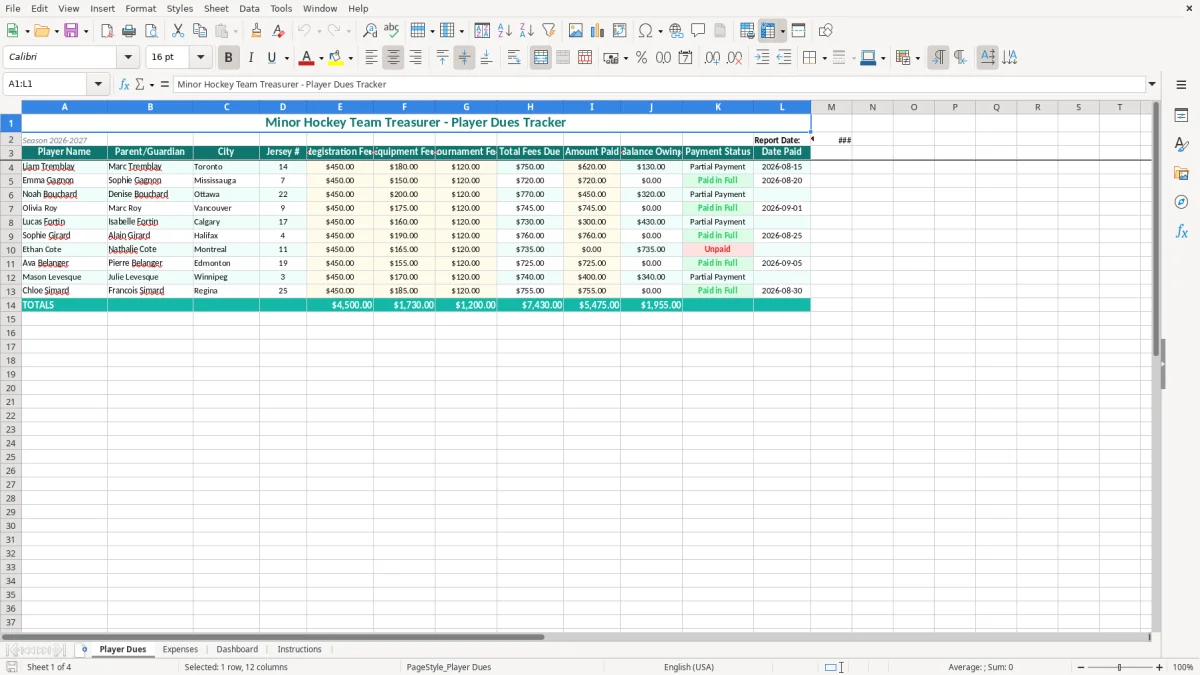
This minor hockey treasurer Excel template tracks each player's fees, payments and balance owing, while keeping team expenses in one place. It includes Player Dues, Expenses, Dashboard and Instructions sheets for a clear view of your 2026 team finances.
Use it when registration opens, tournament costs arrive or the coach asks whether the team can afford another purchase. The layout is built for a volunteer treasurer who needs a practical record without setting up accounting software.
The person using this file is usually a volunteer parent, not a full-time bookkeeper. At the start of the season, a treasurer may be collecting registration money from 17 players, paying ice, tournament and equipment bills, and answering questions in a team group chat between work and rink trips.
Image 1 shows the Player Dues sheet. Its table starts with Player Name, Parent/Guardian, City and Jersey #, then separates Registration Fee, Equipment Fee and Tournament Fee. That separation matters when one family asks why its account shows $750: you can point to $450 registration, $180 equipment and $120 tournament fees rather than searching through messages.
Enter one player on each row and record the amount actually received in Amount Paid. For example, if a $750 account has a $300 deposit, the balance owing should be $450. The Payment Status and Date Paid columns give you a practical follow-up list without maintaining a second notebook.
A team manager or coach can use the file during a season-start meeting, while an outgoing treasurer can hand the same workbook to the next volunteer. The City and jersey number fields are useful when two players have similar names, particularly on a team drawing families from Toronto, Mississauga or Ottawa.
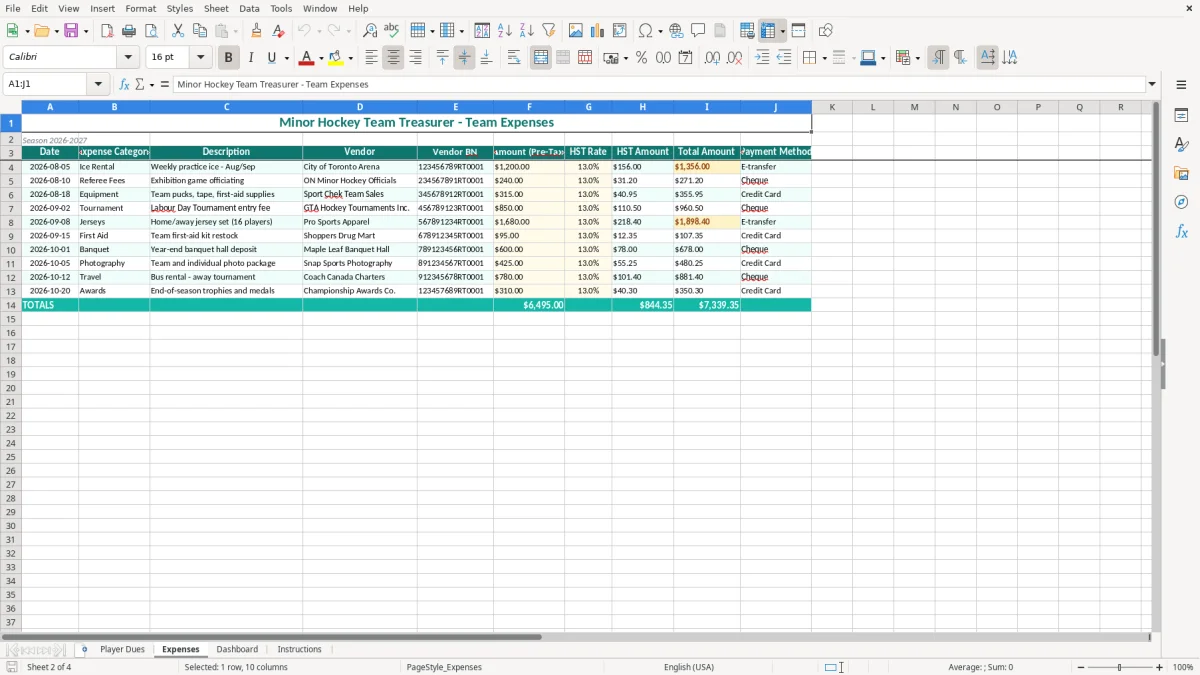
Image 2 shows the separate Expenses sheet, where team spending is kept apart from player collections. Enter a $1,200 tournament deposit, a $640 equipment order or a $95 referee-related cost as it arrives. A treasurer for a four-team association can use separate copies, while a single team can review its own file before committing to another event.
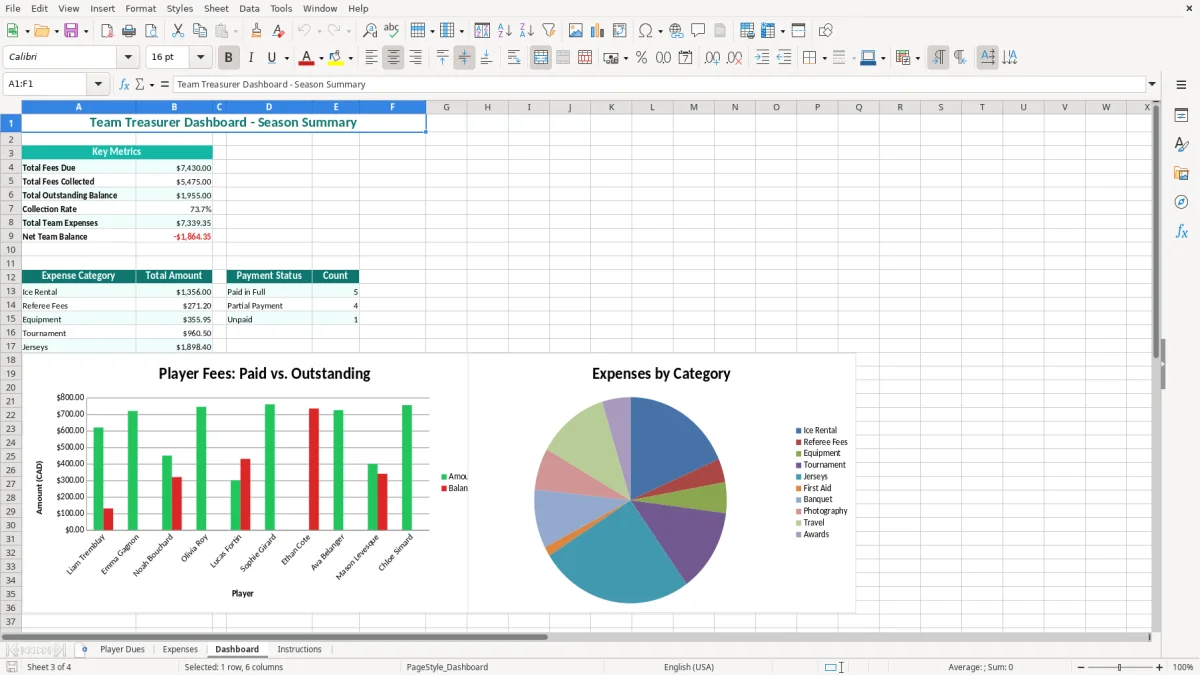
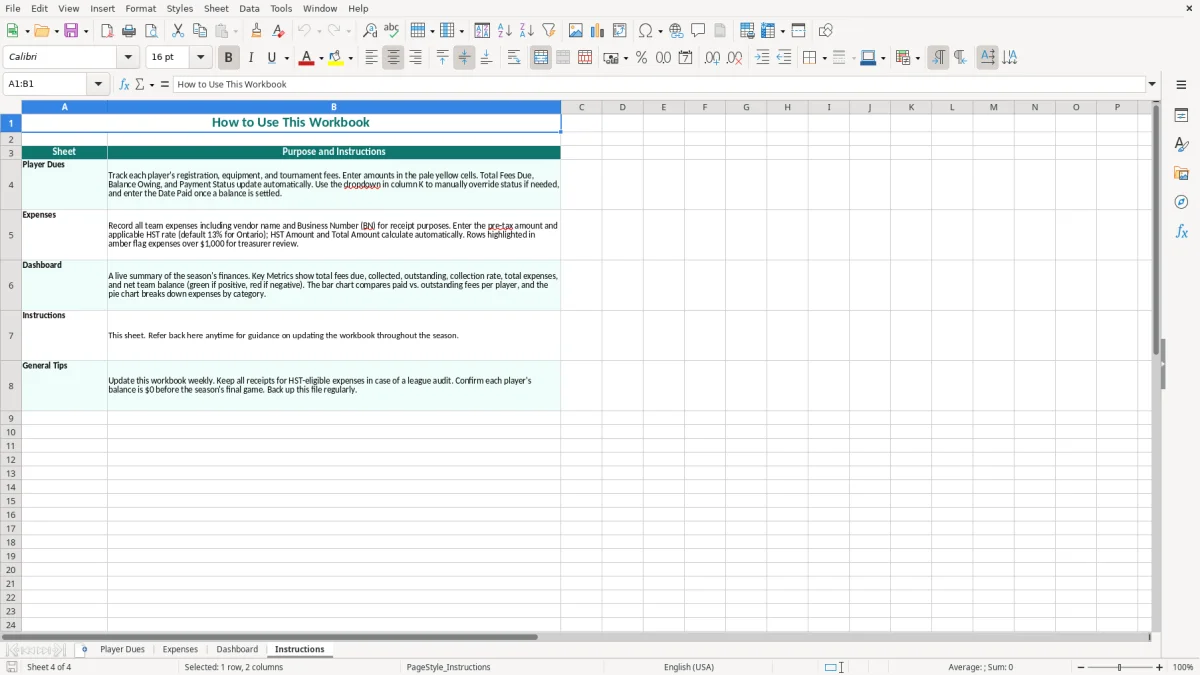
Image 3 is the Dashboard for the summary view, and image 4 is Instructions. The useful routine is to update the dues row when money arrives, enter the expense on the same day, then review the summary before the next parent update.
A minor hockey team should first identify who legally receives the money: the local association, a registered non-profit organization or an informal team group. That distinction affects receipts, bank controls and GST/HST treatment. Do not automatically add 5% GST or 13% Ontario HST to player registration fees; qualifying amateur athletic membership or program amounts can have different treatment from taxable sales of merchandise, camps or equipment.
For taxable supplies, the general small-supplier registration threshold is $30,000 over four consecutive calendar quarters. A non-profit organization that qualifies as a public service body uses a $50,000 threshold for taxable supplies. Once registered, the organization needs a CRA BN with an RT program account, must show GST/HST correctly on invoices and must file according to its assigned monthly, quarterly or annual frequency.
The spreadsheet is a management record, not a substitute for source documents. Keep bank statements, e-transfer confirmations, receipts, invoices, tournament registrations and approval records for at least six years under the CRA record-retention rule. If a parent pays $750 by e-transfer, retain the confirmation and match it to the player's Amount Paid and Date Paid fields.
Image 1's fee categories also help the treasurer explain whether a charge is a registration amount, an equipment recovery or a tournament contribution. That explanation is stronger than presenting one unexplained total. If the association issues donation receipts, remember that a payment providing a direct benefit to the family is not automatically a charitable donation.
Use two-person approval for larger payments and reconcile the workbook to the bank at least monthly. For example, if dues recorded are $12,750 and expenses recorded are $8,420, the expected net position is $4,330 before outstanding deposits, bank fees or unpaid bills. Keep the association's legal name and bank account separate from a volunteer's personal account; incorporation under federal or provincial law does not remove the need for those controls.
The most expensive errors are usually small entries repeated across a whole team. A treasurer may enter a $750 fee as fully paid because the family promised to send the remaining $450, or record a $180 equipment charge twice after receiving both an email invoice and a paper receipt. With 17 players, a single $450 error can make the team's apparent cash position wrong by more than 3% of $12,750 in expected collections.
One common problem is using the total fees due as if it were cash received. Suppose 12 players owe $750 each, giving $9,000 due, but six have paid $300 deposits and six have paid $750. Actual collections are $6,300, leaving $2,700 outstanding. If the treasurer reports $9,000 as available, the team can approve a tournament bill it cannot yet pay.
Another failure is overwriting an old payment instead of recording the new total. The Player Dues layout gives you Amount Paid, Balance Owing, Payment Status and Date Paid; update those fields consistently and keep the e-transfer confirmation beside the workbook. Do not use a green status as proof that a bank transaction cleared.
Teams often pay small costs from several sources: a coach buys $86.40 of tape, a parent pays a $325 tournament deposit and the association pays $1,450 for ice. If only the association invoice reaches the Expenses sheet, the dashboard can overstate available funds by $411.40. Reimbursements then become a second dispute because nobody can tell whether the cost was approved or already repaid.
Late updates create the same problem. A $2,400 tournament invoice entered after the parent meeting can turn a reported $3,100 surplus into only $700. That is why the treasurer should enter a commitment when it is approved, not wait until the cheque or e-transfer leaves the account.
The file contains names, parent details and payment information. Limit access, avoid emailing an unprotected workbook to the entire team and delete old copies when they are no longer needed. PIPEDA requires appropriate safeguards for personal information, while Quebec organizations must also consider Law 25.
A spreadsheet works when updating it is attached to an event that already happens. Set a fixed treasurer appointment, such as the first Monday after the monthly bank statement arrives. Spend 20 minutes entering payments and expenses, then 10 minutes comparing the Dashboard with the bank balance and outstanding invoices.
For example, if three families pay $250 each on Friday, update the workbook that evening rather than waiting for month-end. The difference between $750 recorded promptly and $750 sitting in an email folder is enough to prevent a duplicate reminder or an unnecessary emergency transfer.
Keep the workbook in one shared, access-controlled location and save a dated backup after each review. Use the Instructions sheet to document who approves expenses, where receipts are stored and when the next parent statement is issued. Image 4 is the natural place for those operating notes, while image 3 gives the incoming treasurer a quick starting point.
Do not add complicated automation merely because Excel allows it. For a single team with fewer than 25 players and perhaps 100 transactions in a season, this layout is usually easier to audit than a heavily customized file. Move to bookkeeping software when the association has several teams, more than 1,000 transactions, payroll, inventory or recurring GST/HST filings; at that point, bank feeds, user permissions and a proper audit trail are worth the cost.