
Provincial Tax Excel Template – Free (2026)
6
Free download
Track dividend income, gross-up, tax credit and after-tax results for non-registered Canadian holdings.
Download template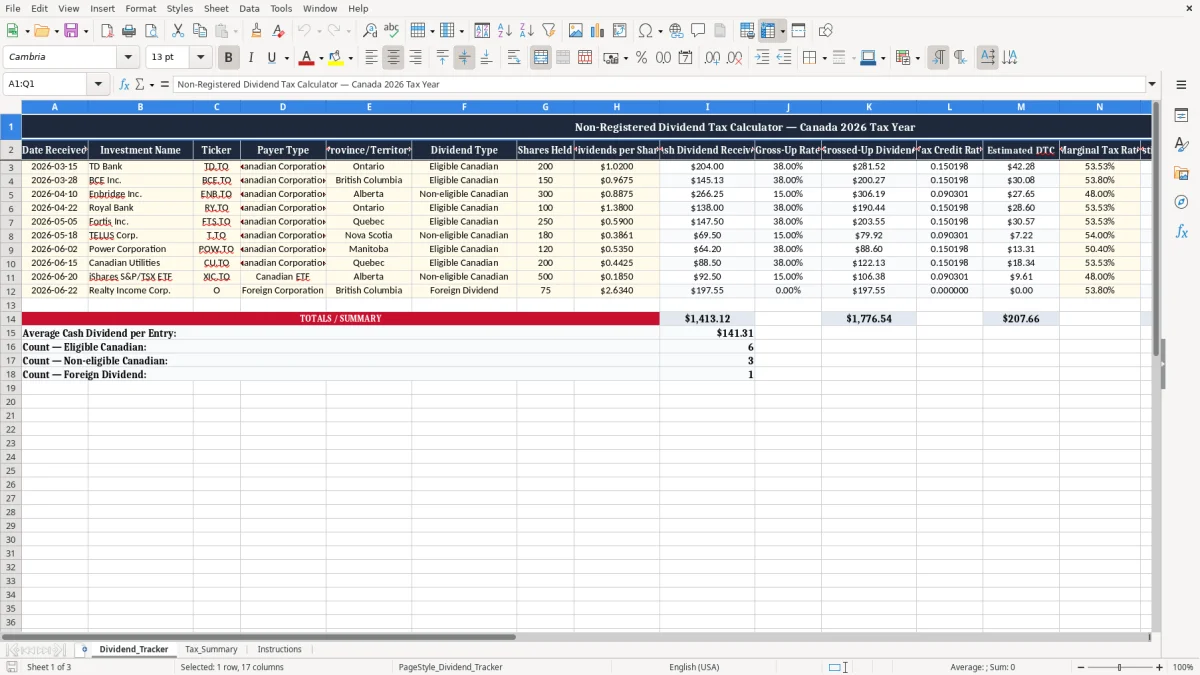
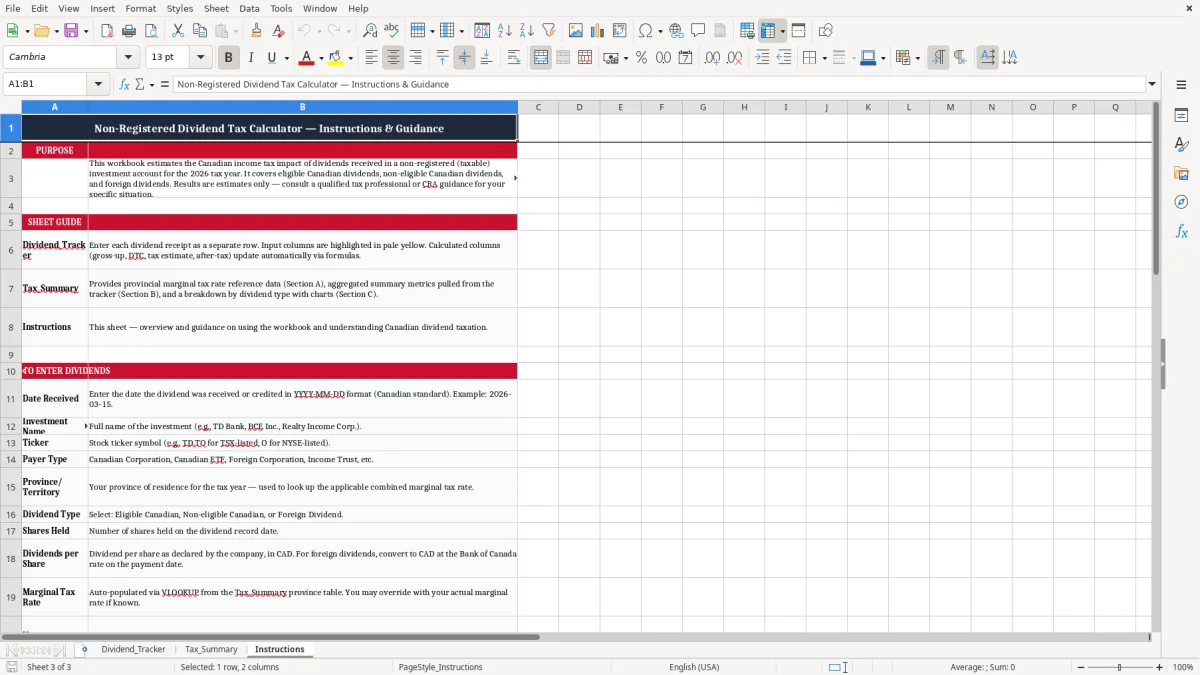
This Excel template tracks non-registered Canadian dividend income and estimates the tax impact of each payment. It includes a Dividend_Tracker sheet, a Tax_Summary sheet, and Instructions so you can record gross-up, dividend tax credit, and after-tax dividend results in one place.
Use it when you hold shares outside a TFSA or RRSP and need a clean record for personal tax planning. The layout is built for Canadian dividends, with fields for payer type, province or territory, gross-up rate, tax credit rate, marginal tax rate, and notes.
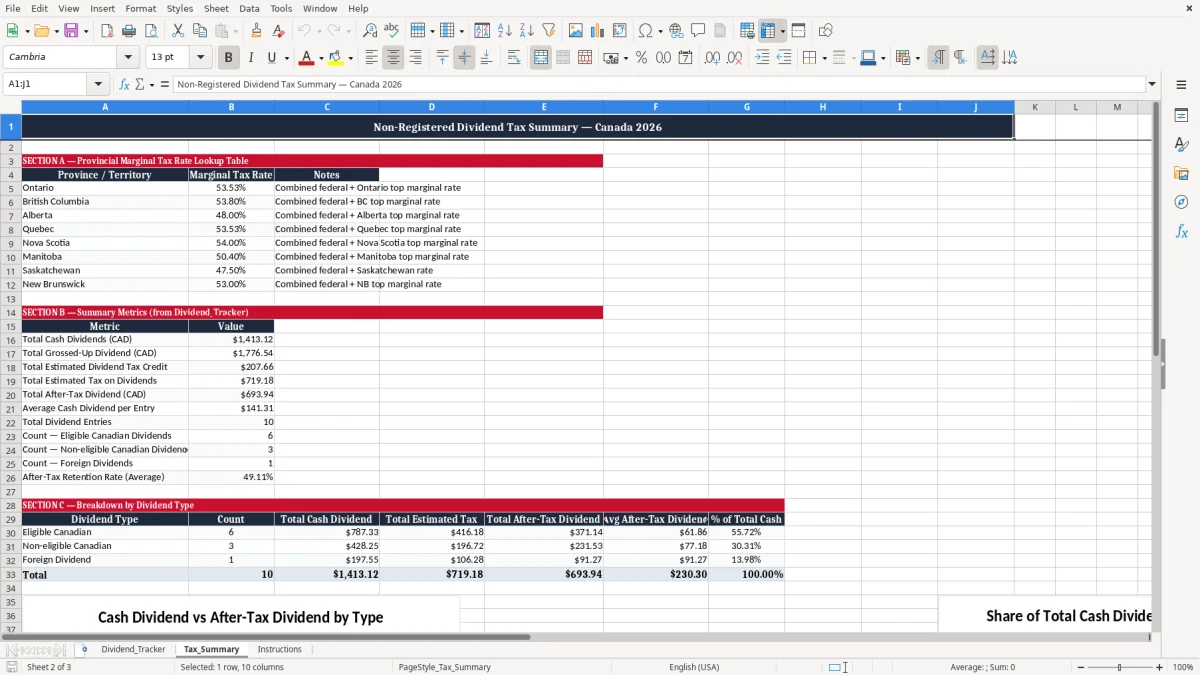
The first sheet shown in image 1 is the working log. Image 2 shows the summary view, which rolls the tracked dividends into totals you can use at tax time or when checking your expected cash income.
This template is for you if you hold Canadian shares in a taxable account and want to see what the dividend really gives you after tax. A sole investor with 8 bank and utility holdings, a bookkeeper helping a family portfolio, or a retiree checking quarterly income can use it when statements arrive.
The first sheet in image 1 is built for row-by-row entry. If you receive 12 dividends a year from 6 holdings, you can record each payment separately and still keep the totals clean for year-end review.
This becomes useful when a broker reinvests dividends, pays a mix of eligible and non-eligible amounts, or shows different payers in the same month. For example, 150 shares of BCE at $0.9675 and 300 shares of Enbridge at $0.8875 are not the same tax result, even though both hit your account as cash.
Image 2 gives you a quick total for the period, which is useful when you are checking taxable income before a mortgage renewal, a retirement drawdown decision, or a family tax projection. If your portfolio pays $6,000 in cash dividends over the year, the taxable amount is not $6,000 once gross-up is applied.
Canadian dividends in a taxable account are not taxed the same way as interest income. Eligible Canadian dividends use a gross-up and dividend tax credit system, while non-eligible dividends use different rates, so the worksheet includes separate fields for gross-up rate, tax credit rate, and estimated tax.
For 2026 planning, the worksheet helps you test the practical result with real numbers. If you receive $204.00 from 200 shares at $1.02, a gross-up does not change the cash you got, but it does change the amount you report on your return and the tax estimate you carry forward.
Your province or territory of residence affects your marginal tax rate and therefore the value of the dividend tax credit. A dividend paid to an Ontario resident and the same dividend paid to an Alberta resident can produce different after-tax figures because the provincial layer is different.
The workbook is designed for personal investment records, not business bookkeeping. It is a simple way to support your T1 return work, keep backup for slips and statements, and keep dividend income separate from wages, interest, or capital gains.
The most common mistake is treating every dividend as if the cash amount were the taxable amount. That leads to sloppy estimates, especially when you own both eligible and non-eligible Canadian payers and the tax impact changes from row to row.
Another problem is forgetting the province or territory, which makes the marginal tax estimate less useful. If you are comparing a $1,000 annual dividend stream in Ontario with the same stream in Alberta, the after-tax result is not identical, and a bad worksheet can hide that difference.
A missed row can throw off your year-end total by hundreds of dollars. If you forgot to log 4 quarterly payments of $87.50 each, you are already off by $350 before you even start reconciling broker slips.
The notes field matters more than people expect. If a dividend was reinvested, adjusted by the broker, or tied to a transfer from a TFSA into a taxable account, the note can save you from rechecking statements line by line at filing time.
Use the spreadsheet on the same day your broker cash activity lands, or at a fixed monthly review. If you wait until March, you will be chasing 12 months of slips instead of entering 1 row at a time.
If your account now has dozens of holdings, multiple brokerages, or complex corporate-class distributions, a spreadsheet is still useful for review but not as your only system. At that point, a portfolio platform or accounting file should take over the heavy lifting, and the workbook becomes your control sheet rather than your full record.