
Maternity Top-Up Excel Template – Free (2026)
2
Free download
Estimate residency and travel amounts for a 2026 Northern Residents Deduction claim with claimant rows, zone rates, dates and a summary dashboard.
Download template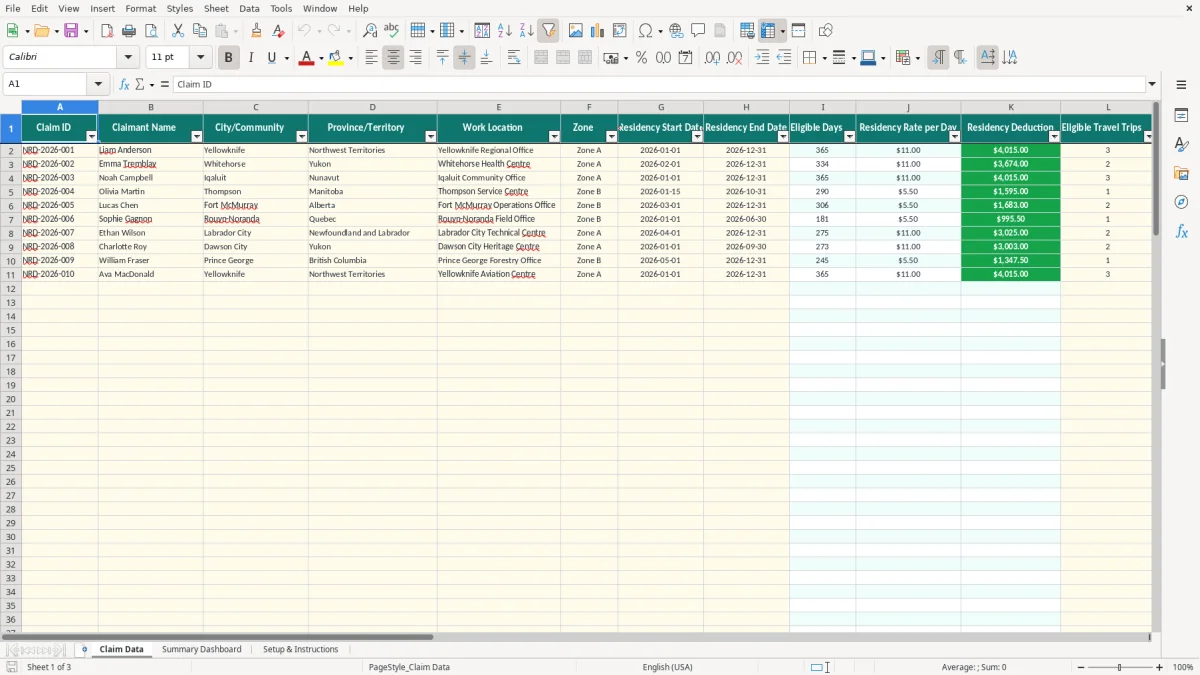
This Northern Residents Deduction Excel template estimates residency and travel amounts for Canadian taxpayers who lived in an eligible northern or intermediate zone during 2026. It contains 100 prepared claimant rows, editable Zone A and Zone B assumptions, date-based eligible-day calculations, travel amounts and a summary dashboard.
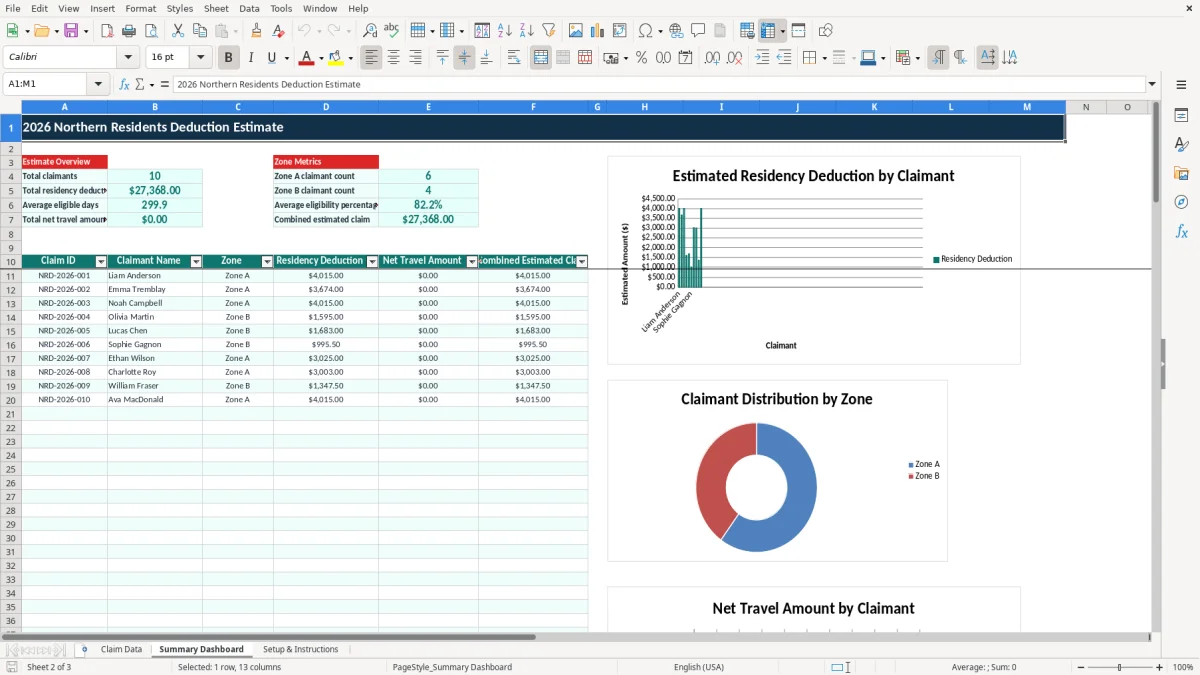
Enter each person on the Claim Data sheet, then review the calculated eligible days, residency deduction, net travel amount and claim status. The Setup & Instructions sheet explains the assumptions and records to retain, while image 2 shows the dashboard used to review totals across claimants.
A sole proprietor in Yellowknife may use this spreadsheet while preparing a personal tax file, while a payroll or benefits administrator may use it to organize employee information before individuals complete their own claims. A bookkeeper at a northern employer can also use it during year-end to separate residency estimates from employer-paid travel benefits.
The key event is not simply where the employer has an office. You need the claimant’s actual residence in a prescribed northern or intermediate zone, supported by dates and records. For example, Emma arrives in Whitehorse on 2026-02-01 and remains there through 2026-12-31. Claim Data calculates 334 days rather than assuming 365, and labels the row Partial-year claim.
Image 1 shows the working register. The first eight columns capture identity, location and residence dates; columns I:K calculate days, the daily assumption and the residency amount. Columns L:O deal with travel, assistance and the resulting net amount, while P:R show the percentage, status and notes.
Suppose an employer has four employees in Iqaluit, two in Yellowknife and one who moved south in July. Entering seven rows lets you compare the records without mixing one person’s travel receipts with another’s. The workbook has 100 prepared rows, so it is suitable for a small payroll or benefits review, but it is not a tax-return filing system.
Image 2 presents the consolidated view: total claimants, total residency deduction, average eligible days, total net travel amount and zone counts. The practical stance is to use the workbook as a documented estimate and review list, not as proof that every listed community or expense qualifies.
The CRA Northern Residents Deduction is claimed by an individual who meets the residence and other conditions for an eligible prescribed zone. Form T2222, Northern Residents Deductions, is the relevant CRA form for calculating the deduction on a personal tax return. This workbook does not submit Form T2222 and does not determine eligibility for a community.
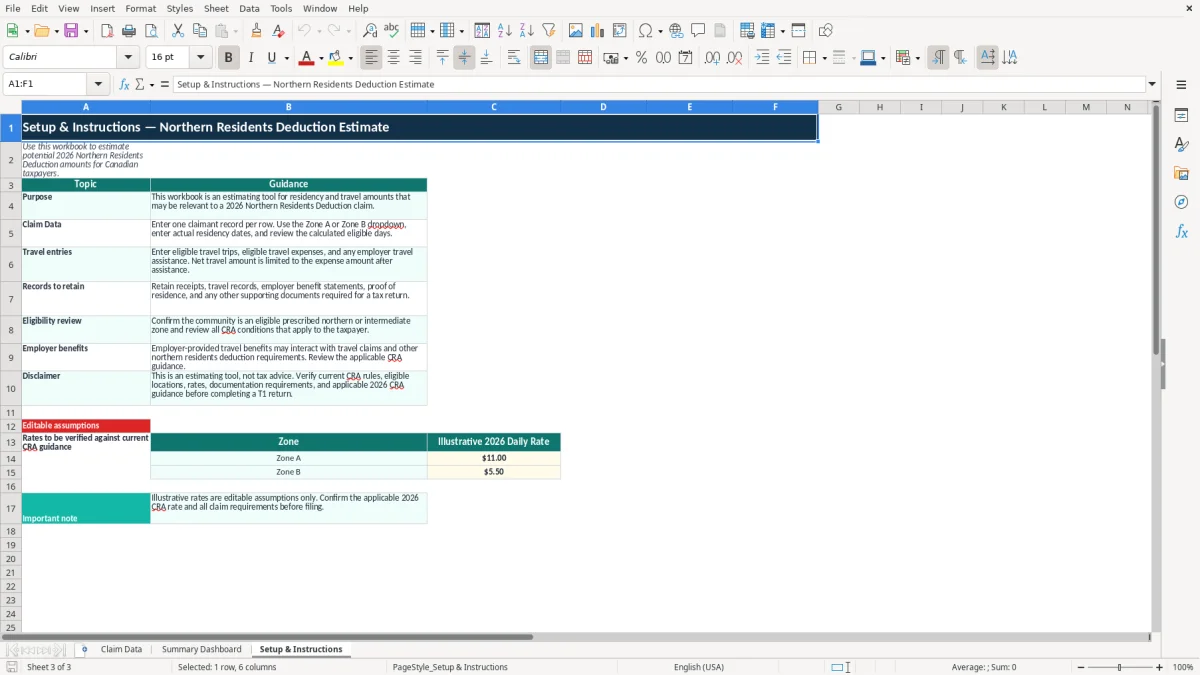
CRA distinguishes prescribed northern zones from prescribed intermediate zones. The workbook uses the labels Zone A and Zone B and supplies illustrative daily assumptions of $11.00 and $5.50 in cells C14:C15. Those figures are editable placeholders, not confirmed CRA rates; verify the applicable 2026 rate and prescribed location before relying on a result.
The date formula counts the overlap between the entered residence period and 2026. A full-year record from 2026-01-01 to 2026-12-31 produces 365 days. A record beginning 2026-07-01 produces 184 days, so the workbook displays Review for full-year claim because its built-in status rule flags 183 or more days for review. That label is a control, not a CRA test.
Travel claims need more than a number typed into column M. Keep receipts, travel dates, destination information and evidence of the reason for the trip. Employer-paid or employer-provided travel assistance belongs in column N because the instructions state that the net travel amount is limited to expenses after assistance.
The CRA’s general record-retention requirement is six years from the end of the relevant tax year. For a 2026 claim, retain the working papers and supporting records through the applicable retention period. Do not treat an employer benefit statement as a substitute for checking the current CRA instructions, and do not use the workbook’s illustrative assumptions as official tax rates.
The most expensive errors I see are usually basic record errors disguised as tax calculations. Someone enters the employee’s hire date instead of the date their residence began, or enters a move-out date as the first day they were no longer resident. The spreadsheet may calculate a clean total, but the supporting timeline will not withstand a review.
A claimant who lived in an eligible community from 2026-03-15 to 2026-10-31 has 231 calendar days in the workbook. If a preparer types 2026-01-01 because the person worked for the employer all year, the result becomes 365 days: 134 extra days multiplied by an illustrative $11.00 rate is $1,474.00 before travel is considered.
Another common problem is selecting Zone A because the work site is remote without verifying the prescribed zone for the actual residence. The Zone dropdown prevents free-text variations such as Zone-A or zone a, but it cannot decide whether the location qualifies. Record the community precisely and retain proof of residence.
A claimant enters $2,650 of travel expenses and $900 of employer assistance. The instructions require the net travel amount to be limited after assistance, so the working estimate is $1,750, not $2,650. Missing receipts, unsupported trip counts or a benefit already reimbursed through payroll can reduce the amount to zero and may require correcting the tax return.
Do not confuse the number of trips with the number of receipts, and do not enter a reimbursement as a negative expense unless the workbook instructions specifically call for that treatment. The prepared validation allows 0 to 10 trips and non-negative expense amounts; it catches extreme entries but not a false claim.
Finally, do not overwrite calculated columns I:K and P:Q. If a formula is replaced with a typed amount, the dashboard may still show a plausible total while losing the link to the residence dates. That is a control failure, not merely a formatting issue.
Use a fixed review point rather than opening the file only when the tax return is due. For an employer, the cleanest routine is a short review after the final 2026 payroll: confirm each employee’s residence dates, update travel assistance and attach the outstanding documents. For an individual, update the row whenever a move or reimbursed trip occurs.
Image 3 shows the Setup & Instructions sheet, including the guidance table and the two editable rate cells. The Claim Data sheet has a table across A1:R101, frozen headings at row 1 and validation for province or territory, zone, trip count and travel amounts. Those controls make weekly entry more consistent than a blank worksheet.
This workbook is a good fit for a small review with 10 or 20 claimants and straightforward residence periods. If you are reconciling 300 employees, receiving weekly changes from several sites or storing sensitive personal information in shared email attachments, move to a controlled tax or HR system with permissions, audit history and document storage.
Protect claimant names and residence details because they are personal information under PIPEDA in many Canadian commercial settings, with additional provincial privacy rules such as Quebec’s Law 25. Password-protect the file, restrict access and delete duplicate exports. A 15-minute Friday review is useful; a spreadsheet with no owner or close-out date is not.