
Restaurant Tip Pooling Excel – Free Template (2026)
1
Free download
Track Canadian employees, eligible wages, vacation pay used and closing liability with a 2026 Excel accrual register and summary.
Download template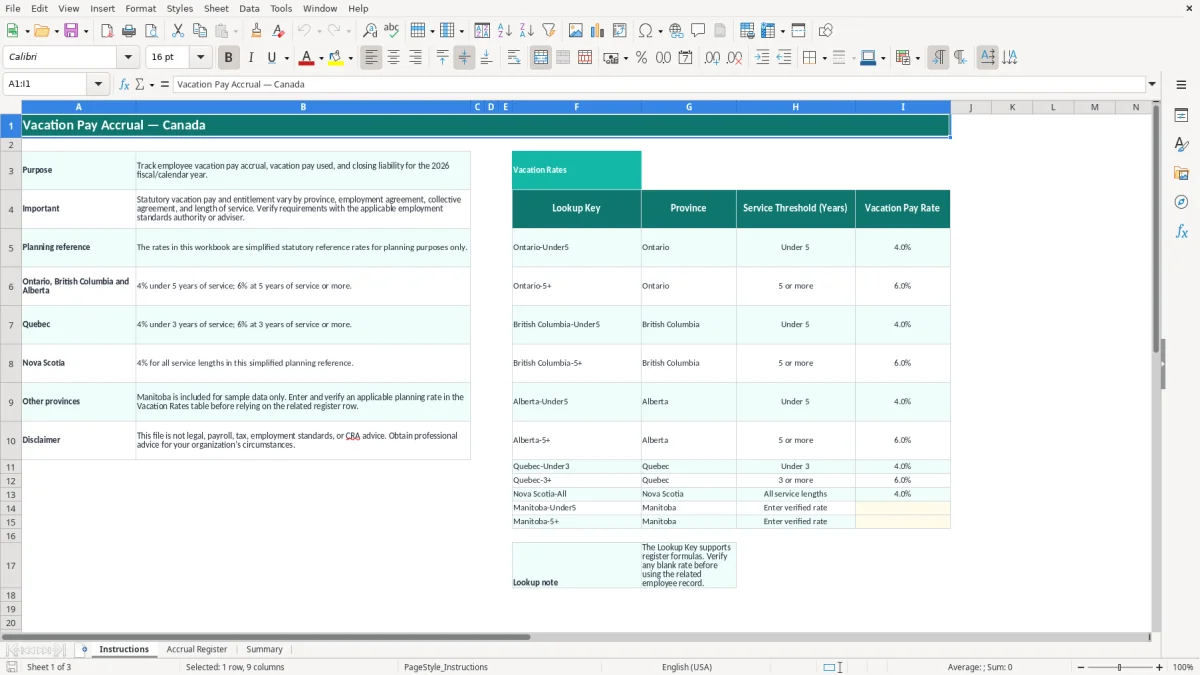
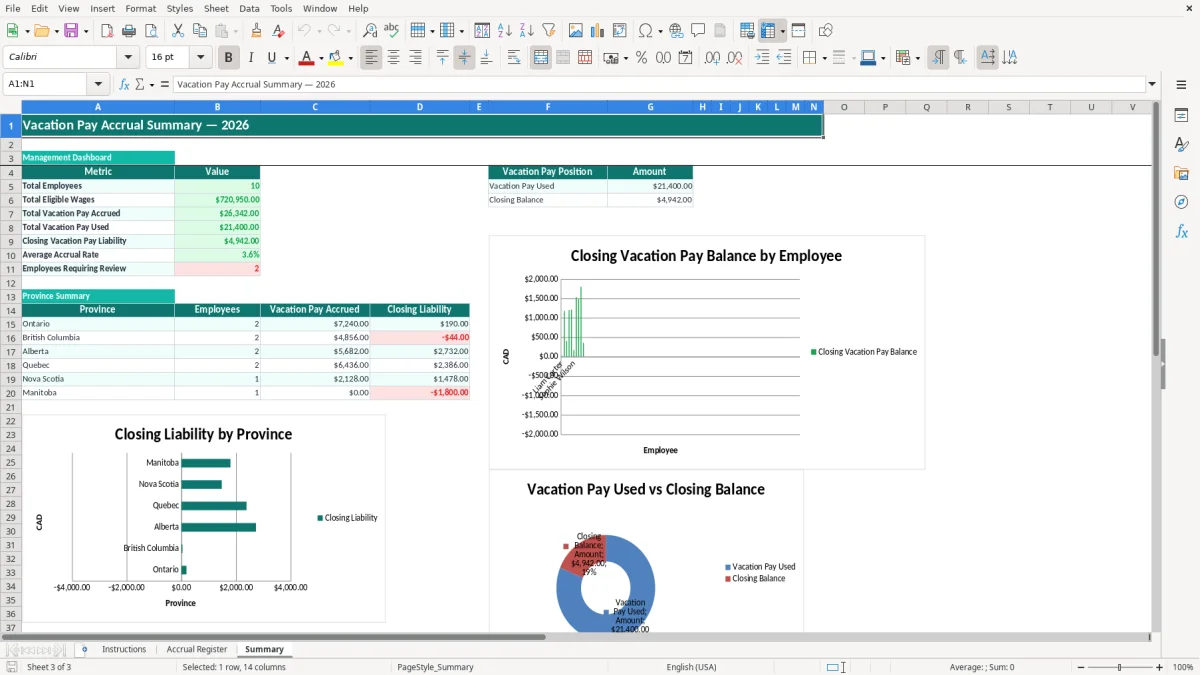
This vacation pay accrual Excel template tracks each employee's eligible wages, vacation pay accrued, vacation pay used and closing liability for 2026. It contains an Instructions sheet with planning rates, an Accrual Register for up to 100 prepared employee rows, and a Summary sheet with totals and province analysis.
Enter the pale-yellow input cells for employee details, hire date, opening wages, current-period wages and vacation pay used. The workbook calculates service years, the applicable planning rate, accrued pay, closing balance and accrual status automatically.
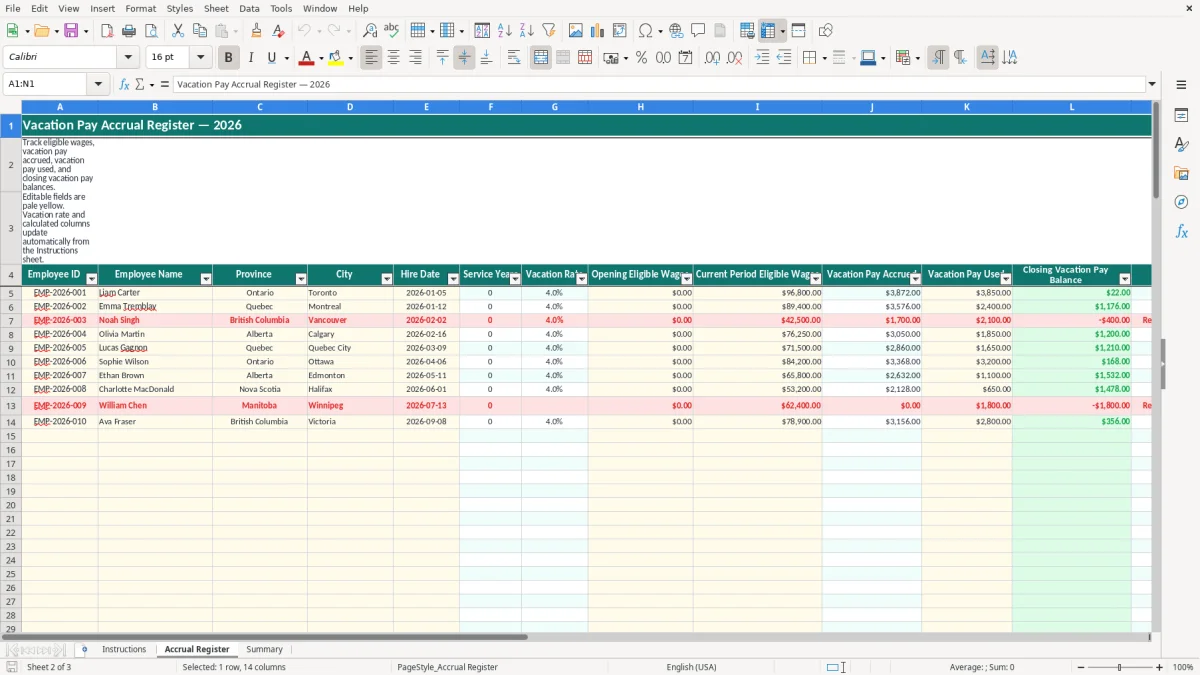
The sample register includes employees in Ontario, Quebec and British Columbia, while the Summary sheet combines the register into management totals. Image 1 shows the Instructions sheet, image 2 shows the employee register, and image 3 shows the dashboard and province summary.
A small incorporated business usually needs this register when payroll is processed, vacation is approved or the fiscal year-end approaches. A bookkeeper can maintain one row per employee, while an office manager at a trades company can update wages and vacation pay used after each payroll run. The file is also practical for a non-profit treasurer who needs a liability estimate without introducing a full payroll system.
Suppose a contractor has four employees and records $180,000 of eligible wages during the year. At a 4% planning rate, the accrued vacation pay estimate is $7,200 before subtracting any vacation pay used. Entering each employee separately shows whether that total is concentrated in one employee or spread across the team.
The Accrual Register has 14 visible columns, from Employee ID through Notes. Image 2 shows the pale-yellow entry cells and calculated columns for service years, vacation rate, accrued pay, closing balance and status. The auto-filter covers A4:N104, and the header remains visible because the sheet freezes panes at A5.
An Ontario employee hired on 2026-01-05, with $96,800 of current-period eligible wages and $3,850 used, appears in the sample data. A Quebec employee and a British Columbia employee demonstrate that the same register can hold different provincial rate logic. The sample British Columbia row has $42,500 of wages and $2,100 used, so its status needs review if usage exceeds the calculated accrual.
For routine work, update the register after each payroll run rather than waiting until December. That makes the closing liability useful for management decisions and gives the bookkeeper a clear audit trail of the numbers entered.
Vacation pay is governed primarily by provincial employment standards, not by a single CRA rate. The workbook is a planning reference, not payroll or legal advice. Its Instructions sheet uses 4% under 5 years and 6% at 5 years or more for Ontario, British Columbia and Alberta; Quebec uses 4% under 3 years and 6% at 3 years or more; Nova Scotia is shown at 4% for all service lengths in this simplified table.
The register calculates completed service years as at 2026-12-31 with DATEDIF. It then uses IF and VLOOKUP to build a lookup key such as Ontario-Under5, Ontario-5+, Quebec-Under3 or Quebec-3+. The resulting rate is displayed in column G. For example, $80,000 of eligible wages at 4% produces $3,200 of accrued vacation pay; at 6%, the same wages produce $4,800.
Eligible earnings are not automatically determined by this file. You must decide which wages qualify under the applicable employment standards legislation, employment agreement or collective agreement before entering columns H and I. A bonus, commission, overtime amount or statutory holiday payment may require specific treatment, so do not treat the spreadsheet's rate calculation as a legal determination.
Keep the payroll register, wage reports, vacation requests and payment records together. The CRA's general record-retention requirement is six years from the end of the last tax year to which records relate, although employment standards records may have their own retention rules. Vacation pay paid through payroll still belongs in the payroll process with applicable CPP, EI and income-tax source deductions where required; this workbook does not calculate those deductions, T4 slips or a ROE.
My practical preference is to use this file for accrual control and reconciliation, but use payroll software for statutory calculations and remittances. That division keeps the liability estimate transparent without pretending that a simple rate table replaces provincial compliance work.
The most expensive errors usually begin with the wrong wage base. If a four-person company enters $250,000 of total payroll when only $220,000 is eligible, a 4% calculation overstates the accrual by $1,200. The liability may look conservative, but management could reserve cash unnecessarily or carry an incorrect year-end balance into the financial statements.
A service threshold error is just as easy to miss. A Quebec employee reaching 3 years of service may move from 4% to 6% in the workbook's planning reference. On $60,000 of eligible wages, that difference is $1,200. If the employee's hire date is blank, mistyped or entered in the wrong date format, the calculated service years and rate cannot be relied on.
Another common failure is entering vacation pay used without entering the related wages. The formula can then produce a negative closing balance. The register labels that row Review - Negative Balance, which is a useful warning, not proof that the employee was overpaid. Check whether the payment belongs to an opening liability, a prior period or a separate payroll item.
The workbook arrives with populated examples, including Liam Carter at $96,800 of wages and $3,850 used, Emma Tremblay at $89,400 and $2,400 used, and Noah Singh at $42,500 and $2,100 used. Leaving those rows in place while adding your employees inflates the Summary totals and the employee count. Delete or replace the sample records before relying on the dashboard.
Do not override calculated columns F, G, J, L or M with manual numbers. A manual correction may appear to solve one employee's issue while breaking the link to the Instructions rate table. Record the reason in Notes and correct the input date, province, wage amount or usage figure instead.
The spreadsheet works best when it is attached to an existing payroll or month-end routine. Pick one date, such as the first business day after the final monthly payroll, and update the same fields every time. If current-period eligible wages are $18,000 in January and $21,500 in February, entering both periods consistently gives management a running view instead of a rushed December estimate.
Use the province list rather than typing variations such as Ont., Ontario or ON. The rate formula expects the listed province names. Do not change the simplified rates without documenting the source and effective date, and do not insert rows inside the prepared calculation range without checking that formulas still extend through row 104.
At year-end, save a dated copy after reviewing the 2026 totals. A business with 12 employees can usually maintain this process in under 30 minutes per month if payroll totals are ready; a company with 80 employees, multiple pay groups and frequent terminations should move to an integrated payroll or accounting system. The trigger is not simply employee count: once reconciliation takes several hours every pay period, the control cost is higher than the spreadsheet's convenience.