
Provincial Tax Excel Template – Free (2026)
6
Free download
Track shareholder advances, repayments, balances, interest and year-end exposure with a Canadian corporate loan account Excel template.
Download template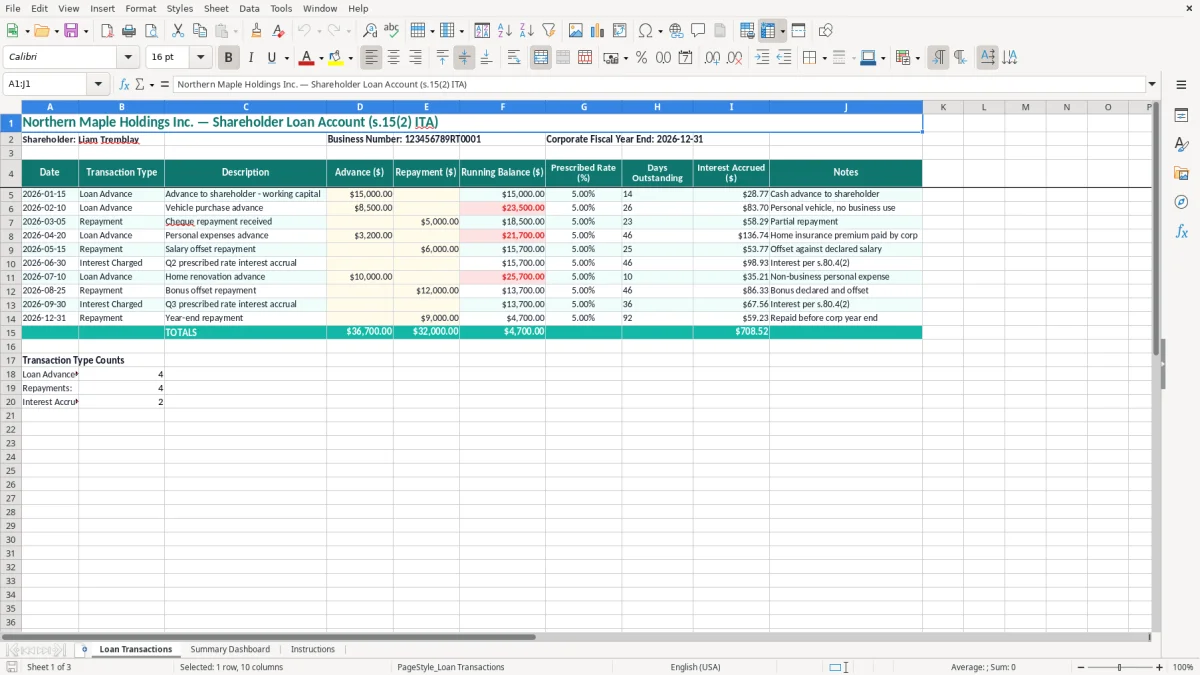
A shareholder loan account Excel spreadsheet records money a shareholder takes from or advances to a Canadian corporation. This template contains a dated transaction log, running balance, prescribed interest rate, days outstanding, interest accrued, and a summary dashboard for year-end review.
Use the Loan Transactions sheet to record every advance and repayment instead of relying on bank statements or memory. The workbook is built around a corporate account such as the example for Northern Maple Holdings Inc., shareholder Liam Tremblay, and fiscal year-end 2026-12-31.
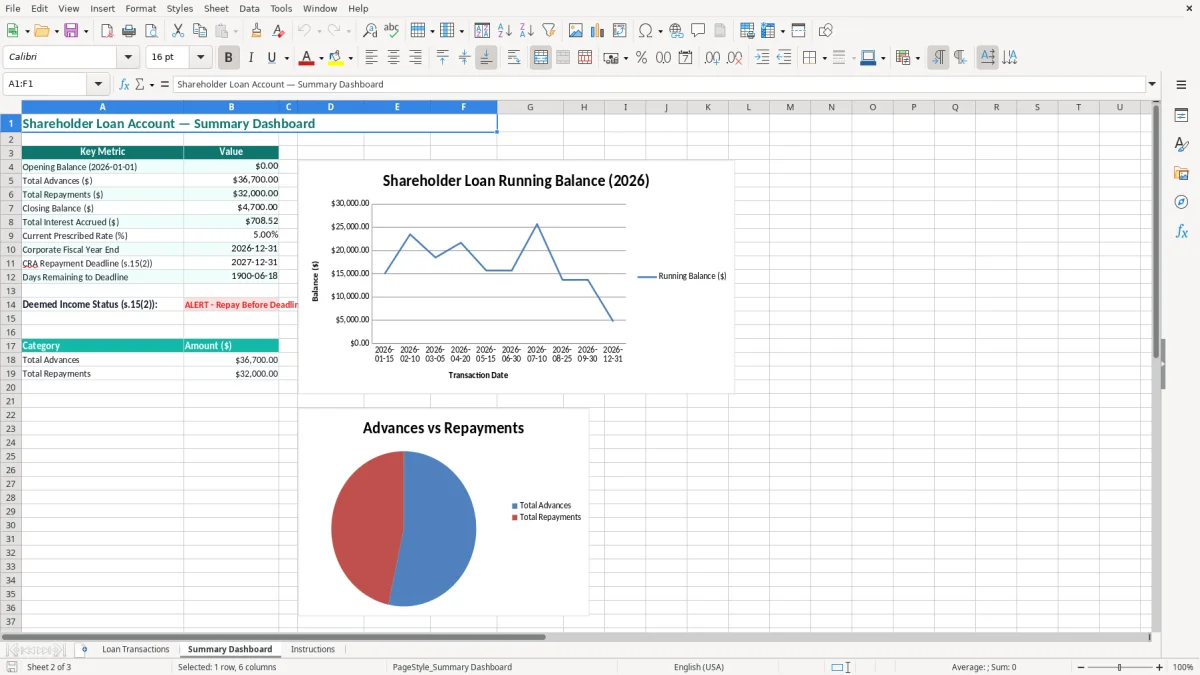
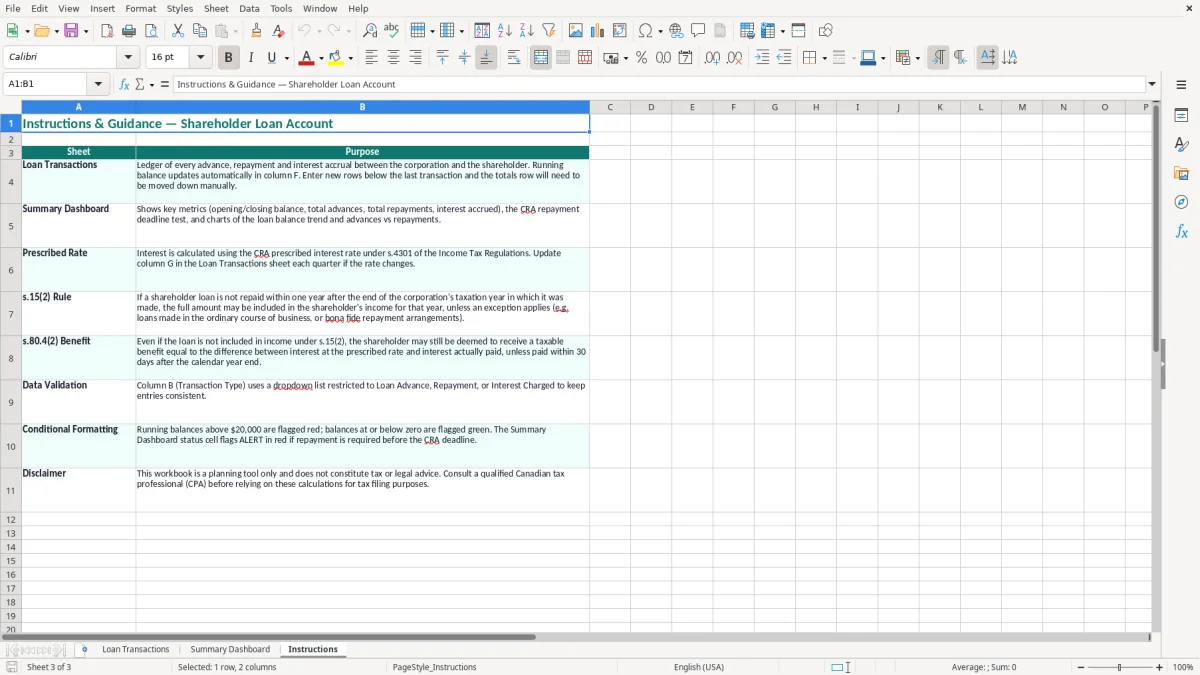
The Summary Dashboard gives you a quick view of the account, while the Instructions sheet explains the intended workflow. This is a practical working paper for a bookkeeper, owner-manager, or accountant; it does not replace the corporation's tax return or legal advice.
A shareholder loan spreadsheet is most useful when an owner-manager uses the corporation's bank account for a mixture of business and personal payments. The bookkeeper at an incorporated plumbing company may see a $3,200 personal credit-card payment, a $12,000 cash withdrawal and a $4,000 repayment in the same quarter. Without a transaction-level record, all three can disappear into a vague shareholder account.
The Loan Transactions sheet in this workbook is designed for that review. Image 1 shows the columns from Date through Notes, including separate Advance ($) and Repayment ($) fields. That separation matters: a $15,000 advance on 2026-01-15 and an $8,500 vehicle purchase advance on 2026-02-10 should not be entered as a single $23,500 unexplained amount.
A sole owner who incorporated a consulting practice can enter the transaction while matching the bank statement, rather than reconstructing the account in March. Use a description such as personal tax instalment, vehicle purchase advance or shareholder reimbursement, and attach the supporting cheque, transfer record or receipt outside the workbook.
For example, if the corporation advances $15,000 and the shareholder repays $5,000, the expected principal balance is $10,000 before any other entries. The running balance gives the bookkeeper a starting point for reconciling the general-ledger account and the dashboard gives the owner a quick review before approving another withdrawal.
An incorporated business with four employees should review this account during the same month-end process used for payroll and bank reconciliation. The owner may not think of a $600 personal fuel payment as a loan, but twelve similar payments total $7,200 in a year.
Image 2 shows the dashboard area intended for this higher-level check, while Image 3 is the Instructions sheet. Use the transaction detail for evidence and the dashboard for questions: what is outstanding, what has been repaid, and which entries need documentation before the 2026 fiscal year-end?
The main rule is section 15(2) of the Income Tax Act. In general, a loan or debt from a corporation to a shareholder, or to a person connected with the shareholder, can be included in the borrower's income unless a specific exception applies. A spreadsheet does not decide the tax treatment, but it gives you the dates and amounts needed to test the rule.
One important timing exception generally requires the loan to be repaid within one year after the end of the corporation's tax year in which the loan arose. There is also an anti-avoidance rule for a series of loans and repayments, so paying $15,000 back on 2027-12-30 and withdrawing $15,000 again on 2028-01-02 is not a satisfactory records strategy. Track the actual dates rather than recording only the year-end balance.
The template includes Prescribed Rate (%) and Interest Accrued ($), and the supplied example uses 5.00%. CRA prescribed interest rates are set by quarter, so do not treat the example rate as a permanent 2026 rate. Enter the rate applicable to the loan and period you are documenting, and retain the source of that rate with the working papers.
Where an employee-shareholder receives a low-interest or interest-free loan, section 80.4 can create a taxable benefit based on the prescribed rate, reduced by interest actually paid within the permitted period. For a $20,000 average loan at 5.00%, a simple annual calculation is $1,000 before repayments and timing adjustments. The row-level days calculation is more useful than applying 5.00% to the opening balance for the entire year.
Keep the workbook, bank support, repayment evidence and board or shareholder documentation with the corporation's records. CRA generally expects business and tax records to be retained for six years from the end of the relevant tax year. The corporation's BN and program accounts identify the entity, but they do not make a personal withdrawal a business expense.
The shareholder-loan balance should agree to the corporation's general ledger and feed into the corporation's year-end tax working papers. A repayment entry is not automatically deductible, and moving an amount to salary, dividend or expense changes the tax analysis. Use the dashboard to find the balance; classify the transaction based on what actually happened.
The costliest mistake is treating every payment from the corporate bank account as a business expense. I have seen a $9,600 personal renovation payment coded to repairs, followed by a year-end journal entry that did not explain who owed the money. That can overstate deductions, understate the shareholder loan and leave the corporation unable to prove the transaction's purpose.
Entering an advance but forgetting the repayment is common when the shareholder pays the corporation back through a different bank account. A $15,000 advance followed by a $15,000 cheque should leave a nil principal balance, but a missing repayment leaves the spreadsheet and general ledger showing $15,000 outstanding. The result is wasted reconciliation time and a misleading section 15(2) review.
The reverse error is just as serious. Recording a repayment that was promised but never deposited makes the account look compliant while the corporation is still out of pocket. A repayment needs bank evidence, a date and a clear link to the original debt; a verbal promise is not a cash receipt.
Applying 5.00% to every advance for twelve months overstates interest when a $10,000 amount was outstanding for only 30 days. The simple time-based amount is approximately $41.10: $10,000 × 5.00% × 30 ÷ 365. Conversely, using the year-end balance alone can understate interest where the account moved between $2,000 and $25,000 during the year.
Do not overwrite a transaction date with the date of the year-end journal entry. A corporation with a 2026-12-31 year-end needs to know whether a $6,000 withdrawal occurred on 2026-03-01 or 2026-12-20, because the outstanding period and repayment deadline analysis differ.
Combining two shareholders in one running balance hides responsibility. If Liam has a $12,000 debit and Maya has a $4,000 credit, a net $8,000 figure does not show who owes the corporation. The workbook heading names one shareholder, so create a separate controlled copy or separate account for each person and reconcile each balance to the ledger.
These errors can mean more than a messy spreadsheet: a disputed shareholder benefit, an unsupported corporate expense, a missed repayment deadline or a reassessment with interest. The practical stance is firm—record the transaction when the money moves, not when year-end pressure begins.
The spreadsheet works when it is tied to a fixed control, not when it is left for the final week of the fiscal year. Set a 15-minute review after the monthly bank reconciliation. The person matching the corporate bank statement should also check for personal-looking payments and enter them before the next payroll run.
Use a consistent description format such as 2026-02-10 vehicle advance or 2026-04-05 repayment by cheque 1842. That makes filtering and review faster than descriptions such as personal item or paid back. Keep a read-only month-end PDF or dated workbook copy so later changes do not erase the audit trail.
This workbook is a good fit for one shareholder, one corporation and a manageable number of transactions. If the account reaches 300 entries a month, involves several shareholders, or requires multiple currencies and approvals, move the source records into accounting software with user permissions and an audit log.
Do not solve volume by copying rows between unrelated files. A single controlled workbook is preferable to five versions named final, final2 and final-year-end. When you outgrow it, export the transaction history, confirm that the closing balance agrees to the ledger, and carry that reconciled opening balance into the new system.
Keep the Instructions sheet with the workbook and make the same person responsible for the monthly review. The dashboard is a summary, not the evidence: decisions should be based on the dated transaction rows, bank support and the corporation's formal accounting records.