
Condo Board Operating Budget Excel Template Canada
9
Free download
Track taxable sales, ITCs and filing periods to calculate your GST/HST remittance in one workbook.
Download template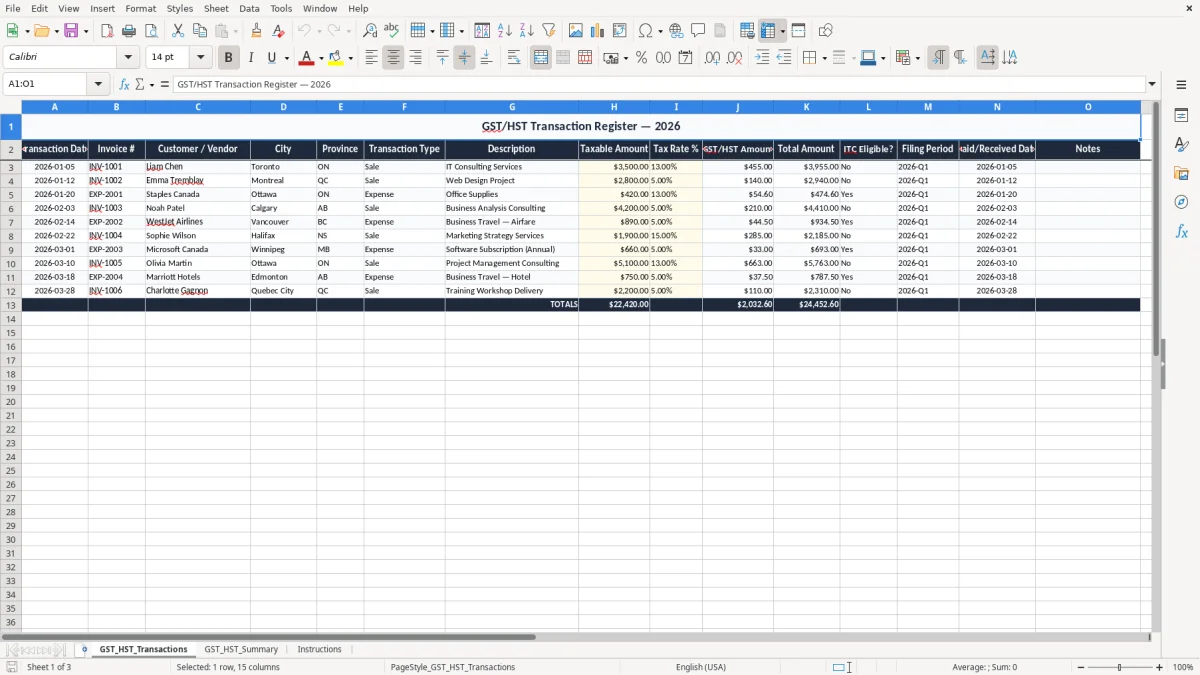
This GST/HST remittance Excel template tracks taxable sales, input tax credits, and filing periods so you can calculate what you owe or claim at each filing. It includes a transaction register, a summary sheet, and instructions.
You enter each sale or expense once, then use the summary to total GST/HST collected and ITCs by period. That makes it easier to prepare a monthly, quarterly, or annual return without rebuilding the numbers from scratch.
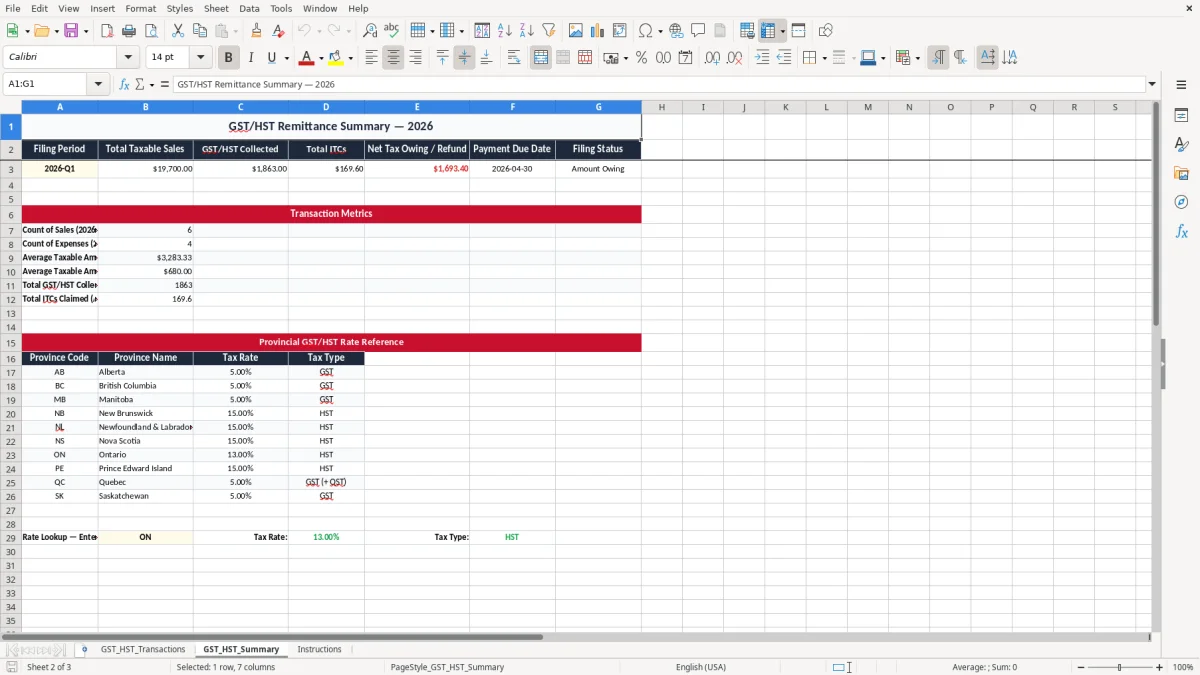
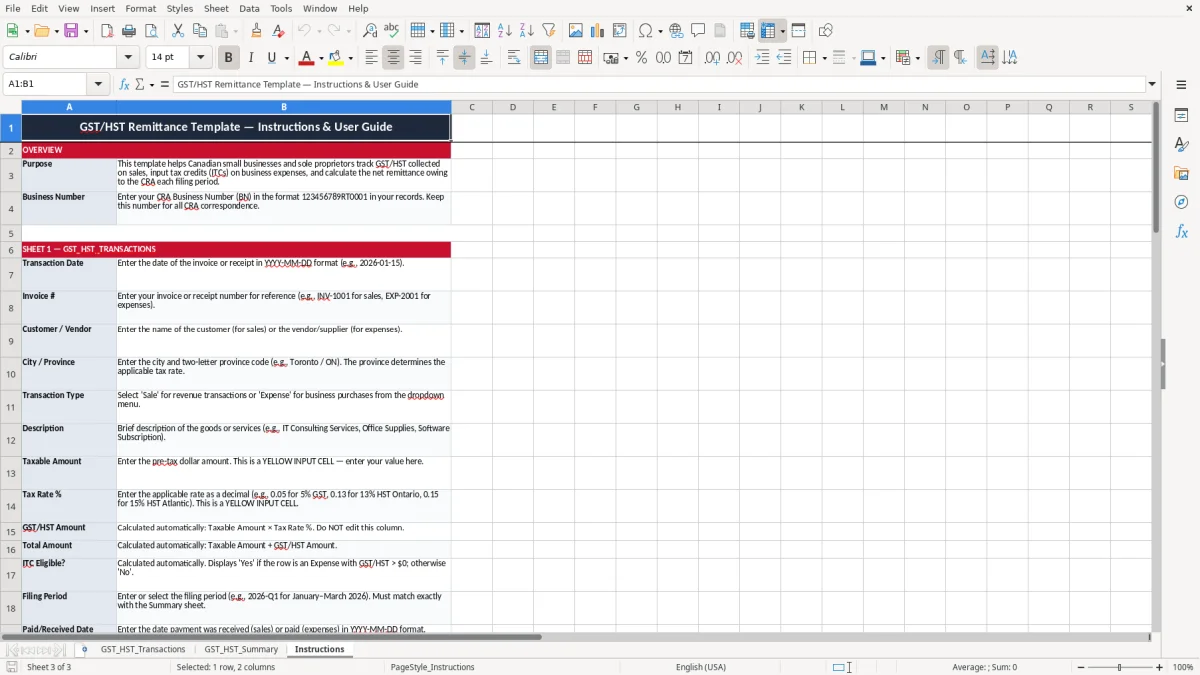
The workbook is built for Canadian small businesses that need a simple way to track GST/HST on everyday transactions. It uses the transaction register shown in image 1, the summary dashboard in image 2, and the instructions sheet in image 3.
You usually reach for this workbook when the filing date is close and the receipts are still sitting in email, a shoebox, or the POS export. A sole proprietor with $52,000 of taxable revenue and $8,600 of expenses can sort the month in under an hour if the transactions are already logged by date and province.
A bookkeeper at an incorporated shop uses it to separate taxable sales from claimable expenses before the GST/HST return is prepared. An office manager at a trades company uses it to track deposits, supplier invoices, and fuel bills across 4 or 5 people on the road.
Image 1 shows the GST_HST_Transactions sheet with columns for Transaction Date, Invoice #, Customer / Vendor, Province, Transaction Type, Taxable Amount, Tax Rate %, GST/HST Amount, and ITC Eligible? That layout is practical because one row tells you whether a $420 office-supply bill in Ontario carries $54.60 of tax and whether it should reduce the remittance.
Image 2 shows the summary sheet that rolls the totals together instead of forcing you to add rows manually. If you have 120 sales invoices at $250 each and 40 expense receipts at different rates, the summary gives you one net figure to compare with your CRA return draft.
The CRA expects you to keep enough detail to support the return, not just a lump sum in a bank account. For GST/HST purposes, that means the invoice date, amount before tax, tax charged, and whether the expense supports an ITC.
The federal GST rate is 5%. Ontario uses 13% HST, while New Brunswick, Nova Scotia, Prince Edward Island, and Newfoundland and Labrador use 15% HST; Quebec uses QST, and British Columbia, Saskatchewan, and Manitoba may add PST on top of GST in some cases.
Once your worldwide taxable revenue passes $30,000 over four consecutive quarters, GST/HST registration becomes mandatory. If you collect $6,500 of GST/HST in a quarter and have $1,900 of claimable ITCs, your net remittance is $4,600 before any instalment or timing adjustments.
Keep the supporting records for six years. If you register, your business number needs the RT program account for GST/HST, and many businesses also have RP for payroll or RC for corporate income tax; this workbook helps you keep the GST/HST side clean before you post anything into your accounting system.
Before posting anything into your accounting system, the quick method HST calculation keeps the remittance side clean.
The biggest problem is mixing tax-inclusive and tax-exclusive amounts in the same register. If you record a $1,130 Ontario sale as taxable sales of $1,130 instead of $1,000 plus $130 GST/HST, you overstate revenue and tax at the same time.
Another frequent error is using 5% on a sale that should be 13% or 15%. On 80 Ontario invoices of $900 each, the difference between 5% and 13% is $5,760 of tax on the quarter, which is not a rounding issue — it is a reassessment waiting to happen.
People also miss ITCs on eligible purchases because the receipt never gets coded properly. If you forget $2,400 of tax on fuel, software, and supplies in a filing period, you hand the government cash you did not need to send.
When rows are not tied to a filing period, a January expense can end up in March by mistake and throw off the return. That turns a simple quarterly filing into a half-day of backtracking through bank feeds, receipts, and invoice PDFs.
3 % de taxe sur le trimestre, ou 2 400 $ de CTI oubliés, montre pourquoi le tableur Excel de calcul TPS/TVH selon la méthode rapide au Canada est utile pour garder les montants et les périodes de déclaration bien alignés.
The easiest way to keep this alive is to link it to one fixed task you already do, like the bank reconciliation or the quarterly remittance check. If you file quarterly, set aside 30 minutes on the same day each quarter and enter all transactions before you touch the return.
If you are handling 300 orders a month, multiple locations, or payroll plus GST/HST in one workbook, you may outgrow a spreadsheet and need accounting software with proper tax codes. For a small service business with 20 to 50 transactions a month, though, this template is usually the fastest way to stay on top of the remittance.