
Provincial Tax Excel Template – Free (2026)
6
Free download
Plan BC strata capital costs with an Excel template for components, useful life, replacement timing, inflation, and reserves.
Download template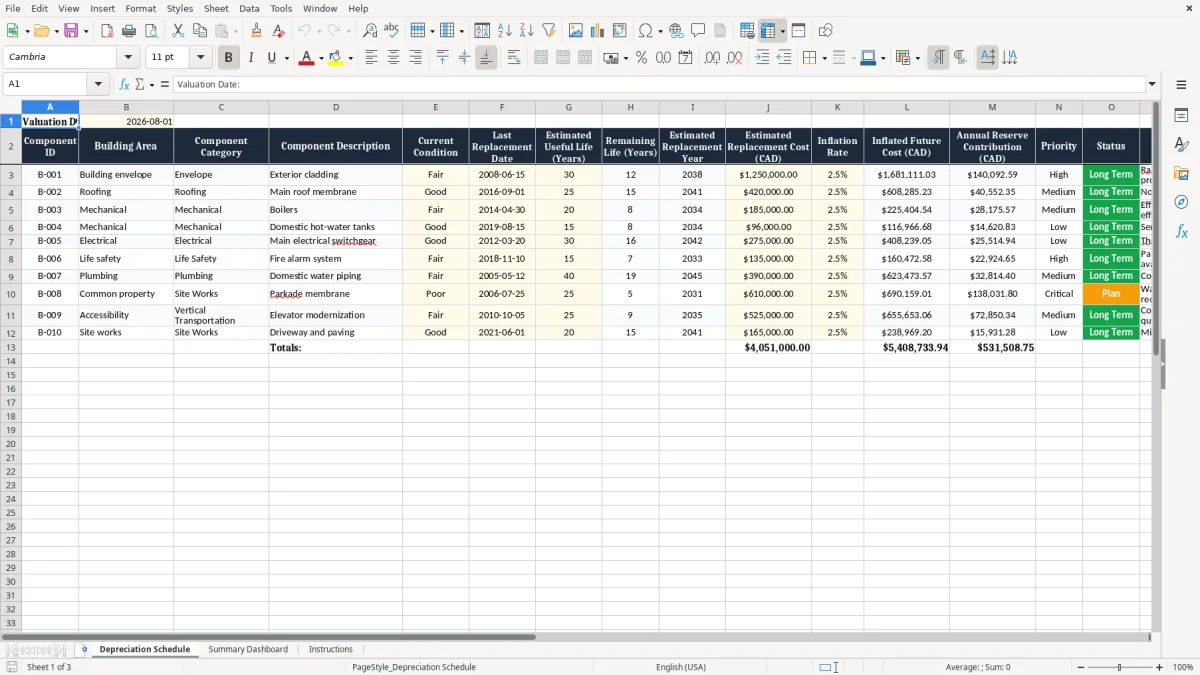
This strata depreciation report Excel spreadsheet is a practical planning template for Canadian strata corporations, property managers, and depreciation report consultants. It helps organize building component information, assess current condition, estimate useful life, project replacement years, and calculate future costs in Canadian dollars. The schedule includes sample entries for common systems such as exterior cladding, roofing, boilers, domestic hot-water tanks, electrical switchgear, and fire alarm equipment.
Replace the sample information with records for your own property and update the worksheet as inspections, repairs, quotations, and replacements occur. The template is intended to support long-term capital planning, contingency reserve fund discussions, maintenance scheduling, and preparation for professional review. It is not a substitute for a formal depreciation report or qualified technical advice.
Start by entering the valuation date in the highlighted input cell, then review each sample row and replace it with information for the strata property. Add a separate row for every major common-property asset or system so that its condition, lifecycle, cost, and funding needs can be evaluated independently. Use invoices, maintenance records, warranty documents, previous reports, inspection findings, and consultant recommendations to confirm the last replacement date and estimated useful life.
Enter the current replacement cost before applying the inflation assumption, and review the projected future cost and annual reserve contribution for reasonableness. Use the Priority and Status fields to identify urgent concerns, upcoming investigations, quotation requirements, planned projects, and completed work. Review high-priority components first, especially systems affecting life safety, water ingress, building operations, or regulatory compliance.
Update the spreadsheet after inspections, major repairs, replacements, changes in market pricing, or revisions to the capital plan. Compare the results with the strata corporation's depreciation report, operating budget, contingency reserve fund, and approved planning decisions. Before relying on the figures for governance, financing, or compliance decisions, ask an appropriately qualified British Columbia professional to review assumptions, condition assessments, quantities, costs, and applicable requirements.
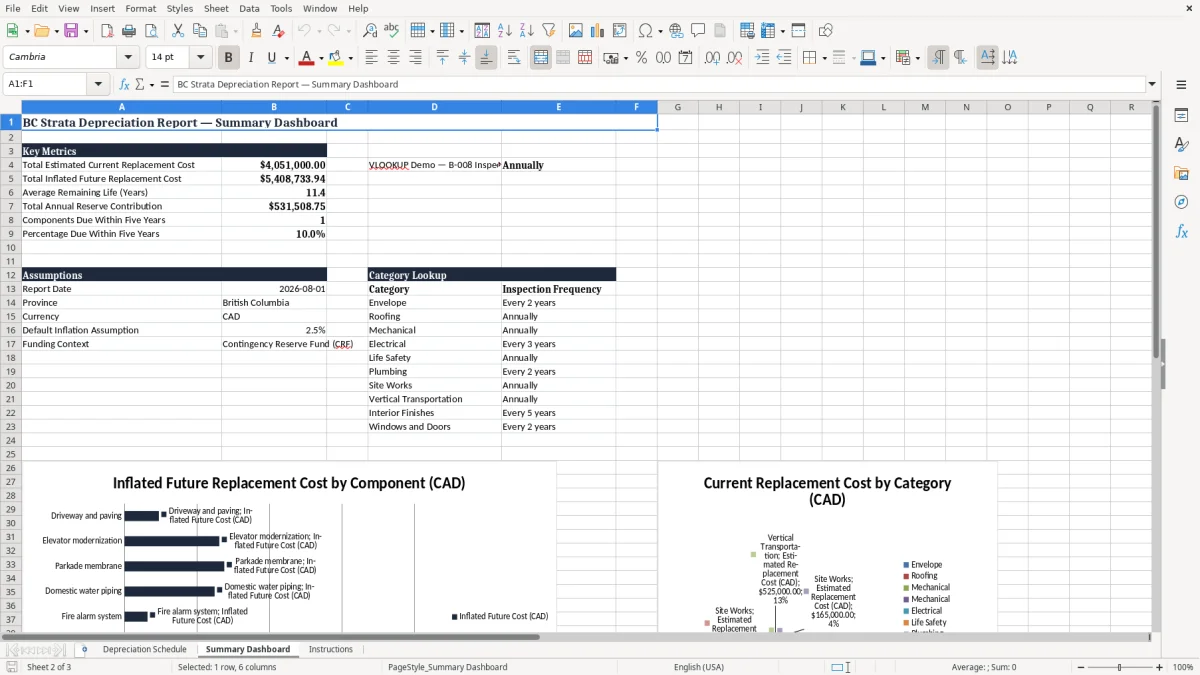
A BC strata depreciation report spreadsheet is a planning workbook used to organize the expected renewal and replacement needs of a strata corporation's common property. Instead of keeping building information in scattered invoices, inspection notes, and meeting files, the workbook places each major component in a consistent schedule. Typical entries include roofing, exterior cladding, mechanical equipment, domestic water systems, electrical equipment, fire alarm systems, elevators, paving, landscaping, and recreational facilities.
For each item, the strata can record its location, current condition, last replacement date, estimated useful life, remaining life, replacement year, and estimated cost in Canadian dollars. This structure makes it easier to see which assets may require attention soon and which can be monitored over a longer period. The spreadsheet can also apply an inflation assumption to a current replacement estimate, producing an indicative future cost for capital planning.
A priority field helps distinguish safety or building-performance concerns from routine future work, while notes provide space for inspection findings, maintenance history, quotations, and unresolved questions. In British Columbia, this type of worksheet may help a strata prepare information for a professional depreciation report and support discussions about the contingency reserve fund. It should not be treated as the report itself.
A formal report may require site review, technical analysis, cost estimating, and recommendations from qualified professionals. The spreadsheet is most useful when it is updated regularly and supported by reliable records. It gives council and owners a clearer working picture of anticipated capital expenses, but its estimates remain dependent on the quality of the condition information, useful-life assumptions, quantities, scope, and market pricing entered by the user.
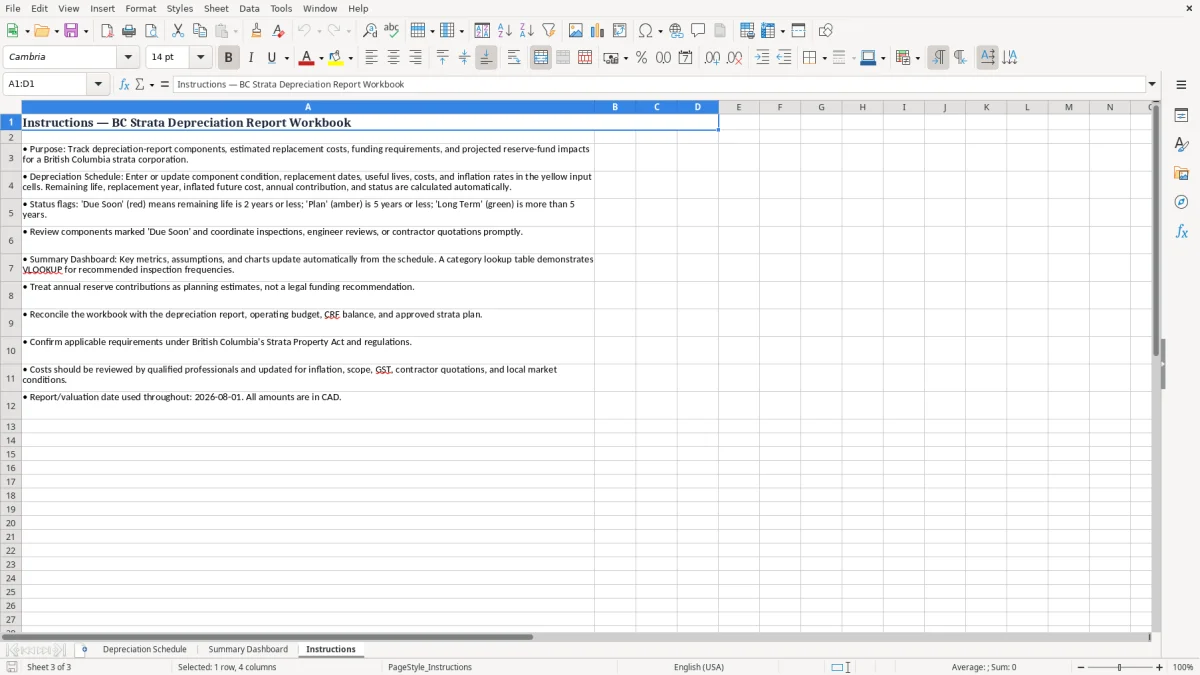
Estimating strata replacement costs starts with defining the scope of the work rather than entering a single unsupported guess. Identify what is included in the component, such as membrane replacement only, a complete roof assembly, or exterior cladding together with flashings, sealants, access, and related repairs. Review previous projects, contractor quotations, maintenance records, warranties, invoices, construction drawings, and professional assessments.
Where possible, separate components that have different service lives or replacement methods. A roof membrane, rooftop equipment, and drainage improvements may need different timing even though they occupy the same general area. Enter a current estimated replacement cost in CAD and record the source or assumptions in the Notes field.
Consider demolition, disposal, permits, engineering, project management, access, temporary protection, taxes, and contingency where appropriate. The inflation rate in the spreadsheet is a planning assumption; it does not predict actual construction pricing. Labour availability, material shortages, site access, building code requirements, insurance conditions, and project complexity can cause actual costs to vary substantially.
The inflated future cost should therefore be reviewed periodically rather than left unchanged for many years. For components with uncertain condition or scope, use a professional inspection or obtain a budget quotation before making a major funding decision. A useful-life estimate is also not a guarantee.
Some assets last longer with strong maintenance, while others fail early because of installation defects, exposure, water damage, obsolete parts, or changing standards. The best reserve planning combines the spreadsheet calculation with current condition evidence and a realistic project scope. Keep an audit trail of assumptions, dates, sources, and revisions so council members and owners can understand how each estimate was developed.
A depreciation schedule can help a BC strata corporation connect building condition information with longer-term financial planning. The Annual Reserve Contribution column provides an indicative way to consider how much funding may be needed for a projected component replacement. It should be interpreted as a planning reference, not as an automatic budget recommendation.
A strata may have several projects occurring in the same year, existing contingency reserve fund balances, investment income, special levies, insurance recoveries, grants, financing, or other funding sources. Conversely, a component may require investigation, repair, or partial renewal before its full replacement date. Review the schedule by year, category, priority, and building area to identify periods when projected spending is concentrated.
A high future cost does not always mean that immediate work is required, and a low cost does not eliminate the need to address a safety or water-ingress issue. The worksheet is especially useful for preparing questions for council meetings, owner education, budget discussions, and professional depreciation report updates. Record whether an item is under investigation, quoted, approved, scheduled, in progress, or complete in the Status field.
After a project is completed, update the replacement date, cost, useful life, condition, and notes so future projections reflect the new information. In British Columbia, strata corporations should confirm current legal, reporting, reserve-fund, and governance requirements rather than relying on an old template or general online guidance. A qualified depreciation report provider, engineer, building envelope consultant, quantity surveyor, accountant, or lawyer may be appropriate depending on the issue.
Clear documentation improves continuity when council members, managers, contractors, or consultants change. It also helps owners understand why reserve planning assumptions may change over time.
A strata depreciation spreadsheet becomes more valuable when it is maintained as a living capital-planning record rather than created once and forgotten. Establish a consistent review cycle, such as an annual update before budget preparation and an additional review after significant inspections, repairs, failures, or replacements. Keep the original file in a controlled location with backups, clear file naming, and access limited to authorized users.
Consider retaining a read-only copy of each approved planning version so changes can be tracked over time. Use unique Component IDs to avoid confusing similar equipment or areas, and write descriptions that a new council member or manager can understand without additional context. Record the date and source of major assumptions in the Notes field.
When a quotation is received, note whether it is budgetary or firm, what scope it covers, when it expires, and whether taxes or contingency are included. Review formulas and input cells after copying rows, and check that dates, costs, percentages, and years use consistent formats. Do not use a low inflation rate to conceal an uncertain scope or defer a known deficiency.
Condition ratings should be supported by inspections or documented observations, and urgent concerns should be escalated rather than simply marked High priority. Compare spreadsheet totals with approved budgets and fund balances, but remember that a simple annual contribution estimate may not reflect cash-flow timing or investment strategy.
Before distributing the schedule to owners, explain that projected costs are estimates and that professional reports may revise them. Good file maintenance, transparent assumptions, and regular technical review make the workbook more useful for Canadian strata governance and long-term asset management.