
CNESST Remittance Excel – Free Template (2026)
0
Free download
Track Canadian EI special-benefit claims, estimated payments, documents, action dates and summaries for employers, bookkeepers and administrators.
Download template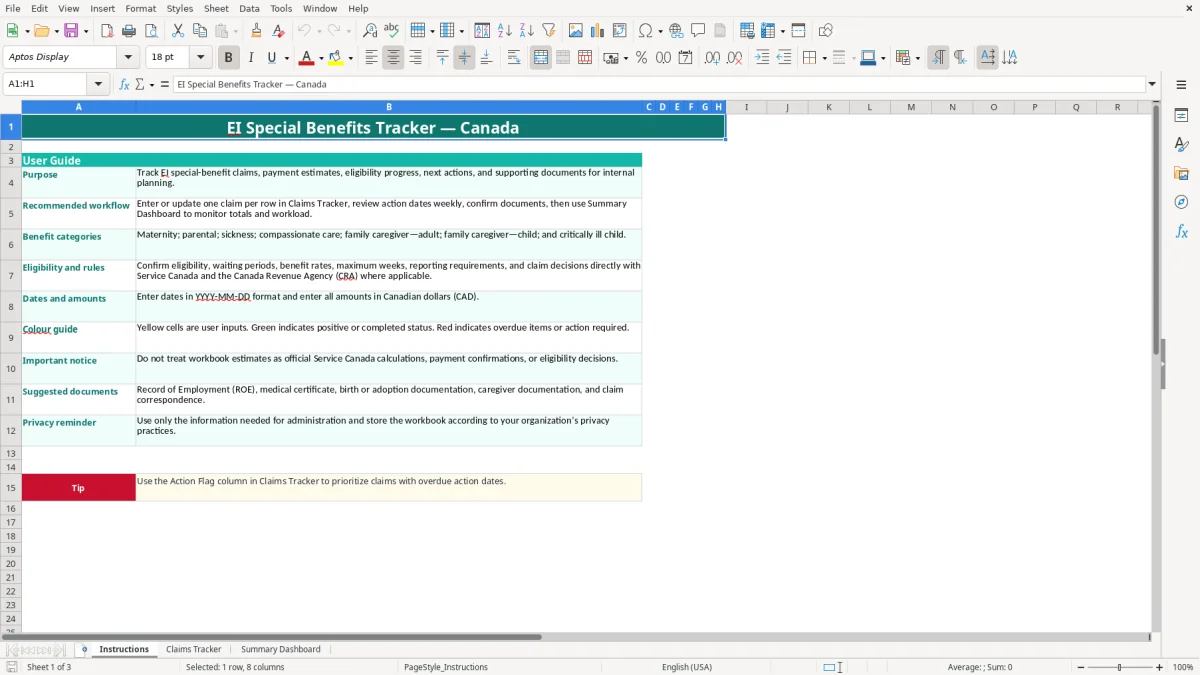
This Excel template tracks Canadian EI special benefits claims from application through payment. It contains a Claims Tracker for claimant, employer, benefit, earnings, payment and document details, plus formulas for estimated benefits, outstanding amounts and action flags.
Use the Instructions sheet before entering data, then review the Summary Dashboard each week. The workbook includes prepared rows for up to 100 claims, but its estimates are for internal planning only and do not replace an official Service Canada decision.
An office manager at a four-employee trades company may use this workbook when an employee begins maternity, parental or sickness leave. A bookkeeper at an incorporated business can update the claim after each payroll run, while a non-profit administrator may use it to follow caregiver claims across several provinces. The workbook is designed for internal administration, not for deciding whether Service Canada will approve a claim.
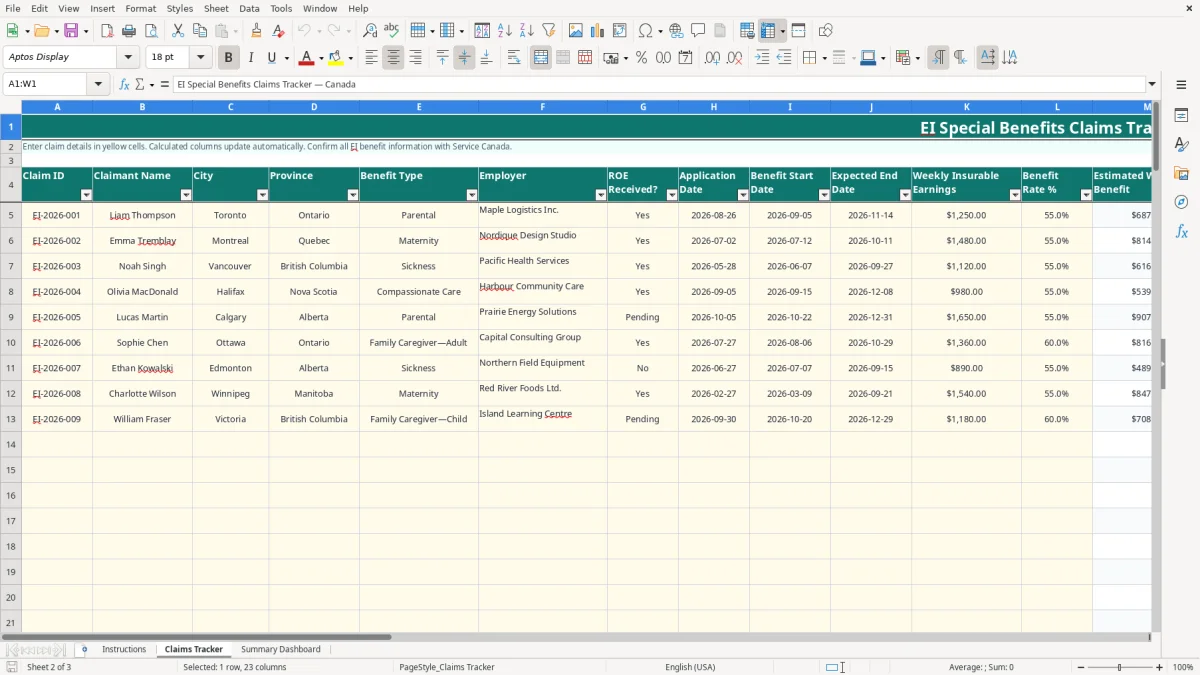
Image 1 shows the Instructions sheet, including the recommended workflow, the seven benefit categories and the privacy reminder. Image 2 shows Claims Tracker with columns for Claim ID, Claimant Name, City, Province, Benefit Type, Employer, ROE Received?, application and benefit dates, weekly insurable earnings, benefit rate, approved and paid weeks, payment status, next action date, documentation status and notes.
For example, the sample parental claim for Liam has weekly insurable earnings of $1,250 and a 55% entered rate. The formula produces an estimated weekly benefit of $687.50; with 10 approved weeks, total estimated benefits are $6,875.00. Five paid weeks produce $3,437.50 paid to date and an outstanding amount of $3,437.50. Those figures are workbook calculations, not an official payment confirmation.
Review claims during the weekly administration meeting, after receiving a Record of Employment, and before a payroll or leave-status update is finalized. A claim with a blank or overdue Next Action Date is marked Action Required when it is not Completed. That makes the file useful for a small employer managing several absences without turning it into a substitute for the claimant's Service Canada account.
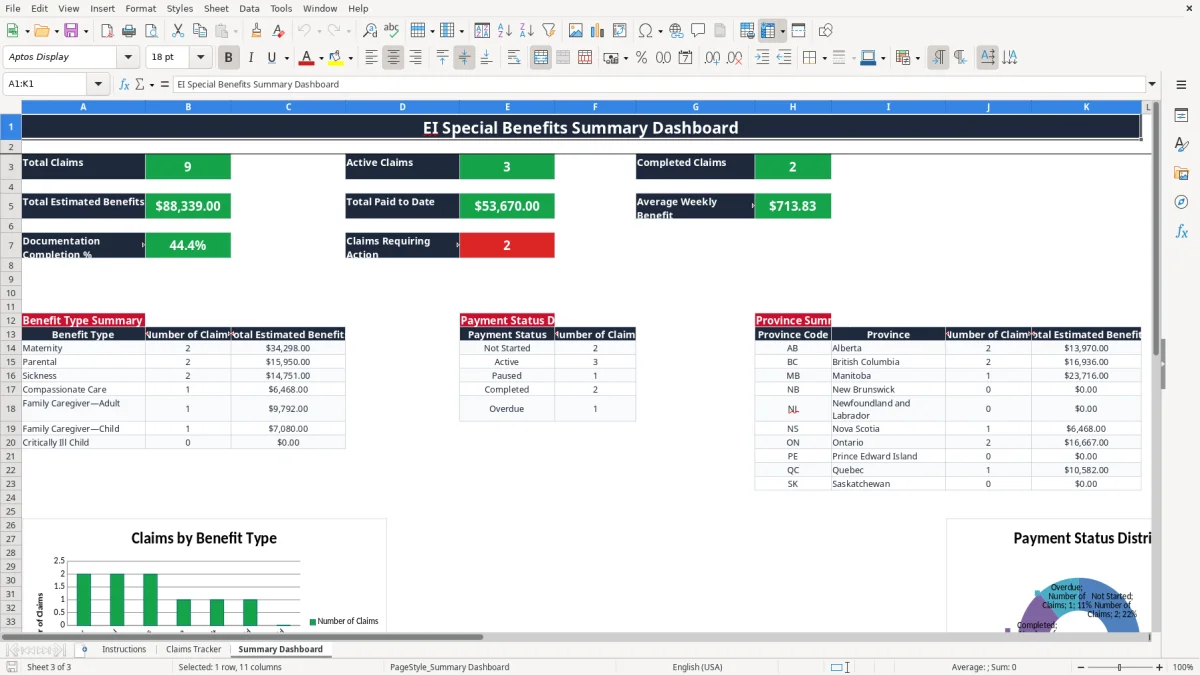
Image 3 shows the Summary Dashboard. It brings together total claims, active claims, completed claims, estimated benefits, paid amounts, average weekly benefit, documentation completion and action-required claims, followed by summaries by benefit type, payment status and province.
Employment Insurance (EI) special benefits are administered through Service Canada under the Employment Insurance Act and related regulations. The categories used in this workbook are maternity, parental, sickness, compassionate care, family caregiver—adult, family caregiver—child and critically ill child. The eligibility test, waiting period, number of payable weeks and maximum weekly amount are not determined by the spreadsheet, so confirm the applicable 2026 information directly with Service Canada.
An employer normally needs an accurate Record of Employment (ROE) when an interruption of earnings occurs. Payroll records should also support the employee's insurable earnings and dates. A medical certificate, birth or adoption documentation, caregiver documentation and claim correspondence may be relevant depending on the benefit type. The workbook's Documentation Status values are Complete, Pending and Missing; they are administrative labels, not proof that Service Canada has accepted a document.
For a practical check, suppose weekly insurable earnings are $1,480 and the user enters 55%. The workbook calculates $814.00 per week. If 13 weeks are approved, it calculates $10,582.00 in total estimated benefits. Do not present that amount as an entitlement: the actual rate, maximum, waiting-period treatment and approved weeks must come from the official claim decision.
EI is a federal program, while employment standards such as protected leave, notice and job protection are generally governed by the applicable province or territory. In Ontario, for example, the Employment Standards Act, 2000 addresses employment standards; it does not decide the claimant's EI approval. Quebec has its own maternity, parental and paternity benefit administration through the Quebec Parental Insurance Plan, so a Quebec employee's leave planning should not be treated as an ordinary federal EI calculation.
Retain source records according to your legal, payroll and privacy obligations. Limit the workbook to information needed for administration, restrict access, and avoid storing unnecessary medical details. The file includes names, locations and claim information, so apply your organization's privacy practices rather than emailing an unprotected copy broadly.
The most expensive errors usually happen before anyone opens the dashboard. A payroll clerk may mark an ROE as received because it was prepared, even though the submission or correction is still outstanding. Another common problem is entering a benefit rate as 55 instead of 55%; the formula then multiplies $1,250 by 55 and displays $68,750 rather than the intended $687.50. Check the number format and the underlying value before relying on an estimate.
A claim can appear active while its Next Action Date is blank. The Action Flag formula treats a non-completed claim with no action date as Action Required, which is useful only if Payment Status is kept current. If an employee has finished receiving benefits but the row still says Active, the dashboard overstates the active workload and may cause a duplicate follow-up.
Consider three claims with estimated benefits of $6,875.00, $10,582.00 and $17,920.00. If one $10,582.00 claim is entered under the wrong province, the national total remains unchanged but the provincial summary is wrong; that can distort management reporting and send a reviewer to the wrong administrator. If five paid weeks are entered as six on the first claim, paid-to-date increases by $687.50 and outstanding benefits fall by the same amount.
The workbook does not connect to Service Canada, verify an ROE, interpret a medical certificate or confirm a claimant's insurable hours. It also does not contain charts of official approval decisions or a payment import. Treating the calculated total as guaranteed cash can create a poor leave-cost forecast, especially where the official decision changes the rate or weeks approved.
There is also a privacy cost. A workbook containing claimant names, cities, employers and leave-related notes can become an unnecessary disclosure if copied into a shared drive without access controls. Keep Notes factual, exclude medical diagnoses, and record only the documents and actions needed to administer the claim.
The workbook works best when one person owns the update and reviews it at a fixed time. A practical choice is Friday afternoon, after the payroll run: reconcile new leave information, update ROE Received?, enter payments and set the next action date. With 12 claims, spending two minutes on each row takes about 24 minutes; that is far less disruptive than reconstructing a month of missed follow-ups.
Use the existing drop-down lists consistently: choose Active rather than creating your own variation such as In progress, and choose Complete, Pending or Missing for documents. The Claims Tracker has 100 prepared claim rows, so assign a stable Claim ID such as EI-2026-001 and do not reuse it after a claim is closed.
This file is a good fit for a small administration team with a defined owner and fewer than 100 tracked rows. Move to a controlled case-management or payroll system when several users need simultaneous editing, you require an audit trail, documents must be attached, or the organization is handling hundreds of claims. For example, 80 active claims with three administrators can create conflicting updates even though the workbook has room for 100 rows.
Keep a dated backup before major changes and protect access to the file. The Summary Dashboard contains formulas and charts but no automatic connection to official records, so the routine still depends on timely human updates and confirmation from Service Canada.