
Bi-Weekly Payroll Excel Template – Free (2026)
13
Free download
Track restaurant tips, staff hours, allocation points and payouts across Canada with reconciliation checks and dashboard summaries.
Download template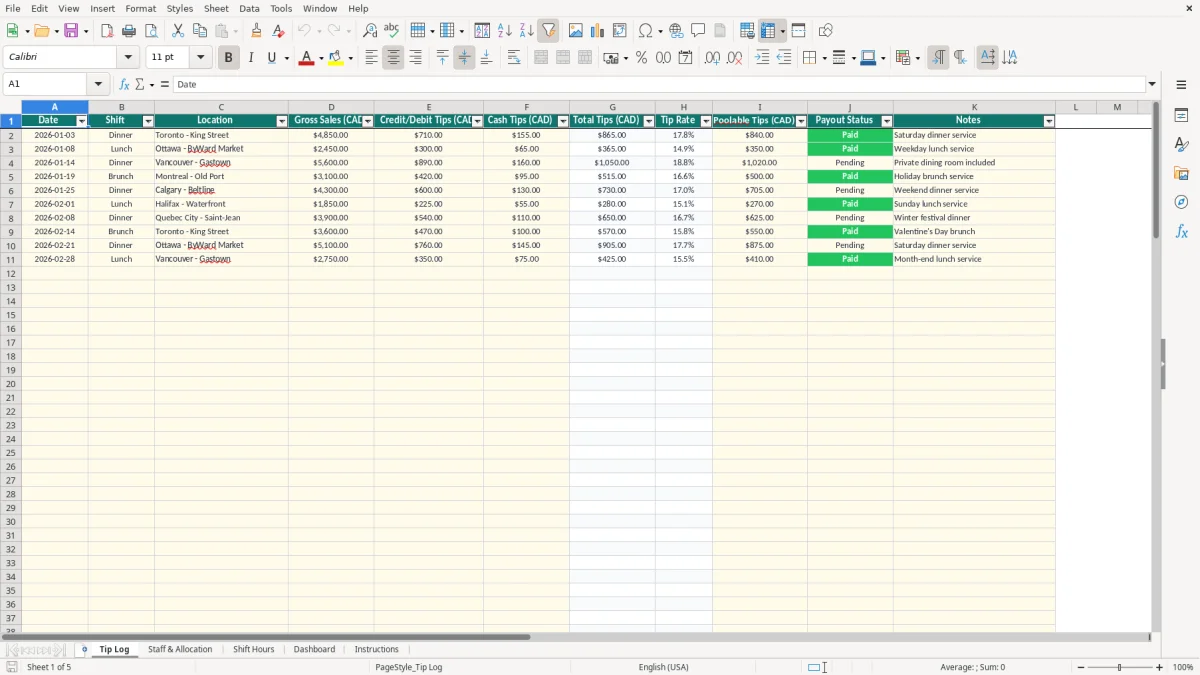
This restaurant tip pooling Excel template records service tips, staff hours and allocation points, then calculates each employee's share. It contains Tip Log, Staff & Allocation, Shift Hours, Dashboard and Instructions sheets for Canadian restaurants managing pooled tips across shifts or locations.
Enter each service's sales and tips in Tip Log, maintain employee weights in Staff & Allocation, and record hours in Shift Hours. The workbook calculates total tips, weighted units, pool shares and allocated tips, while the Dashboard checks whether the allocation balances to the pool.
A restaurant manager, bookkeeper or owner usually opens this file at the end of each service, before a payroll run or when staff ask how a pooled amount was divided. It is useful for a single dining room, a group with several locations, or a seasonal operation that needs the same allocation method during a busy period.
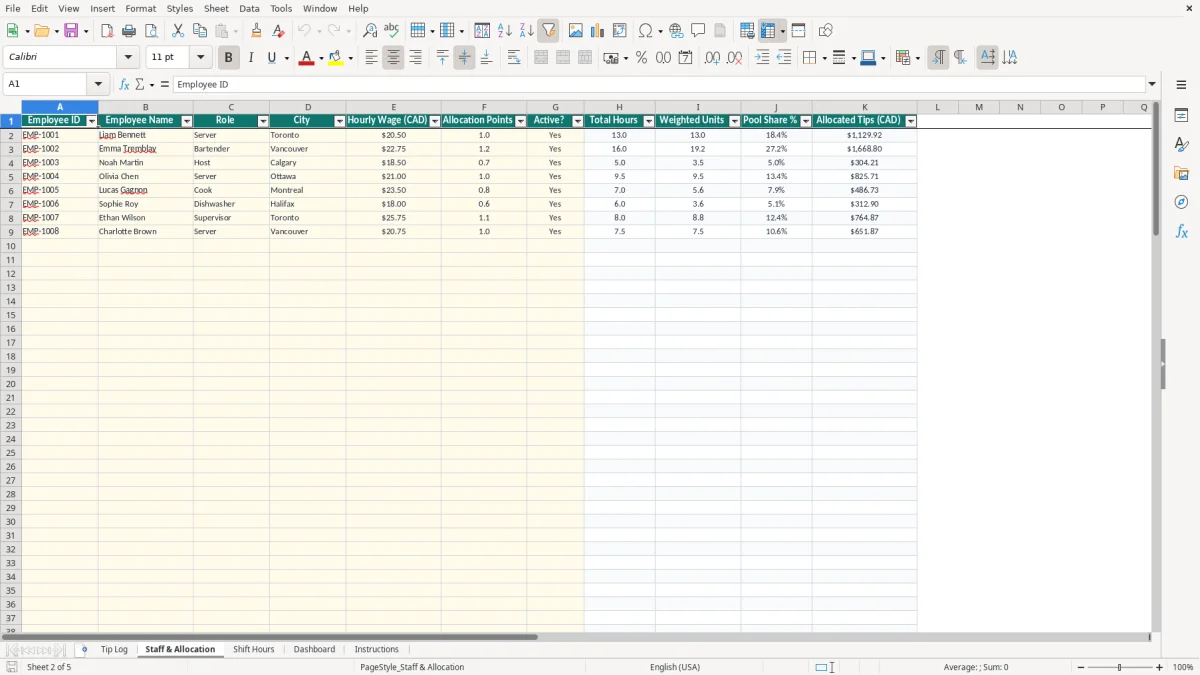
The workbook is built for a team that includes servers, bartenders, hosts, cooks, dishwashers and supervisors. In the sample data, Liam Bennett has 1 allocation point and Emma Tremblay has 1.2. If Liam works 8 hours, his weighted units are 8; if Emma works 7.5 hours, hers are 9.0. Those units, not hours alone, determine the relative pool share.
That approach gives you a practical way to recognize different roles without typing a manual dollar amount for every person. The decision remains yours: allocation points are a policy choice and should match the written tip-pooling arrangement used at the workplace.
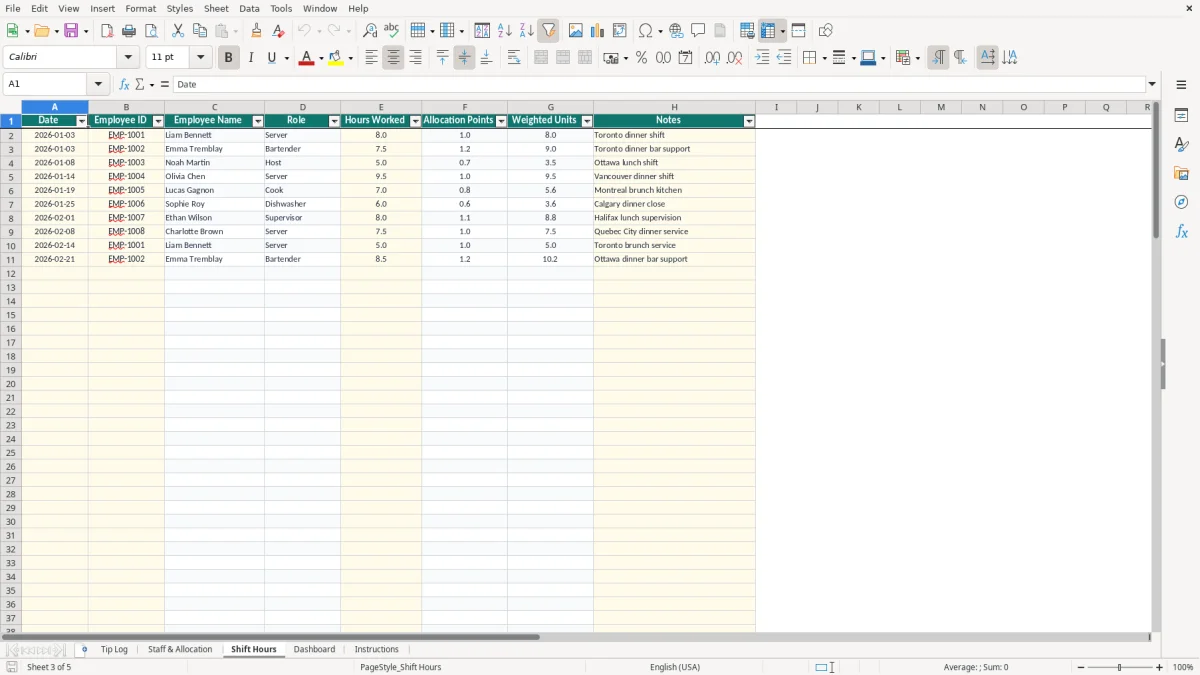
Image 1 shows Tip Log with service date, shift, location, sales, two tip channels, poolable tips and payout status. Image 2 shows Staff & Allocation, where the employee list and points are maintained. Image 3 shows Shift Hours, where a selected Employee ID brings back the name, role and points.
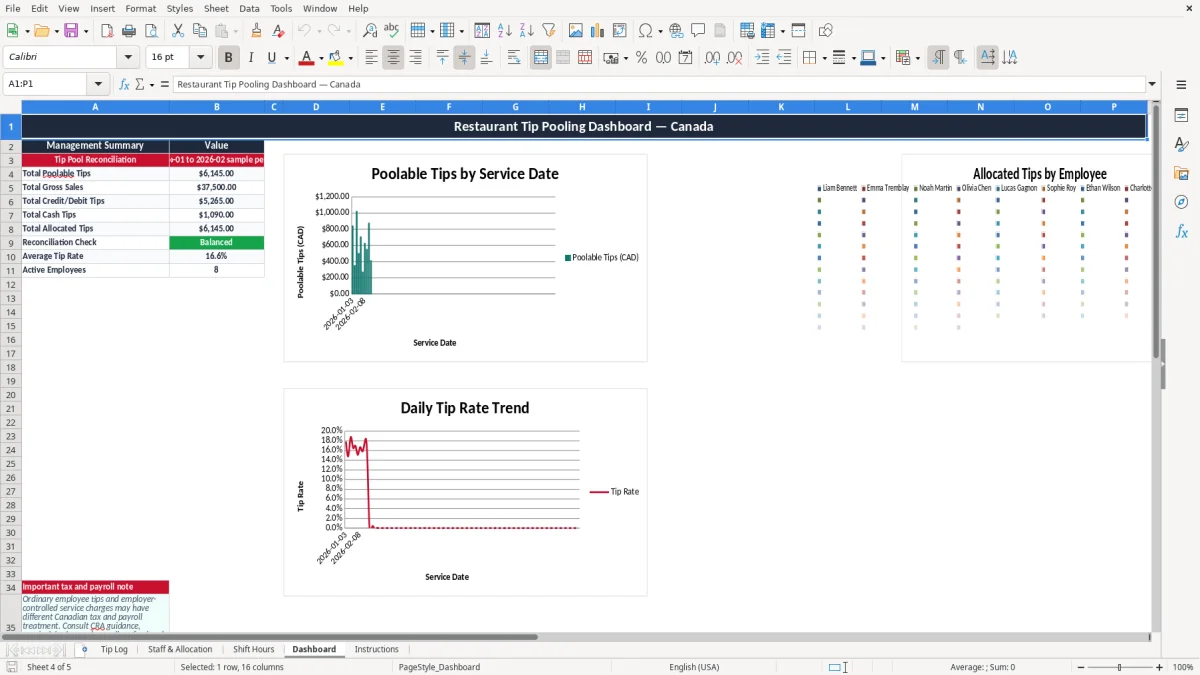
Image 4 shows the Dashboard with the management summary and charts. Image 5 shows Instructions, including the distinction between entry cells and calculated cells. A sample row records $4,850 of sales, $710 of electronic tips and $155 of cash tips; the calculated total is $865, while the entered poolable amount is $840.
Tip pooling is not just a division exercise. In Canada, you must distinguish ordinary employee tips from employer-controlled service charges because their payroll treatment can differ. The workbook's Dashboard includes an explicit tax and payroll note; use it as a review prompt, not as a legal conclusion.
Employee tips generally need to be considered when preparing payroll records and determining the correct treatment for CPP, EI and income tax. Employer-controlled amounts may be treated differently from direct tips. Before applying the file to payroll, document who controls the money, who receives it and when it is paid.
If the restaurant is registered for GST or HST, keep sales and tax records separate from the tip allocation. GST is 5%; HST is 13% in Ontario and 15% in New Brunswick, Nova Scotia, Prince Edward Island, and Newfoundland and Labrador. Mandatory registration generally begins when worldwide taxable revenue exceeds $30,000 over four consecutive quarters. Tips are not automatically treated like taxable food sales, so do not add tax to the pool merely because a receipt contains both amounts.
For a restaurant with four employees and $2,400 of poolable tips in a pay period, the allocation may be $900, $720, $480 and $300. Those amounts should agree with the approved policy, payroll records and payment evidence. The workbook's Balanced result only proves that the entered pool reconciles; it does not decide whether the policy complies with provincial employment standards.
Retain the Tip Log, Shift Hours, payout evidence and policy documentation for the CRA's six-year record-retention period. Reconcile the file to payroll before issuing T4 slips, and ensure the business's BN and applicable payroll account records are consistent. Provincial rules, including Ontario employment standards, can affect how wages and deductions are handled.
The most expensive errors usually happen between the point-of-sale report and the payout sheet. A manager copies $865 of total tips into the pool when the policy permits only $840, or enters a cash amount twice after a server has already received it. The staff may notice the difference immediately, but the bookkeeping trail becomes difficult to repair.
Tip Log deliberately has separate columns for Total Tips and Poolable Tips. In the sample service, $710 plus $155 equals $865, but the poolable amount is $840. If you overwrite the distinction, a $25 difference appears in the Dashboard reconciliation. With 20 similar shifts, that small error becomes $500.
A second failure is recording a flat split when people worked different shifts. Suppose three employees produce weighted units of 8, 9 and 4. Their shares are 38.1%, 42.9% and 19.0%, not one-third each. An incorrect Employee ID in Shift Hours can also bring back the wrong name and allocation points through VLOOKUP, sending the payout to the wrong person.
Another common problem is leaving a former employee marked Yes. The Dashboard then counts that person as active, while the Staff & Allocation formulas continue to include their hours and weighted units if entries remain. Marking Active? as No is useful for administration, but you should also review old shift rows and the applicable policy before closing the period.
Finally, do not treat a Balanced result as proof of correct payroll. The formula compares totals rounded to two decimals; it cannot identify an unapproved allocation point, a missing cash deposit, an incorrect date or a tip amount that should not have entered the pool.
The workbook works best when you update it at a fixed time rather than reconstructing a month of services from memory. For a restaurant that runs six days a week, set a 15-minute close after the final service: enter the POS totals, verify cash, add the poolable amount and record the payout status.
Keep the allocation policy beside the workbook. If a bartender has 1.2 points and a host has 0.7, record those values once in Staff & Allocation instead of changing them during every payout. That preserves a stable calculation: 7.5 hours at 1.2 points produces 9 weighted units.
This file has 100 prepared rows for tips, staff and shift hours. That is suitable for a small operation or a controlled trial, but an online booking or restaurant group producing 300 service records a month will quickly need a payroll or point-of-sale integration. Move to a dedicated system when multiple managers edit the file, approvals need an audit trail, or historical corrections are frequent.
Keep a dated copy at each completed payroll close. A simple naming pattern such as RestaurantTips_2026-02-28.xlsx makes it easier to retrieve the version supporting a payout without changing the formulas or sample structure.