
Provincial Tax Excel Template – Free (2026)
6
Free download
Canadian GIFI balance sheet template with codes, amounts, variance, notes, and CRA filing reference.
Download template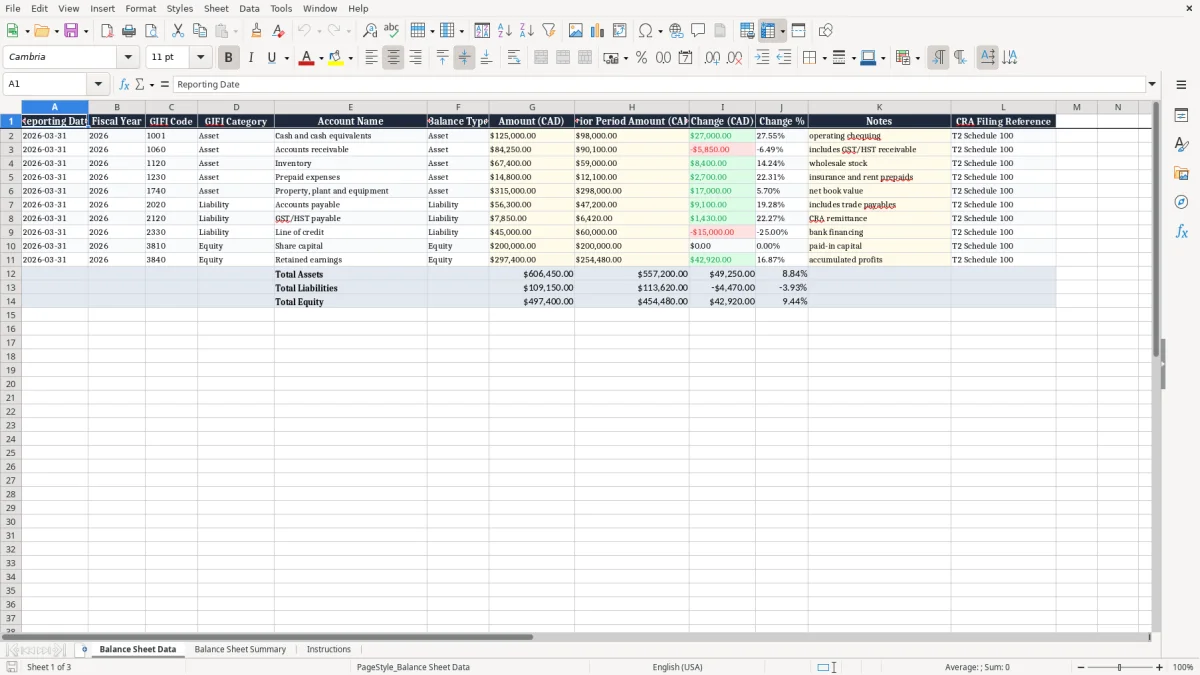
This GIFI balance sheet Excel spreadsheet helps you map balance sheet accounts to the right GIFI codes and compare current-year and prior-period amounts in one place. It includes Balance Sheet Data, Balance Sheet Summary, and Instructions.
You use it when preparing year-end working papers, checking a CRA filing, or reconciling a corporation’s assets, liabilities, and equity before a T2 return. The template is built for Canadian records, with reporting date, fiscal year, change, and filing reference fields.
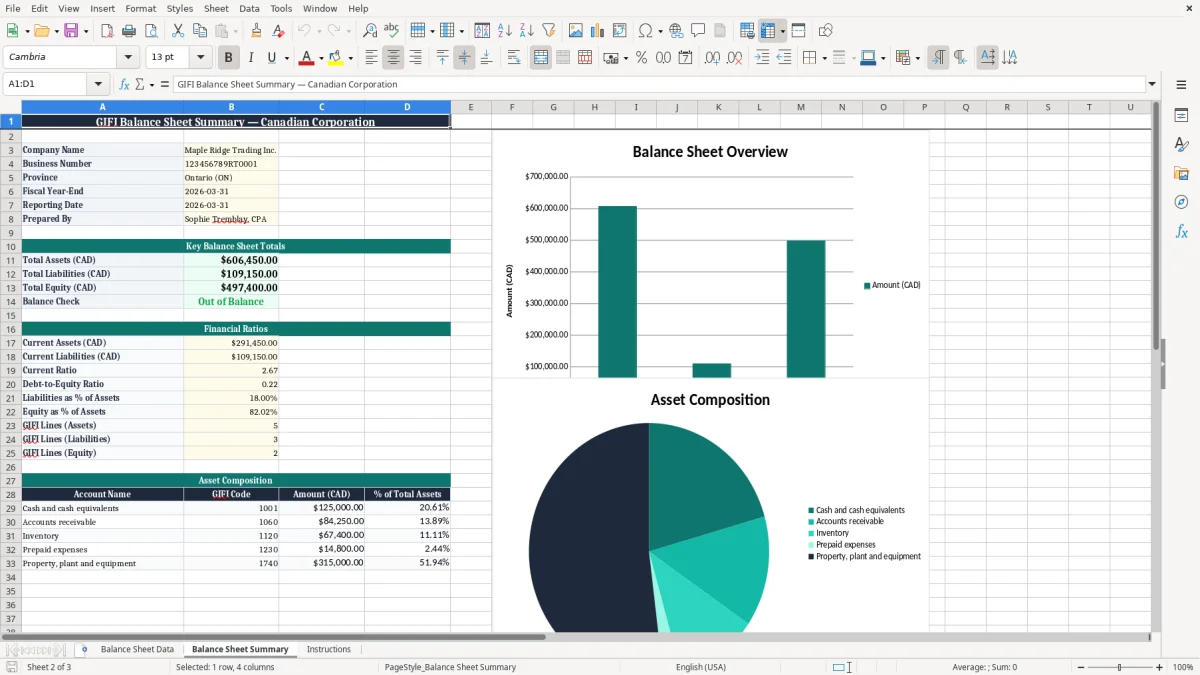
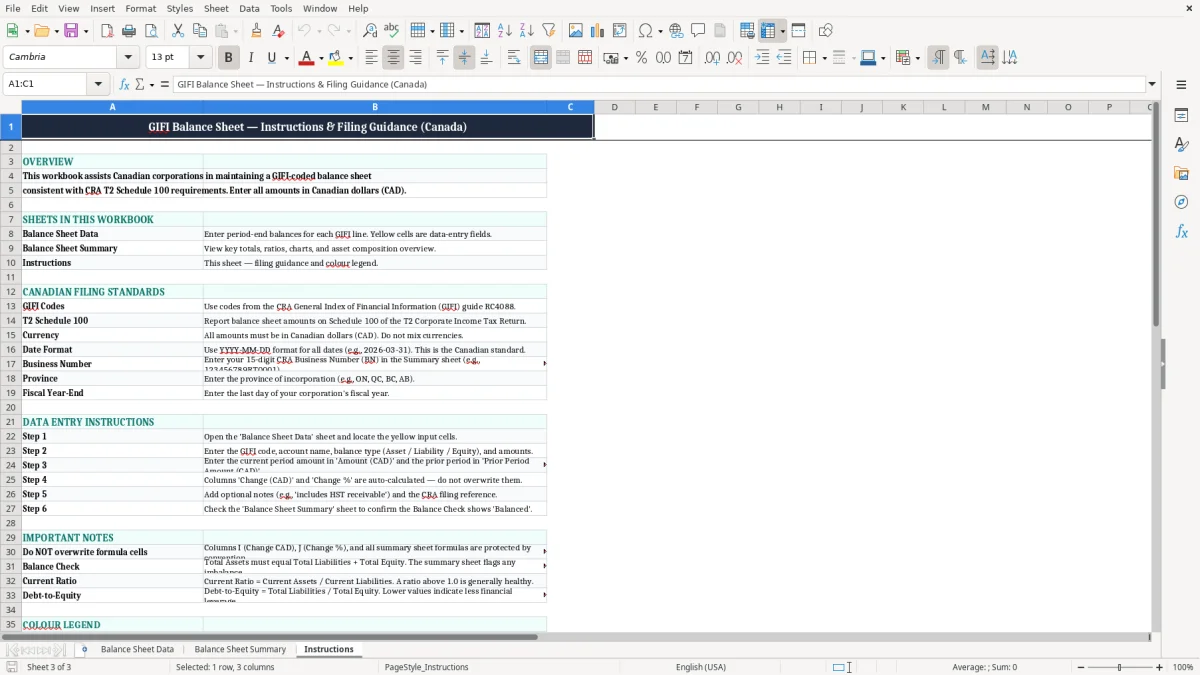
Image 1 shows the data-entry sheet with 12 columns and space for notes. Image 2 shows the summary view, and image 3 gives the instructions you need to keep the file consistent.
This is the file you reach for when you are building a corporate balance sheet for a T2 file, cleaning up year-end working papers, or checking whether every account has the right GIFI code. A bookkeeper in an incorporated plumbing company might use it after month-end, while a controller at an online retailer might use it before a March 31 fiscal year-end.
The usual user is the person who has to make the numbers line up before they go to the accountant. If a company has 40 bank and liability accounts and 15 of them changed in the month, this sheet lets you compare the current amount against the prior period without hunting through a general ledger export.
Say your balance sheet shows cash at $81,400.00 this quarter and $64,900.00 last quarter, while accounts payable moved from $52,300.00 to $71,800.00. Those two movements tell you where to ask questions before year-end, especially if the business also has inventory, shareholder loans, or deferred tax balances.
The summary sheet is the fast review page. You use it when a treasurer wants a clean snapshot for a board meeting, or when you want to check that the numbers on the workbook match the copy going into the tax file.
The CRA uses GIFI to standardize financial statement information on corporate returns, so the account mapping matters. For a corporation filing a T2, the balance sheet should be consistent with the tax return and the supporting records, not just internally neat.
The CRA’s six-year record-retention rule means you need to keep the working papers, source documents, and the bridge between account names and GIFI codes. If you file a 2026 return, you should still be able to explain the figures years later without guessing which account got grouped where.
A $240,000 loan from a shareholder is not the same thing as retained earnings, and a $37,500 prepaid expense is not the same thing as an asset already used up. When you force those balances into the right GIFI category, the tax file and the financial statements line up better and the review takes less time.
Use the fiscal year field, the reporting date, and the CRA filing reference together. That gives you a traceable path from the balance sheet line to the supporting schedule, which is exactly what saves time during review or audit.
That same traceable path also makes it easier to reconcile sales tax, and a quick HST calculation sheet keeps the reporting date tied to the amount filed.
The most common problem is a lazy mapping: one generic account name is left to cover several very different balances. That is how a $96,000 bank overdraft ends up parked with cash, or how a shareholder loan gets mixed into equity and throws off the whole statement.
If you misclassify $58,000 of current liabilities as long-term debt, you can misread working capital and make the business look healthier than it is. At year-end, that leads to more back-and-forth with the accountant and more time spent reworking the income statement and balance sheet package.
The Change (CAD) and Change % columns are there for a reason. If receivables jump from $44,200.00 to $67,900.00 in one period, that 53.6% increase deserves an explanation before the file moves on.
A blank notes column forces you to remember details later, and that is where mistakes survive. A simple note such as “reclass from prepaid rent” or “year-end accrual reversed next period” can save an hour of digging when someone asks why the number moved.
Use the workbook at the same point in your closing cycle every time. Most small businesses get the best results when they update it right after bank reconciliation and before the accountant starts the T2 review.
If you are tracking hundreds of accounts, multiple entities, or repeated consolidation entries, the workbook starts to get heavy. At that point, you usually move to a proper accounting system or a controlled closing package, because the risk of broken links and stale balances becomes too high.