
Provincial Tax Excel Template – Free (2026)
6
Free download
Track CCA, half-year rule, UCC and GST/HST on business assets in Canada with three sheets for 2026.
Download template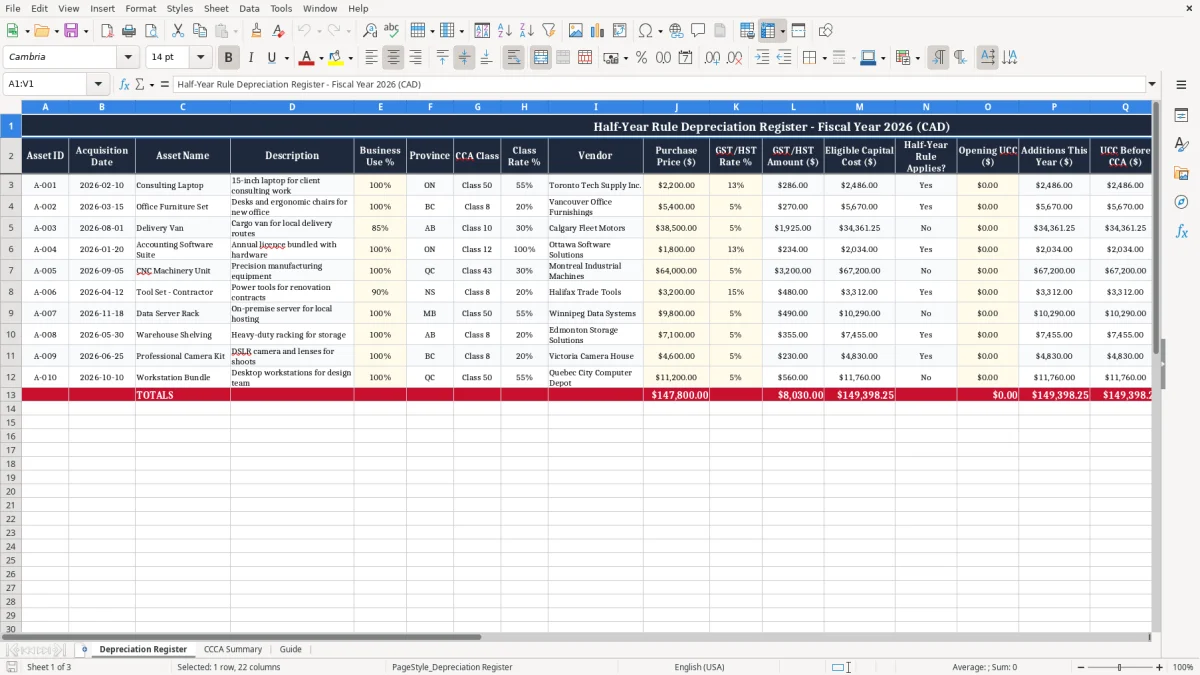
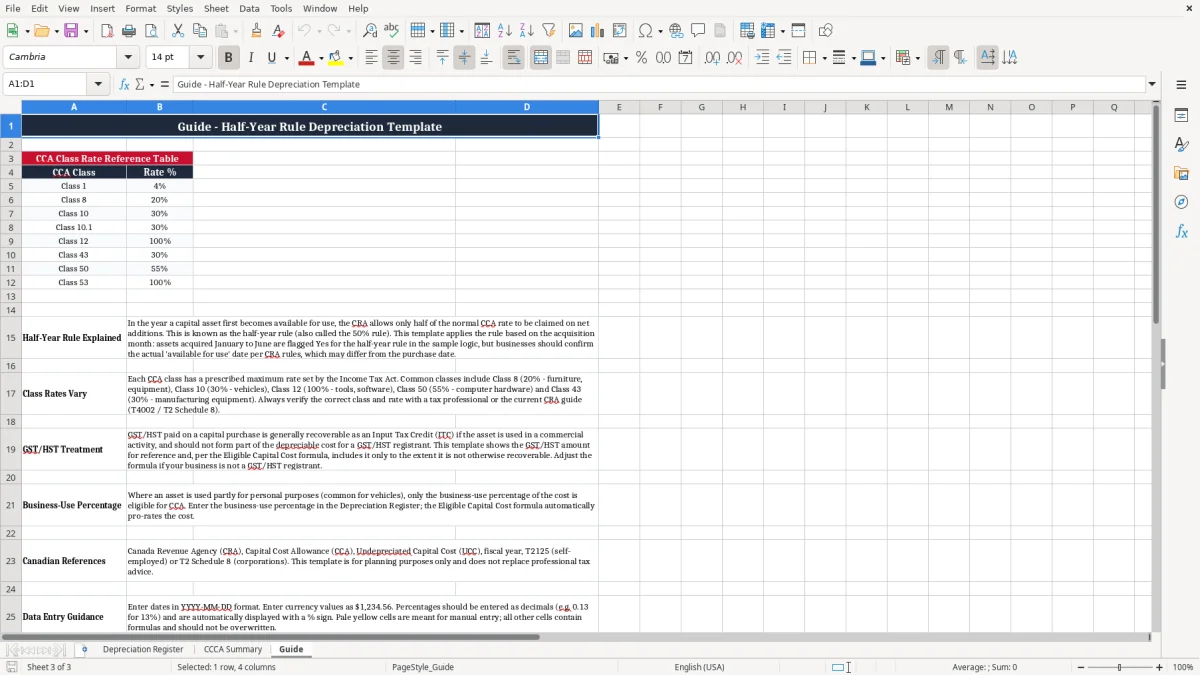
This Excel template helps you track capital assets under the Canadian half-year rule, calculate CCA, and carry forward UCC for year-end tax work in 2026. It includes a Depreciation Register, a CCCA Summary, and a Guide sheet.
Use it when you buy laptops, tools, vehicles, or office equipment and need a clean record for your books and your return. The register shows purchase details, business-use percentage, GST/HST, class rate, and claimed depreciation in one place.
If you are doing your own books, preparing a T2125, or checking the numbers before year-end, this gives you a simple way to keep the asset schedule consistent. It is built for Canadian records, not a generic fixed-asset list.
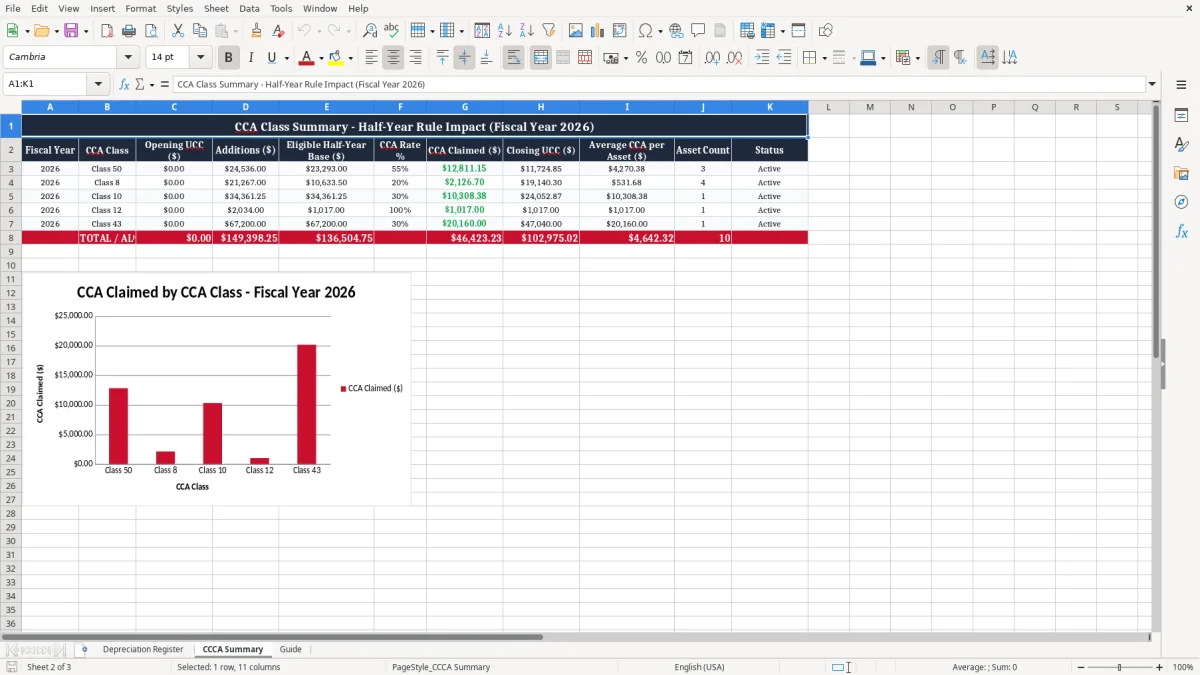
You use this workbook when you buy capital assets and need to track them for bookkeeping and tax. A sole proprietor buying a $2,200 laptop in February, an incorporated contractor replacing 4 jobsite tablets, or a treasurer recording a $7,500 sound system before year-end all need the same thing: a clean CCA schedule and a running UCC balance.
The pressure point is usually year-end, when you are preparing a T2125 or corporate working papers and need to know what can be claimed. If you bought 3 office chairs in November and one printer in December, the half-year rule limits the first-year base, so a simple list in Excel is much safer than trying to reconstruct the purchase dates later.
In a small business with 18 laptops, 2 vans, and a copier lease buyout, you do not want depreciation buried in invoices or scattered across bank feeds. The register keeps each asset on one line, which is exactly what you need when you are comparing book cost to tax cost at year-end.
The year-end comparison is easier when those book amounts are carried into a capital cost allowance schedule for the tax-side calculation.
The CRA expects you to keep enough detail to support each asset claim: acquisition date, description, cost, business use, and the class you used. The record-retention rule is six years, so if you claim depreciation on a machine in 2026, keep the supporting file through at least the end of 2032.
Under the half-year rule, you normally claim CCA only on half of the net additions in the first year. If you buy a $10,000 class 10 asset, only $5,000 enters the first-year CCA base before the class rate is applied, which is why the first claim is always smaller than the long-run annual amount.
For a sole proprietorship, this information supports your T2125; for a corporation, it feeds the fixed-asset schedule behind the T2. If you recover GST/HST as an input tax credit, keep the GST/HST amount separate from the asset cost, because the tax you recover should not stay in the capitalized amount.
The most common error is claiming full CCA on a new asset without applying the half-year rule. On a $5,000 purchase in a 20% class, that mistake can overstate the first-year deduction by hundreds of dollars, which then distorts both your tax return and your closing UCC.
Another problem is mixing personal and business use. If you claim a $3,600 phone as 100% business when only 70% is used for work, the deduction is inflated by $1,080 before you even get to depreciation.
People also forget to separate GST/HST or misplace an asset in the wrong class. A wrong class rate can change the claim for several years, and a missing invoice can leave you with no support if the CRA asks for documents during a review.
A missing invoice can also leave your input tax claim unsupported, so the next step is lining up the combined GST return with your expense records before you file.
The best way to keep this file alive is to update it at the same time you enter bills or finish month-end. If you buy equipment in March and record it that week, you will not waste time hunting for serial numbers in December.
If you have dozens of assets, several classes, and monthly disposals, a spreadsheet can still work. Once you are managing a larger fleet, repeated dispositions, or multiple legal entities, you may want fixed-asset software so the audit trail is easier to control.