
Canadian Condo Reserve Fund Excel Template
17
Free download
Plan a Canadian hockey tournament budget in Excel. Track CAD income, expenses, GST/HST, payments, and budget variances.
Download template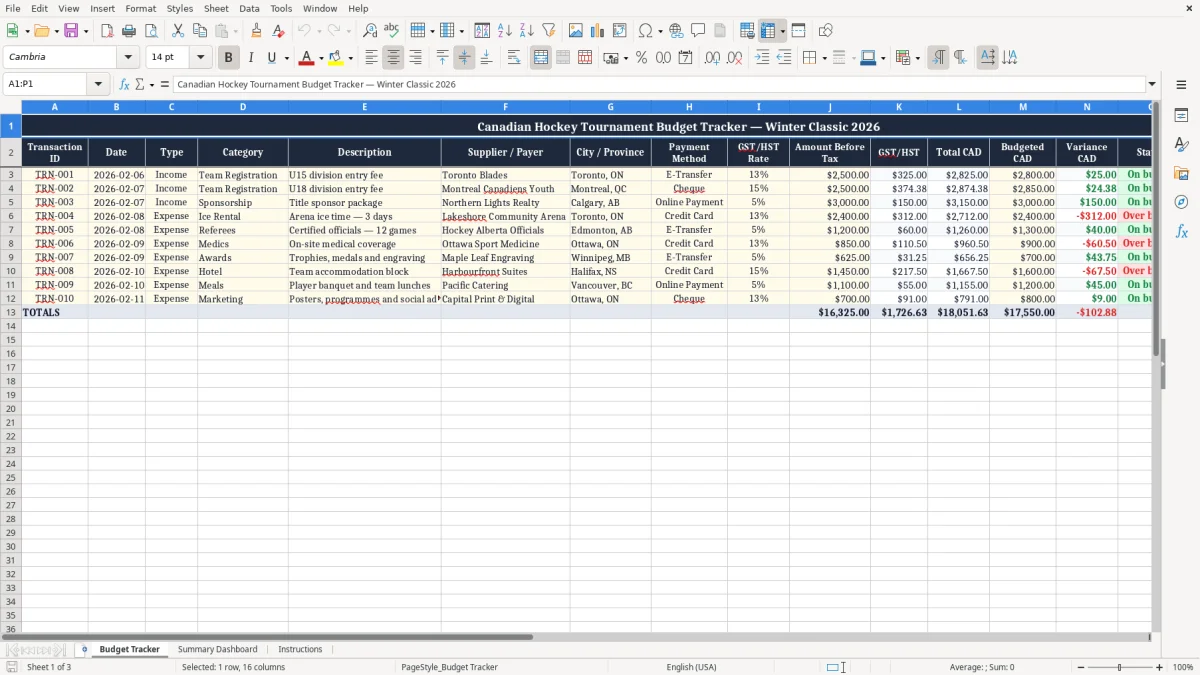
Plan and track your hockey tournament finances in one practical Excel spreadsheet. This Canadian template helps tournament committees, hockey associations, clubs, schools, and event organizers record team registration fees, sponsorships, arena costs, officials, accommodations, food, merchandise, transportation, and other event transactions.
Amounts are organized in Canadian dollars, with fields for GST/HST rates, tax amounts, budgeted costs, actual totals, variances, payment methods, suppliers, payers, cities, provinces, statuses, and notes. Use the workbook before, during, and after your event to keep financial information consistent, support committee reviews, and prepare a clearer tournament summary.
Start by replacing the sample tournament title, dates, and example transactions with details for your own event. Enter one row for each income or expense transaction, then assign a unique transaction ID, date, type, category, description, supplier or payer, city or province, and payment method. Add the applicable GST/HST rate and tax amount when required, then enter the amount before tax, total CAD, and budgeted CAD values.
Use the variance column to compare actual and planned amounts, and update the status field as transactions are paid, deposited, reimbursed, approved, or reconciled. Add notes for receipt numbers, contracts, approvals, refund details, or follow-up tasks. Before the tournament, use the file to estimate expected revenue and planned costs.
During the event, update the workbook regularly and retain supporting receipts and invoices. After the event, review totals by transaction type, category, supplier, province, or payment method. Confirm tax treatment, reporting requirements, and accounting procedures with your tournament treasurer or a qualified Canadian professional.
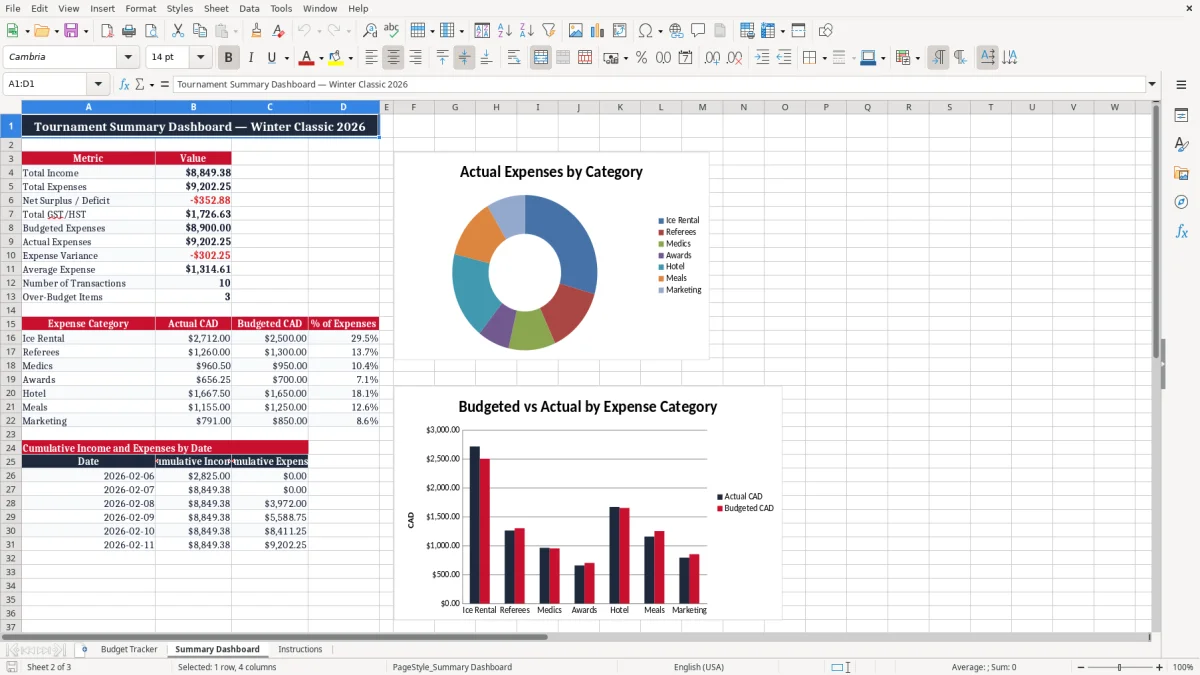
A hockey tournament budget needs to show both where money comes from and where it goes. Registration fees may be the main source of revenue, but a successful event can also depend on sponsorships, donations, merchandise sales, food services, raffle proceeds, or other community support.
On the expense side, organizers may need to plan for ice rentals, referees, timekeepers, arena staff, insurance, permits, awards, accommodation, transportation, food, equipment, supplies, marketing, and payment processing fees. This Excel spreadsheet provides a simple structure for recording each transaction instead of relying on separate notes, emails, or paper receipts.
Use the Type column to identify income or expenses and the Category column to group similar items. Descriptions can explain the purpose of a payment, such as a U15 registration fee, a weekend rink rental, or a trophy order.
The Supplier / Payer field identifies who provided the money or received it, while City / Province adds useful Canadian event context. Entering information consistently makes it easier to sort, filter, review, and summarize the tournament budget.
The workbook can be adapted for minor hockey tournaments, adult recreational events, school competitions, charity tournaments, regional showcases, and winter hockey festivals. It is also useful when several volunteers share financial responsibilities because each person can follow the same entry format. Establish a process for assigning transaction IDs and saving receipts so the file remains reliable as the event develops.
A clear record helps tournament directors understand the financial position before approving new costs and gives treasurers a stronger starting point for final reporting. Review the budget at regular committee meetings so emerging risks, missing deposits, and changing assumptions are identified early rather than after the tournament ends.
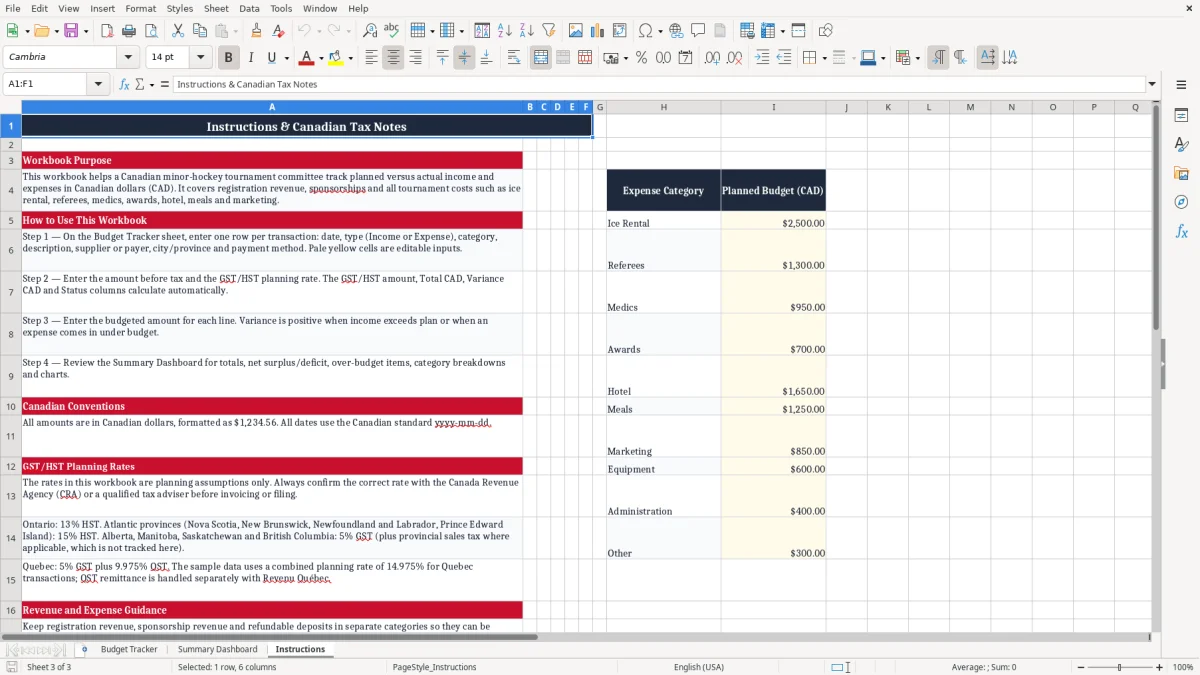
Canadian hockey tournaments may involve transactions with different tax treatments, rates, and documentation requirements. The spreadsheet includes separate columns for GST/HST Rate, GST/HST, Amount Before Tax, and Total CAD so organizers can capture the information shown on invoices, receipts, registration records, or payment confirmations.
This structure helps prevent tax details from being mixed into general expense notes. Enter the rate applicable to the individual transaction and retain the supporting document with your tournament records.
Provincial circumstances and organizational status can affect how GST/HST applies to registration fees, sponsorships, donations, merchandise, food, rentals, and services. For that reason, the workbook should be used as a planning and record-keeping tool rather than as a substitute for professional tax advice.
Confirm uncertain treatment with your treasurer, accountant, or qualified Canadian tax advisor. Tracking values in Canadian dollars also makes it easier to compare expected revenue and expenses when suppliers, teams, or sponsors are located in different provinces.
Use the Budgeted CAD column to enter the approved or estimated amount, then compare it with the Total CAD value actually recorded. The Variance CAD field can highlight overspending, savings, or differences that need explanation. Regular reviews are especially helpful for large costs such as arena bookings, accommodation blocks, officials, transportation, and catering.
If a transaction is pending, refunded, reimbursed, or only partly paid, describe the situation in Status or Notes rather than deleting the original record. Keeping the original transaction history supports reconciliation and gives the committee a clearer explanation of how the final tournament result was reached. Store invoices, contracts, deposit records, and reimbursement forms with the workbook for a more complete financial file.
Tournament finances can change quickly as teams register, withdrawals occur, invoices arrive, and last-minute event needs appear. A structured tracker helps organizers respond to those changes without losing the connection between a transaction and its budget category.
Begin with expected team registration income and other planned revenue, then add approved spending estimates for the main tournament activities. As payments and deposits occur, update the relevant rows instead of creating informal lists in different locations.
Payment Method can identify e-transfer, cheque, credit card, cash, invoice, or another method used by the organization. Status can show whether a transaction is pending, paid, deposited, refunded, reimbursed, approved, or reconciled.
Notes can record a receipt number, contact name, approval reference, split payment, early-bird rate, or required follow-up. These fields are valuable when a committee has multiple volunteers handling registration, purchasing, sponsorships, and arena coordination.
Suggested income categories include Team Registration, Sponsorship, Donations, Merchandise Sales, 50/50 or Raffle Revenue, Food and Beverage Revenue, and Other Income. Suggested expense categories include Ice Rental, Referees and Officials, Timekeepers and Scorekeepers, Arena Staff, Insurance and Permits, Accommodation, Transportation, Food and Hospitality, Awards and Trophies, Tournament Apparel, Equipment and Supplies, Marketing and Advertising, Payment Processing Fees, Refunds, and Other Expenses. Categories can be renamed or expanded to match the event’s accounting practices.
At review meetings, sort or filter by Type to separate revenue from spending, or by Category to investigate a particular area. Comparing budgeted and actual amounts can reveal whether registration income is sufficient, whether a supplier invoice is missing, or whether a planned cost needs approval. This consistent workflow supports better decisions before, during, and after the tournament.
That same comparison process also feeds the GST/HST remittance record when registration fees and other taxable items need to be summarized for reporting.
This hockey tournament budget template is suitable for organizations of different sizes and event formats across Canada. A small community tournament can use it to track a few teams, rink charges, officials, awards, and volunteer reimbursements.
A larger regional event can use the same structure for multiple divisions, hotel arrangements, sponsors, food vendors, transportation providers, and merchandise sales. Schools, minor hockey associations, private tournament organizers, charitable groups, and adult recreational leagues can customize the categories and descriptions without changing the overall workflow.
Before the event, the committee can enter estimated registration numbers, sponsorship expectations, planned ice time, and anticipated operating costs. During the event, a treasurer or assigned volunteer can update transactions as deposits, invoices, purchases, and refunds are processed.
After the final game, the file can support a review of actual income, outstanding payments, supplier balances, and the remaining surplus or shortfall. The workbook is also helpful when preparing information for a board meeting, sponsor update, grant file, or internal financial report.
To improve accuracy, agree on who enters transactions, who approves expenses, and who checks receipts. Use one transaction ID per row and avoid overwriting historical values without recording the reason in Notes.
Back up the file regularly and restrict editing access when appropriate. Keep documents such as rink contracts, official assignments, supplier invoices, team payment confirmations, deposit slips, and reimbursement forms with the spreadsheet.
The template does not replace accounting software, formal books, or professional advice, but it can provide a practical central record for event planning. By maintaining current information in CAD and reviewing GST/HST details carefully, organizers can make more informed decisions and present a clearer financial picture to the people responsible for the tournament. Consistent records also make it easier to explain final results to volunteers, directors, sponsors, and participants after the event concludes.
That same clear recordkeeping carries over to a grant tracking sheet when sponsors or directors want a simple audit trail for funds and final results.