
Condo Board Operating Budget Excel Template Canada
9
Free download
Track rental income, expenses, GST/HST, and CCA for T776 reporting with a summary sheet and instructions.
Download template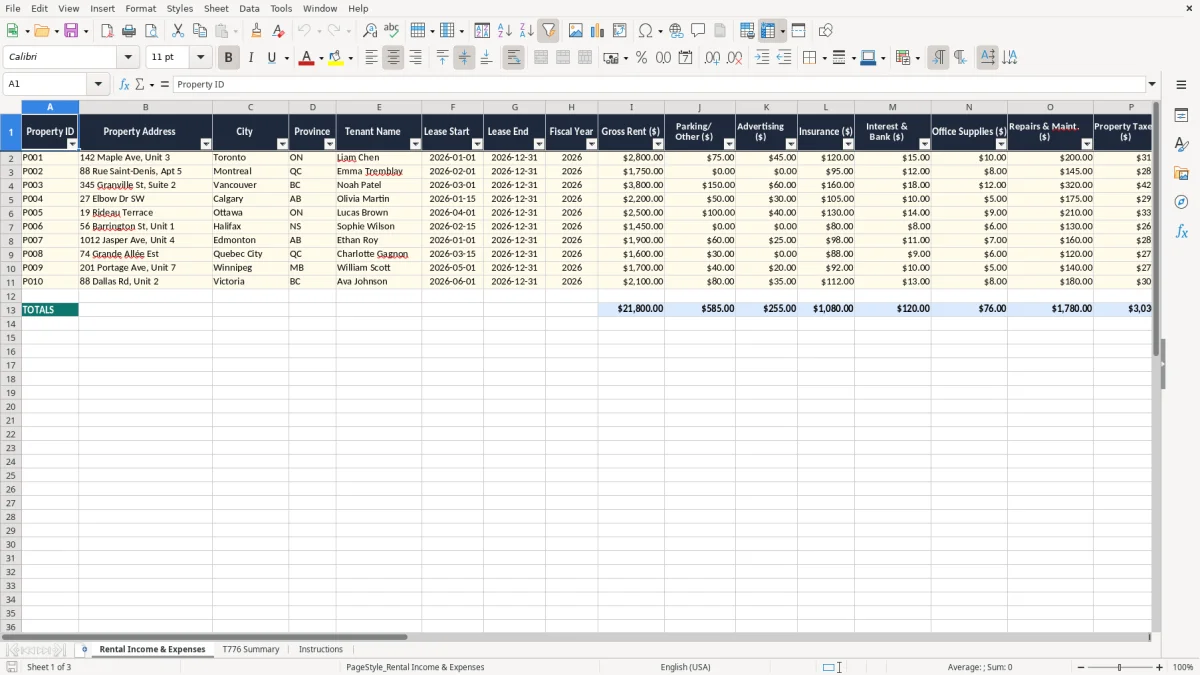
This Excel template is a rental income statement worksheet for Canadian landlords who need to total rent, expenses, GST/HST, and CCA for T776 reporting. It includes a detailed entry sheet, a summary sheet, and instructions so you can move from property-level records to the numbers you need at tax time.
The workbook is set up for one or more properties, with columns for tenant details, lease dates, gross rent, parking and other income, and the main expense categories. You enter the figures once, then use the T776 Summary sheet to pull the totals together for your tax records and year-end review.
If you manage a duplex, a basement suite, or several doors in different cities, this gives you one place to keep the income statement clean and traceable. It is also useful when you want to separate mortgage interest from capital cost allowance and see the net rental income before you file.
This template is for you if you own a rental suite, a condo, a duplex, or several small properties and want a cleaner way to prepare your T776 numbers. A sole proprietor with one basement apartment may only have 12 rows of data, while a small landlord with 4 doors can use the same layout to keep each property separate.
The Rental Income & Expenses sheet (image 1) is built for the real tax season workflow: lease start and end dates, tenant name, rent, parking, and the main expense buckets that end up on your return. If you collect $2,400 a month from a unit and spend $7,200 a year on repairs and utilities, the sheet helps you see the net result before you sit down with the return.
You use it at month-end, at fiscal year-end, or when you are pulling records together for an accountant or bookkeeper. A landlord with 3 properties and $68,400 in annual rent can check each row against bank deposits and receipts instead of hunting through a pile of statements.
Keeping property ID, address, and tenant details on the same line stops the common problem of mixing one building’s repairs with another building’s interest. If you have a city townhouse and a rural cottage, the sheet gives you a clean split so your income statement is easier to trust.
The CRA expects you to keep source documents for rental income and expenses for six years, so the workbook is designed to support that record trail. That means rent receipts, insurance invoices, property tax bills, utility statements, and mortgage interest statements should match the amounts you enter here.
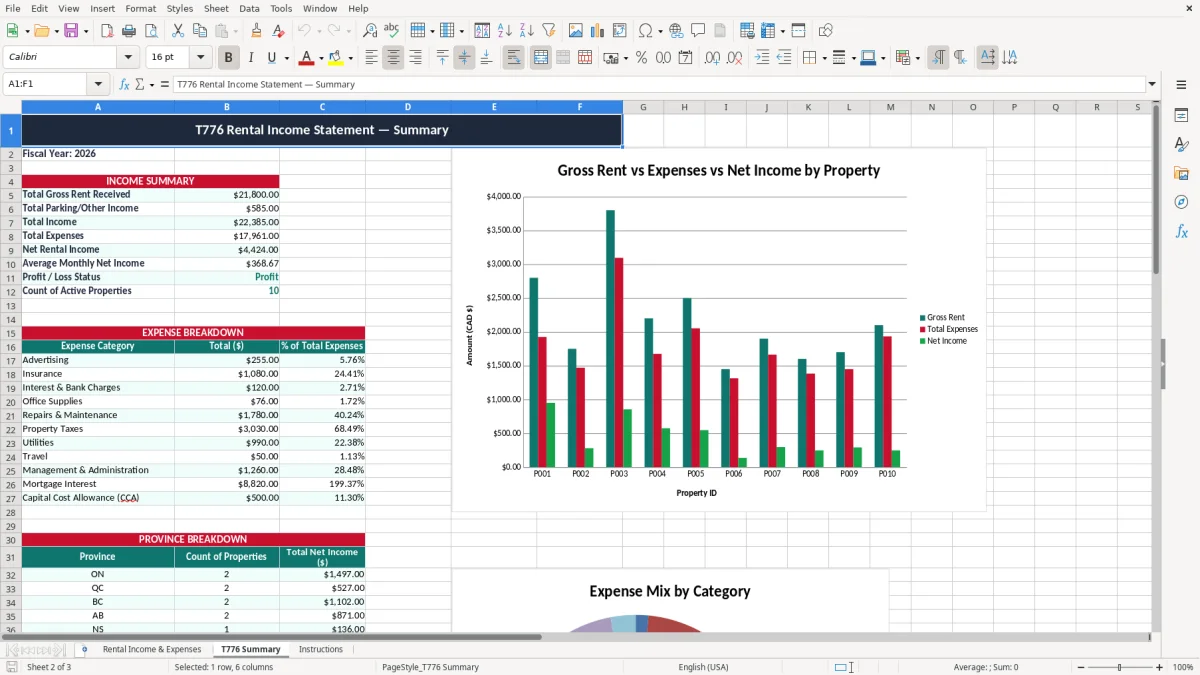
The T776 Summary sheet (image 2) is the part you use when you want the annual totals in one place. If your property shows $24,000 in gross rent, $3,600 in property taxes, and $1,200 in insurance, you can check the summary against the supporting documents before filing.
Rental housing is often exempt, but taxable supplies such as parking or short-term accommodation can create GST/HST tracking needs. If you collected $1,560 of HST on taxable services in Ontario at 13%, the workbook gives you a spot to record what you collected and what you remitted.
Keep CCA separate from current operating expenses. A common error is to bury capital cost allowance inside repairs, which makes the return harder to explain; this sheet keeps the category visible so your year-end numbers are easier to follow on the T776 and in your books.
The biggest mistake is mixing personal and rental costs on the same line. If you pay $1,800 for a roof repair and only 60% belongs to the rental unit, recording the full amount without allocation will overstate your expense by $720 and distort your net rental income.
Another failure point is weak property identification. When you have a city condo and a suburban duplex, a repair invoice for $425 can be entered in the wrong row and later show up in the wrong year-end total, which wastes time and can create questions if the CRA reviews the file.
Mortgage interest, property taxes, and repairs are not interchangeable. If you put $9,000 of mortgage interest into repairs, your operating expense mix changes and your income statement becomes misleading, even if the final net income number accidentally looks close.
GST/HST also gets missed when people only record the net amount from a payment processor or bank deposit. If you collected $226.00 on a taxable charge and only logged the deposit after fees, your records no longer show what was actually collected versus what was remitted, and that creates reconciliation work at year-end.
Those missing tax details eventually belong on a remittance worksheet so the collected amount and the remitted amount stay tied to the same sale.
The easiest way to keep this workbook alive is to tie it to a fixed event, not to motivation. For most landlords, that means updating it right after rent day or during a month-end bank reconciliation, so the numbers stay close to the actual deposits and bills.
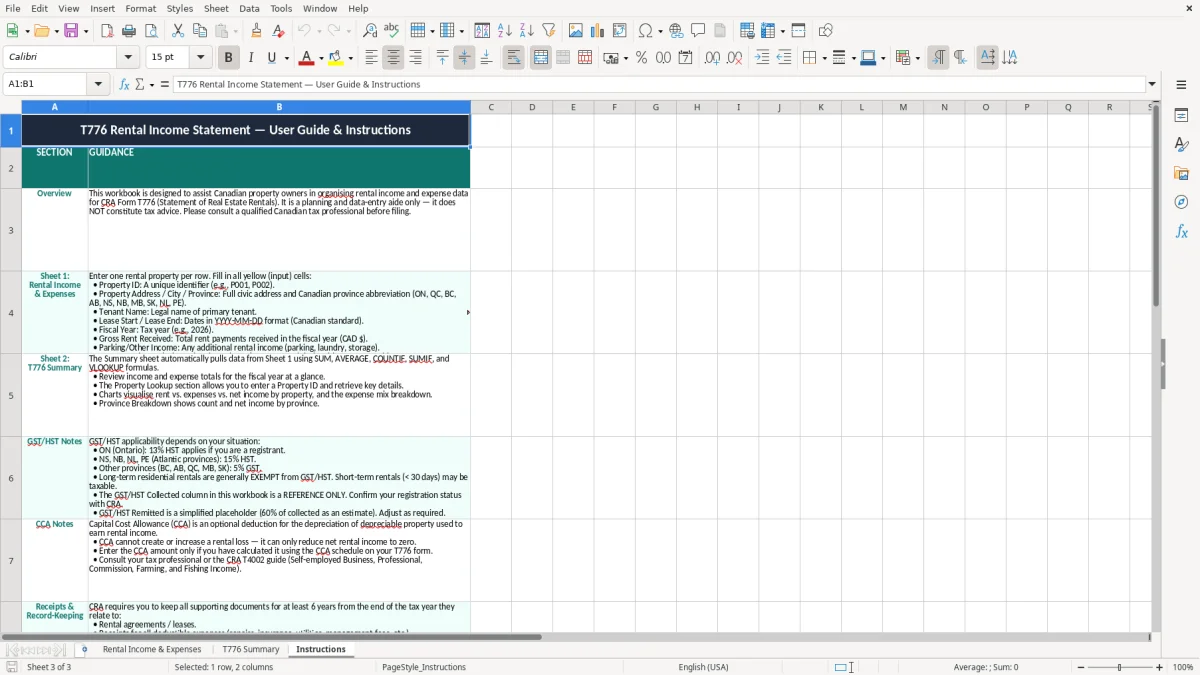
If you are handling 10 or more properties, multiple co-owners, or frequent short-term stays, you may outgrow a simple workbook and need accounting software with better posting controls. Until then, this template gives you a practical bridge: one sheet for entry, one for the T776 summary, and one for instructions so you can keep the routine consistent.
That same point is where quick HST calculations matter, since the routine starts to include sales tax treatment alongside the monthly rental totals.