
Maternity Top-Up Excel Template – Free (2026)
2
Free download
Track AgriInvest contributions, government matches, balances, and farm details in one Excel workbook for Canadian producers.
Download template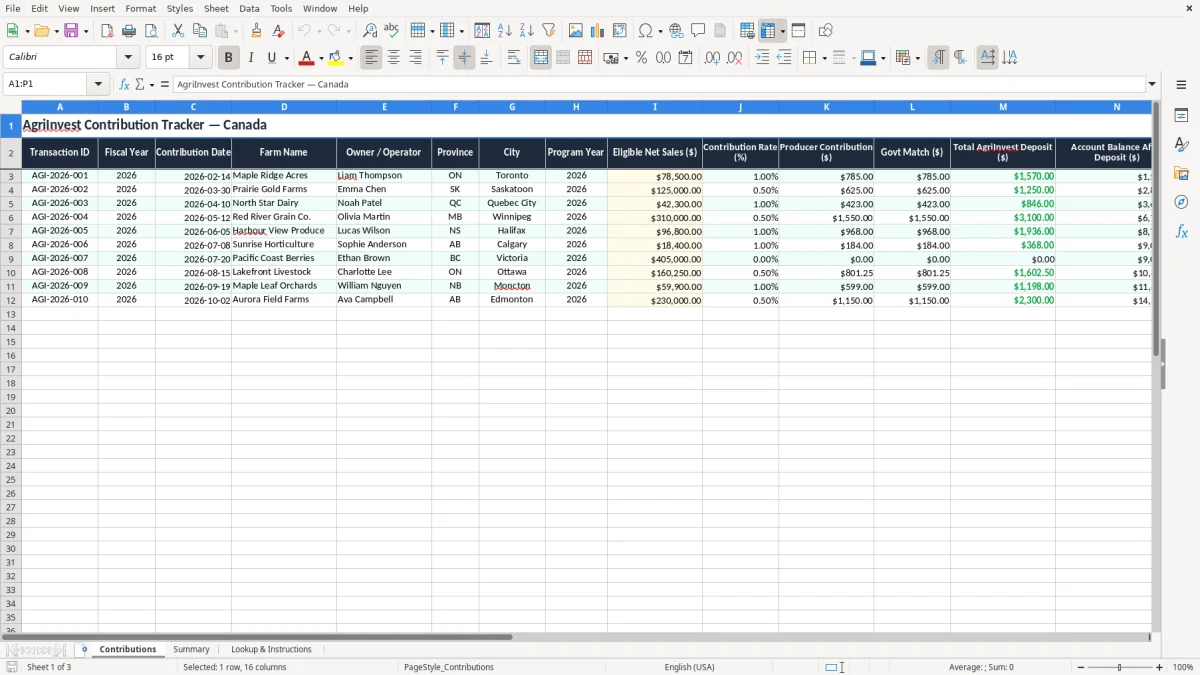
This AgriInvest contribution tracker Excel template records farm deposits, government matches, and running balances in one workbook. It is built for Canadian producers, bookkeepers, and farm office staff who need a clean trail for each contribution year.
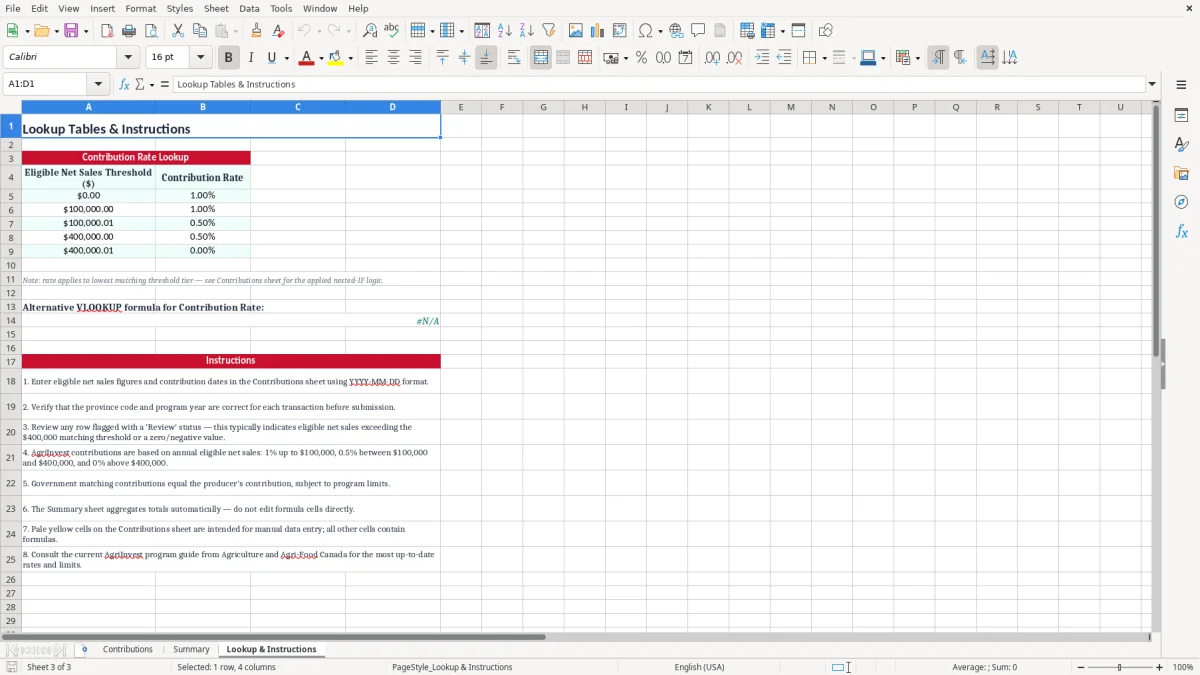
The workbook includes three sheets: Contributions, Summary, and Lookup & Instructions. You enter the farm, province, eligible net sales, and contribution amount, then the sheet calculates the matching deposit and ending balance.
Use it when you are preparing for the AgriInvest deadline, reconciling farm records, or checking that each deposit ties back to the right program year. The layout is simple enough for a sole operator and structured enough for a bookkeeper handling multiple farms.
A producer usually opens a tracker like this at contribution time, at year-end, or when a bookkeeper asks for backup for a deposit. If you run a grain farm, a livestock operation, or a mixed farm, you need one place to tie the eligible net sales figure to the deposit that actually hit the account.
The Contributions sheet is built for day-to-day entry: one line per transaction, with the farm name, owner, province, program year, and notes beside the numbers. Image 1 shows a practical layout for a farm with 4 contributions in a season, where each entry can be checked against the bank statement in minutes instead of digging through emails.
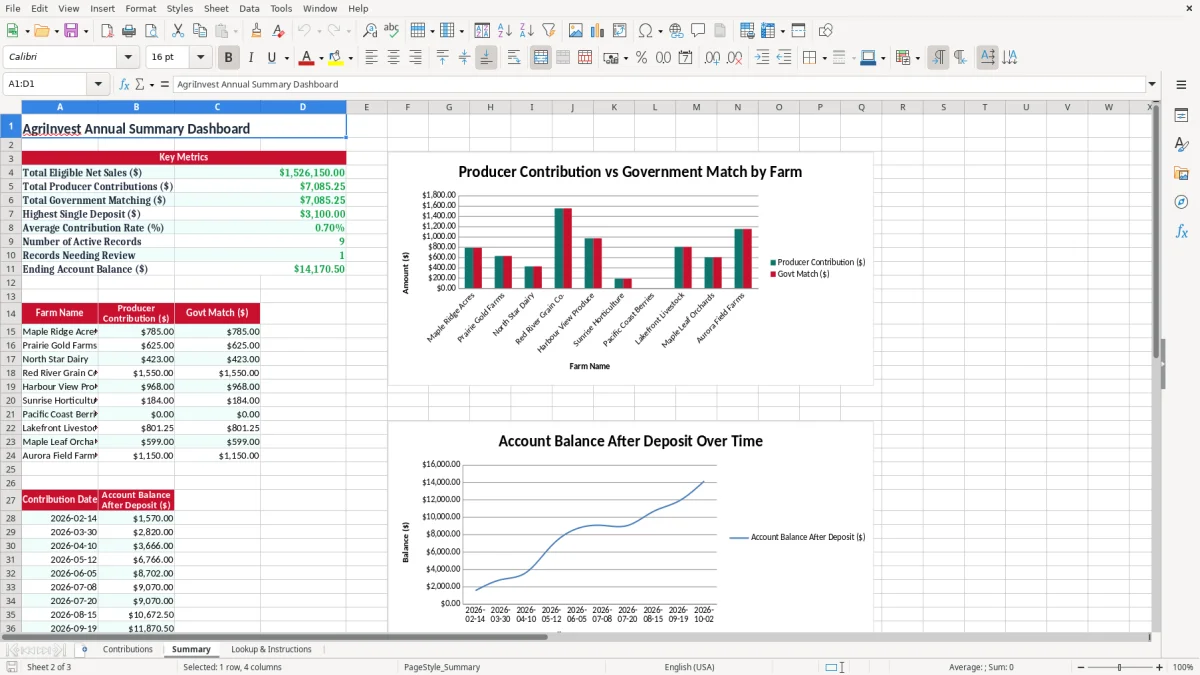
Image 2 is the Summary sheet, which gives you a quick total for the year and a cleaner view when you are reconciling multiple farms. For example, if a farm has 3 deposits of $250.00, $400.00, and $175.00, you can confirm the running total of $825.00 without rebuilding the math by hand.
The biggest time pressure comes when you are closing a season, preparing working papers, or answering a question from the owner about a missing match. A structured sheet avoids the classic farm-office problem: the numbers are right in someone’s head, but not in a format that can be checked two months later.
The useful part of this workbook is that it preserves the audit trail you need for farm records: date, amount, farm name, program year, and a clear balance after each deposit. The CRA expects records to be kept for six years, so a workbook that still makes sense next winter is better than a loose note on a calendar.
Keep fiscal year and program year separate. That matters when a December deposit belongs to one accounting year but gets reviewed alongside a different AgriInvest year, especially if your year-end is not December 31.
If a producer contribution is $300.00 and the government match is $300.00, the total deposit should show $600.00 on the line and in the bank feed. That is the kind of simple check that keeps a bookkeeper from wasting 20 minutes tracing a difference that is really just a missed row.
If you file other business records under a BN with program accounts, keep the farm records in the same discipline: one workbook, clear naming, and no hidden manual math. That is far easier to defend than scattered tabs, because the figures in the sheet can be traced back to the source entry and the bank deposit.
That same one-workbook discipline carries over when you need a loan repayment schedule, where each payment, balance, and adjustment has to stay traceable from the source entry to the final total.
The most common mistake is entering the wrong eligible net sales figure and carrying that error through the rest of the sheet. If you type $52,000 instead of $25,000 at a 1.00% rate, you have turned a $250.00 contribution into a $520.00 contribution, and the imbalance will follow you into the reconciliation.
Another problem is treating the government match like a separate deposit with no link to the original contribution. That creates double-counting in the records, and on a farm with 6 entries it can make the ending balance look $1,000 or more higher than it should be.
Some users dump every explanation into Notes and skip the main fields. That works until a year-end review, when nobody can tell whether a line belongs to 2026 or the prior year, or whether the amount was a contribution, a match, or a correction.
The balance-after-deposit column is not decoration. If the account started at $1,200.00 and three deposits of $150.00, $250.00, and $175.00 are entered correctly, you should land at $1,775.00; if you do not, the error is usually in the latest row, not in the whole year.
The same running-balance habit matters when you need a cost base tracker, because each purchase and adjustment has to reconcile cleanly to the current total.
The sheet works best when you update it on the same day you receive the statement or confirmation notice. If you wait until month-end, you will spend more time hunting for the deposit details than entering them.
If you are managing dozens of farms, multiple staff users, or live bank feeds, move to an accounting or farm-management system. For a smaller operation with a handful of annual entries, this tracker is usually the fastest and clearest option.