
Maternity Top-Up Excel Template – Free (2026)
2
Free download
Track Canadian fuel purchases, GST/HST, provincial fuel tax and editable climate-credit scenarios for business and household use.
Download template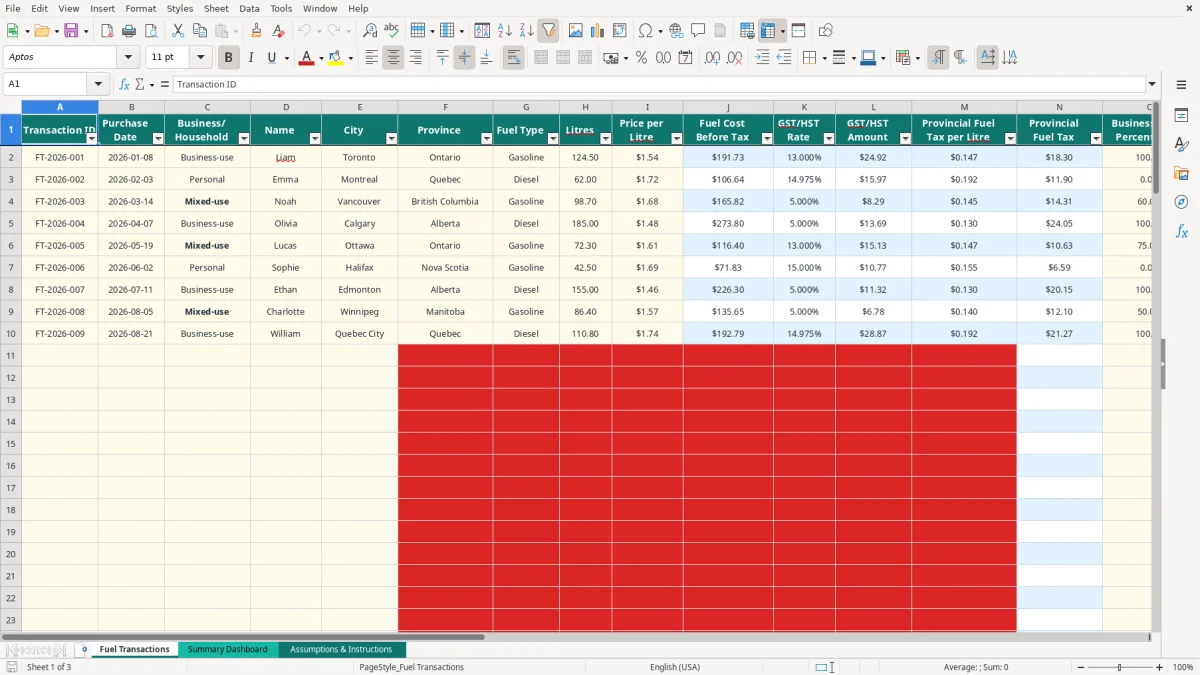
This gas tax credit Excel spreadsheet records Canadian fuel purchases, calculates GST/HST and provincial fuel tax, applies business-use percentages, and estimates a climate rebate or fuel tax credit scenario. It includes 100 prepared transaction rows, a date-filtered dashboard, provincial assumptions and review flags.
Use the Fuel Transactions sheet for gasoline or diesel purchases, whether they are business-use, personal or mixed-use. The Summary Dashboard totals fuel cost, litres, taxes, recoverable GST/HST, review-category costs and estimated credits for the selected reporting period.
The workbook is an estimate, not tax advice. Programme status and rates must be verified before you use the figures in a GST/HST return, income tax return or rebate application.
A sole proprietor with a service van usually opens this workbook during the monthly bookkeeping session, when fuel receipts are still available and the business-use percentage is easy to support. An office manager at a trades company can use it for several drivers, while a household can record personal purchases separately instead of mixing them into business costs.
Image 1 shows the Fuel Transactions sheet. The visible columns run from Transaction ID and Purchase Date through Business/Household, Name, City, Province, Fuel Type, Litres and Price per Litre. The right side adds Fuel Cost Before Tax, GST/HST Rate, GST/HST Amount, Provincial Fuel Tax per Litre, Provincial Fuel Tax, Business-Use Percentage, Recoverable GST/HST, Rebate/Credit Category, Eligible for Review? and Notes.
Suppose a contractor records 124.5 litres at $1.54 per litre in Ontario. The fuel cost before tax is $191.73. At the workbook's sample 13% HST rate, the calculated HST is about $24.92; with 100% business use, the recoverable GST/HST field also shows about $24.92.
A second vehicle may be mixed-use. At 98.7 litres and 60% business use, only the business share should support the recoverable-tax calculation. That is why the percentage is an input rather than a fixed assumption for every driver.
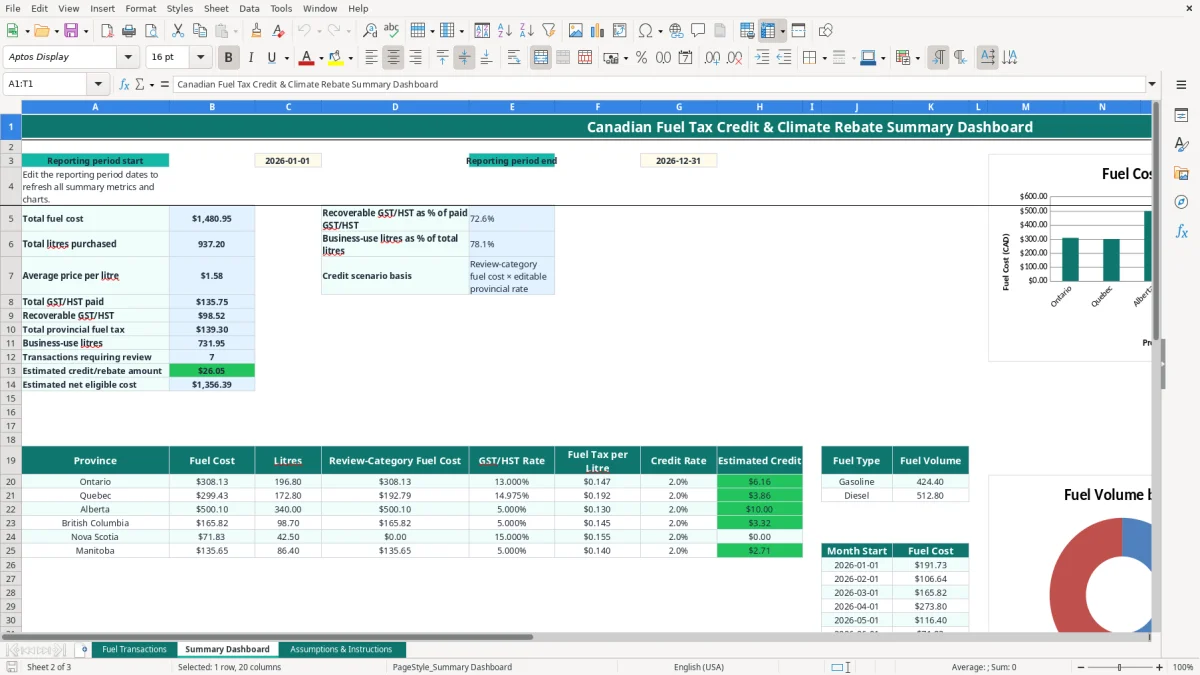
At a GST/HST filing review, the bookkeeper can select the filing dates and compare paid HST with the calculated recoverable amount. Image 2 shows the Summary Dashboard, including reporting dates, headline totals, province detail, fuel-type volume and monthly fuel-cost data feeding three charts.
The workbook separates three different ideas that are often confused: GST/HST charged on a fuel purchase, provincial fuel tax included in the price, and a possible climate rebate or fuel tax credit. They are not interchangeable. A calculated review amount is not automatically an input tax credit, refund or CRA entitlement.
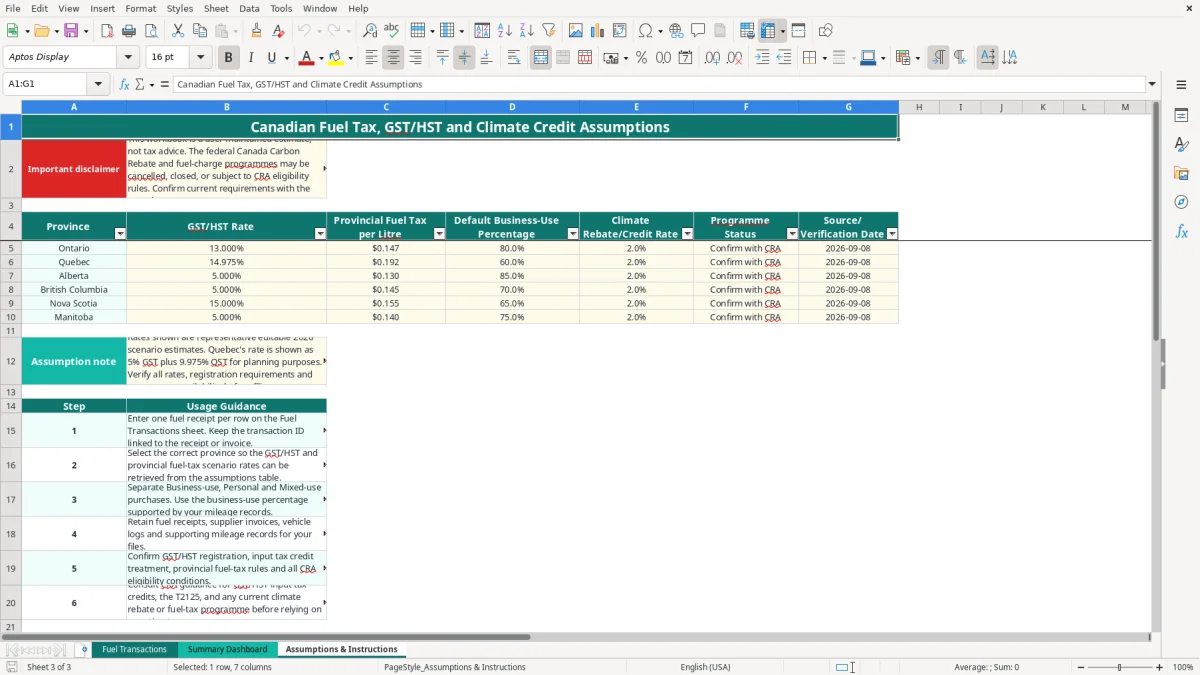
The sample assumptions include 13% HST for Ontario, 14.975% for Quebec, 5% GST for Alberta and British Columbia, 15% HST for Nova Scotia, and provincial fuel-tax values such as $0.147 per litre for Ontario and $0.192 for Quebec. These are workbook assumptions dated 2026-09-08 and must be verified before use.
A business generally must register for GST/HST when worldwide taxable revenue exceeds $30,000 over four consecutive calendar quarters, or immediately when it exceeds that threshold in a single quarter. A registered business claims input tax credits only for the eligible business portion, supported by invoices and records. A sole proprietor normally reports business activity on form T2125; an incorporated business uses its corporate records and T2 filing process.
Image 3 shows Assumptions & Instructions. Its table contains Province, GST/HST Rate, Provincial Fuel Tax per Litre, Default Business-Use Percentage, Climate Rebate/Credit Rate, Programme Status and Source/Verification Date. The sample status says Confirm with CRA, and the disclaimer identifies the workbook as a user-maintained estimate.
For example, a review-category fuel cost of $2,000 multiplied by an editable 2% credit rate produces a $40 scenario amount. That $40 is not a prescribed 2026 benefit unless the applicable programme, eligibility rules and filing mechanism confirm it. Keep fuel receipts and supporting records for the CRA's six-year retention period.
The most expensive error is treating every litre as business-use fuel. If a mixed-use vehicle buys 500 litres and only 60% is business-related, claiming 100% overstates the business share by 200 litres. At $1.70 per litre, that is $340 of unsupported fuel cost before considering the associated GST/HST.
Drivers often buy fuel in one province while the vehicle or business address is elsewhere. Applying Ontario's sample 13% HST to a Quebec purchase, where the workbook assumption is 14.975%, changes the tax calculation on a $200 fuel purchase by $3.95. That difference repeated across 40 purchases is $158.
The VLOOKUP formulas retrieve rates based on the Province field. A spelling change, blank province or unverified assumption can therefore produce a blank or misleading result. Use the controlled province list and check the source date rather than typing a rate directly into calculated columns.
The Eligible for Review? column returns Review when the category is Climate rebate review or Fuel tax credit review. It returns No action for other categories. This is a workflow signal, not a determination that the purchase qualifies.
Another common mistake is confusing recoverable GST/HST with a climate credit. A $24.92 recoverable HST amount and a hypothetical $40 credit scenario answer different questions. Posting both as tax recoveries would overstate the benefit by $40 and could distort the GST/HST reconciliation.
Finally, receipts without purchase date, litres, fuel type or business purpose are difficult to defend. A contractor with 80 monthly purchases can spend several hours rebuilding missing evidence at year-end; entering the note when the receipt is received is the cheaper control.
This spreadsheet works best when fuel entry is attached to a routine that already exists. Set aside 15 minutes every Friday to enter receipts, then perform a longer review after the monthly bank reconciliation. Do not wait until the GST/HST filing deadline to reconstruct three months of fuel purchases.
Image 1 has drop-down validation for Business/Household, Province, Fuel Type and Rebate/Credit Category, plus decimal validation for Business-Use Percentage. Use those controls consistently: entering Business use instead of Business-use can break filtering and make review work harder.
At month-end, change the Summary Dashboard dates to the month under review and compare total litres with fuel-card or bank records. If 1,200 litres were purchased but only 900 litres appear in the sheet, investigate the missing 300 litres before calculating a scenario credit.
Keep a dated workbook copy after each review. The file has 100 operational transaction rows; if you regularly exceed that volume, need multiple vehicles, user permissions, receipt attachments or automated bank feeds, move to bookkeeping or fleet software. Excel remains useful for review, but it should not become the only control over a large fuel programme.