
Maternity Top-Up Excel Template – Free (2026)
2
Free download
Track Canadian medical expenses, reimbursements and receipts, then estimate eligible net expenses and federal and provincial credits.
Download template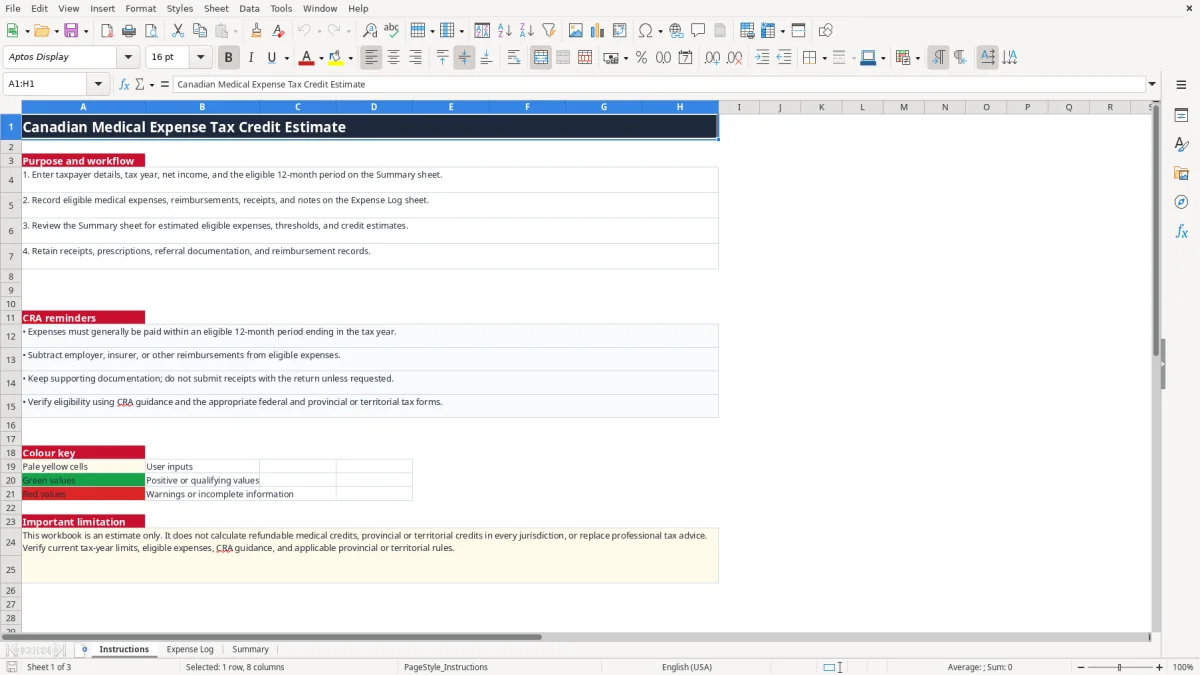
This medical expense Excel spreadsheet records paid medical costs, reimbursements, family members, receipts and eligibility status. Its Summary sheet calculates eligible net expenses and provides an estimate of the federal and provincial or territorial medical expense tax credit for your selected 2026 tax year and 12-month period.
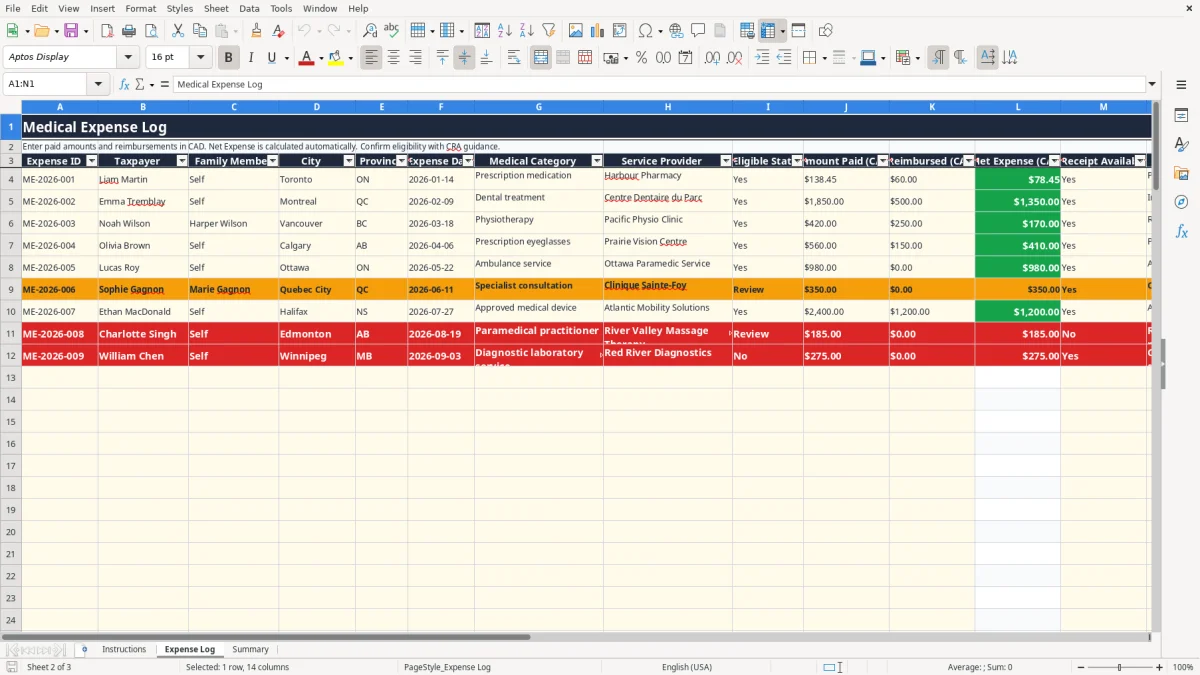
Use it while gathering records for your CRA return instead of sorting pharmacy receipts, dental invoices and insurance statements at tax time. The workbook has Instructions, Expense Log and Summary sheets; image 1 explains the workflow, image 2 shows the 100-row expense table, and image 3 shows the calculation area and three summary charts.
A sole proprietor completing a personal T1 return, an employee with family dental costs, and a bookkeeper supporting an incorporated business owner all face the same practical problem: eligible expenses are paid in different places and often reimbursed later. The Expense Log keeps the person receiving care, the provider, province and documentation together rather than relying on a bank statement alone.
Enter a prescription when it is filled, a dental payment when it is made and a physiotherapy invoice after the appointment. For example, Liam pays $138.45 at a Toronto pharmacy and receives a $60 insurance reimbursement. The workbook calculates $78.45 as the net expense; Emma's $1,850 dental treatment less a $500 reimbursement becomes $1,350.
This timing matters because medical expenses are generally claimed for a 12-month period ending in the tax year, not necessarily January to December. A family can choose the period that produces the better claim, subject to the CRA rules and the requirement that the expenses fall within that selected period.
A parent can enter a child's orthodontic treatment under Family Member, while an individual can record only Self. The Province column distinguishes ON, QC, BC and the other Canadian jurisdictions, and Notes can identify a retained prescription, insurance statement or referral.
For a household with $3,200 of paid expenses and $900 of reimbursements, the summary starts from $2,300 net rather than $3,200. That is the right working figure for reviewing eligibility, although the workbook does not decide whether every service qualifies.
Image 1 is the Instructions sheet. Image 2 shows the Expense Log table with 100 prepared rows and its calculated Net Expense column. Image 3 shows Summary inputs, category totals, key calculations and three charts, including monthly eligible net expenses.
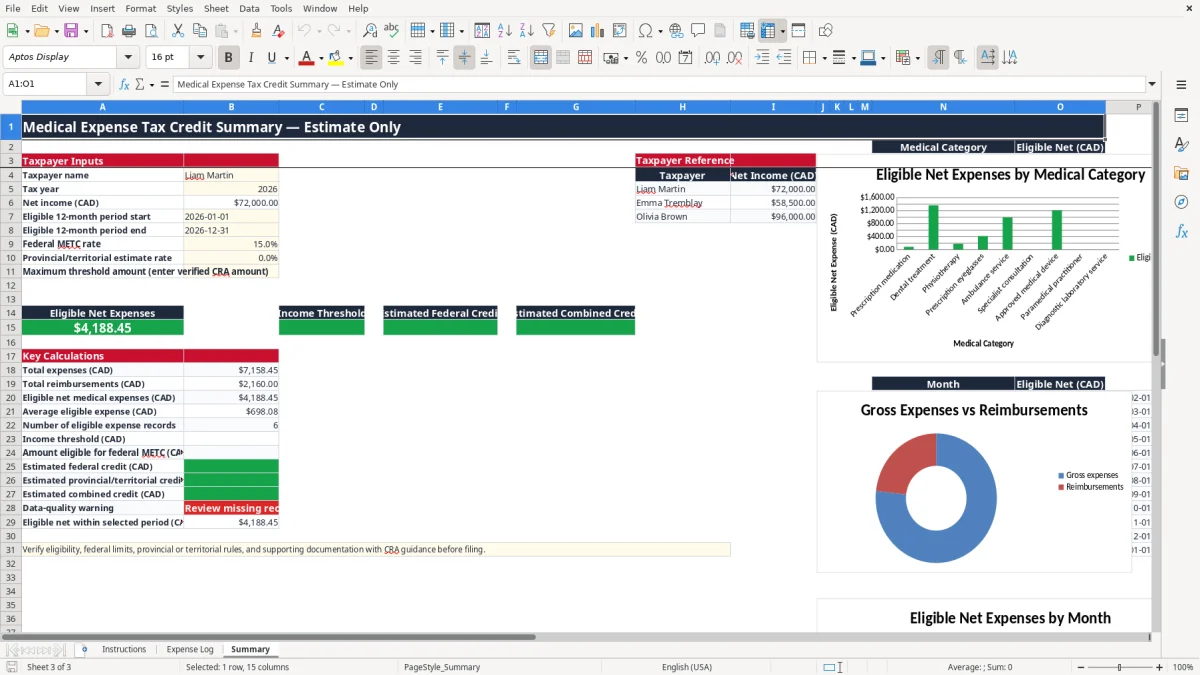
The federal METC is a non-refundable credit based on eligible medical expenses after reimbursements and after the federal threshold. The workbook uses an editable federal rate set to 15% in the sample and asks you to enter the verified maximum threshold amount; it deliberately does not hard-code an indexed amount that may change for 2026.
For the federal calculation, the threshold is generally the lesser of 3% of the claimant's net income and the annual indexed maximum. If net income is $72,000, 3% is $2,160. With $4,500 of eligible net expenses, the amount above that illustrative threshold is $2,340 before applying the 15% rate, producing an estimated $351 federal credit. Use the Summary inputs and confirm the actual CRA figure for the tax year.
CRA guidance generally requires expenses to have been paid within an eligible 12-month period ending in the tax year. Employer health plans, insurers and other reimbursements must reduce the claim. A $1,000 dental bill with $400 reimbursed contributes $600, not $1,000.
Keep receipts, prescriptions, referral documentation and reimbursement records for the CRA's six-year record-retention requirement. You normally do not send receipts with the return unless the CRA requests them, but an entry marked Yes in Receipt Available should correspond to documentation you can produce.
Ontario applies 13% HST, Quebec applies 5% GST plus QST, and other provinces may use GST, HST or PST systems, but sales tax treatment does not determine whether a medical expense qualifies. The workbook's provincial or territorial estimate rate accepts only 0%, 5%, 10% or 15%; it is an input, not a complete jurisdiction-specific return calculation.
The Summary limitation is important: it does not calculate refundable medical credits or every provincial or territorial credit. Treat the result as a review estimate and transfer figures only after checking the relevant CRA instructions and tax forms.
The most expensive error I see is claiming the invoice total after insurance has paid part of it. A $2,400 procedure with $1,500 reimbursed leaves $900, so overstating the claim by $1,500 can create a reassessment, interest and a second round of document gathering. The Expense Log's separate Amount Paid and Reimbursed columns prevent that shortcut.
A receipt proves payment; it does not automatically prove that a service is an eligible medical expense. A provider may describe treatment as wellness, coaching or a general program even when the patient considers it medical. Marking Eligible Status as Review is better than entering Yes simply because the receipt exists.
For example, a $420 physiotherapy payment with a $250 reimbursement gives $170 net. If the referral documentation is missing, the amount may still need review even though the arithmetic is correct. Use Notes to identify the missing referral or the document you have retained.
Entering the invoice date instead of the payment date can put an expense outside the selected 12-month period. A December 2025 invoice paid in January 2026 is not the same record as a January 2026 payment. Similarly, assigning a child's expense to Self can distort the claim and make a family review harder.
Another common failure is using the wrong taxpayer's net income. If a $5,000 family expense is attached to someone with $90,000 of net income instead of the person selected in Summary, the 3% threshold changes from $2,700 to $1,800 only if the correct income is actually $60,000. That $900 difference changes the estimated federal credit by $135 at 15%.
Setting the provincial rate to 15% because the federal rate is 15% can overstate the combined result. The workbook allows a rate choice for an estimate, but a red or incomplete value should trigger verification rather than a confident filing entry.
The easiest routine is to update the log whenever you reconcile your bank or credit-card transactions. Set aside 10 minutes every Friday, filter mentally by pharmacy, dentist, optometrist and paramedical provider, and enter the paid amount while the receipt is still available.
Copying last year's workbook can save time, but clear the old transactions before entering 2026 records. Keep the Summary inputs visible and use the category and province lists instead of typing new spellings such as Ont., Ontario and ON in different rows.
Do not overwrite Net Expense. Its formula returns the positive difference between Amount Paid and Reimbursed, so $600 paid and $750 reimbursed produces $0 rather than a negative claim. The Summary uses SUMIFS to total eligible net expenses by category and month, while AVERAGE and COUNTIF support the average and qualifying-entry count.
Review the three charts after each monthly update. A sudden $8,000 category total may be a legitimate surgery, but it may also be a duplicated receipt or a reimbursement entered in the wrong row.
This workbook provides 100 prepared expense rows and no shared database, receipt storage or audit workflow. Move to accounting or document-management software when several staff enter records, the family has more than 100 items, or you need secure access for multiple users. Protect files containing health information and limit access under PIPEDA where applicable; delete obsolete copies securely.