
Maternity Top-Up Excel Template – Free (2026)
2
Free download
Track 2026 child care payments, receipts, providers and planning limits, then review a T778 estimate for your Canadian tax records.
Download template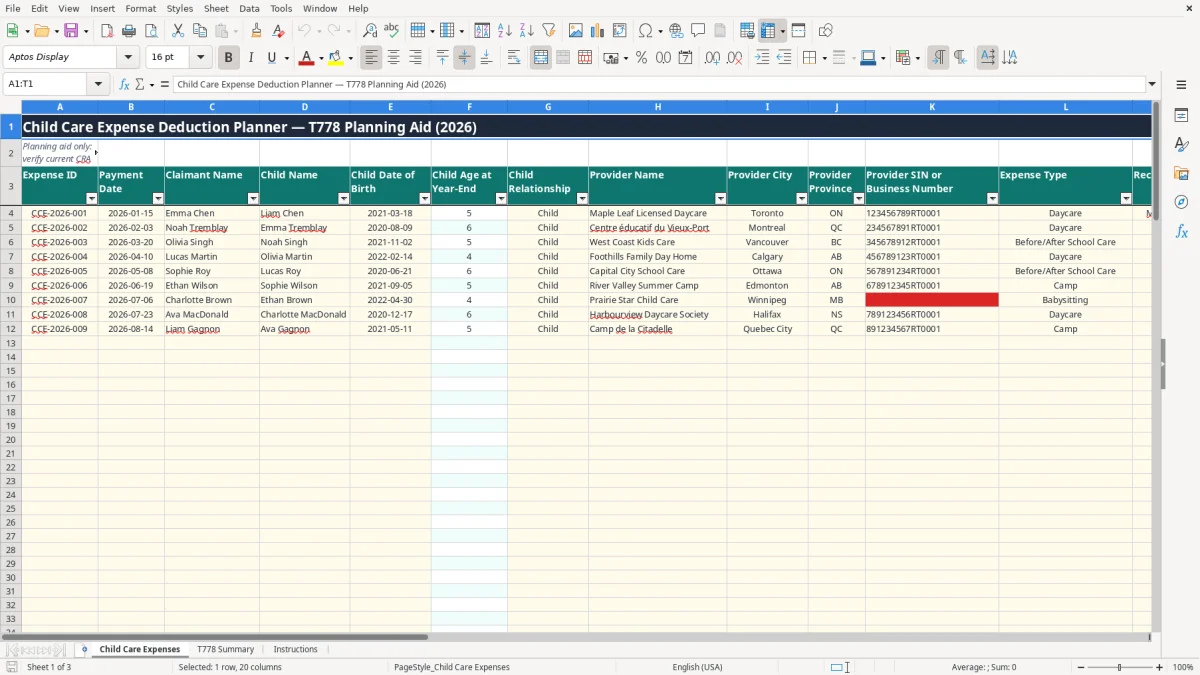
This child care expense deduction workbook records payments made during 2026, links each child to a planning limit, and estimates a T778 eligible amount. It contains a detailed Child Care Expenses sheet, a T778 Summary dashboard with charts, and an Instructions sheet.
Use it as a planning aid before completing the official CRA Form T778. The sample rows show daycare and before- or after-school payments, but you should remove unrelated records and replace the sample claimant, children, limits and amounts with your own information.
A parent usually opens this workbook during tax preparation, but the useful work happens earlier. A sole proprietor may enter payments after each month-end, while an employee with two young children may update the file when daycare statements arrive in March. Keeping the information together is particularly helpful when the claimant and spouse must determine who can claim the expense.
Image 1 shows the Child Care Expenses sheet with columns for Expense ID, Payment Date, Claimant Name, Child Name, Child Date of Birth and Child Age at Year-End. It continues with the child relationship, provider name and city, province, provider SIN or business number, expense type, receipt number, amount paid in CAD, payment method, receipt status and notes.
For example, the populated sample includes a $1,250 daycare payment on 2026-01-15 and a $650 before- or after-school payment. The age, annual child limit, T778 eligible amount and planning category are calculated columns rather than fields you should overwrite.
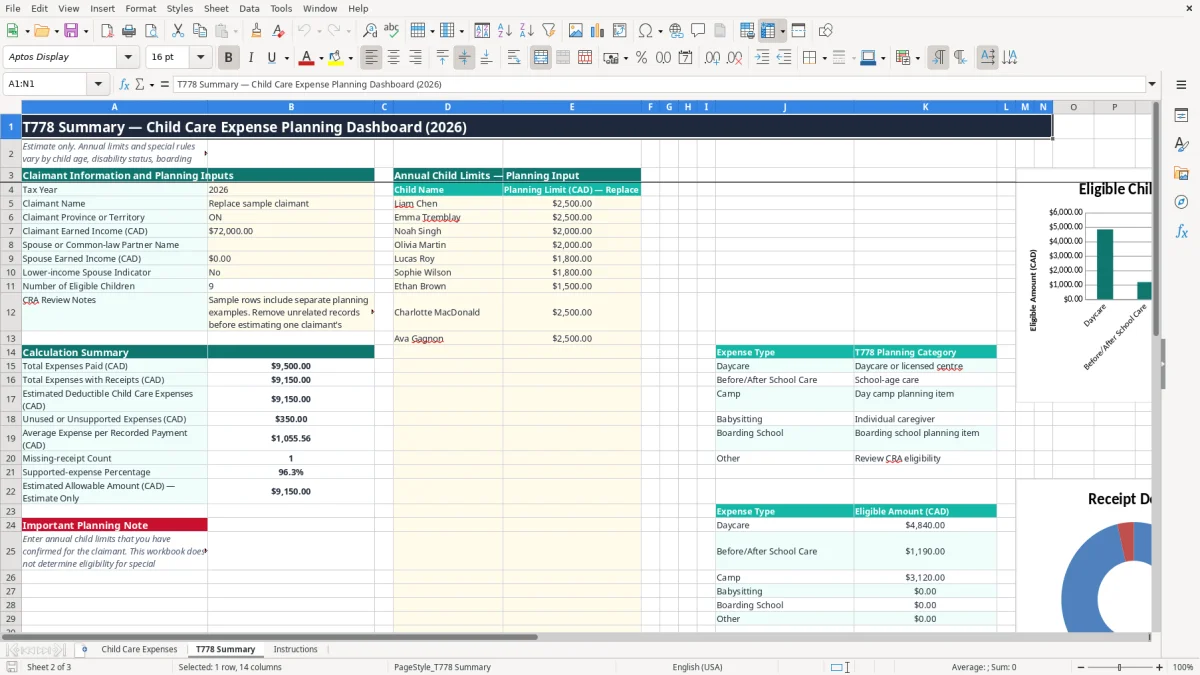
Image 2 shows the T778 Summary sheet. It combines claimant inputs, child-specific planning limits and a calculation summary, including total payments, payments with receipts, estimated eligible amounts, average payment and the number of rows marked No for receipt availability.
A family with 12 monthly daycare payments of $1,100 has $13,200 of recorded payments. The summary does not automatically establish the legal deduction; it gives you a structured estimate to check against the official form and your supporting records.
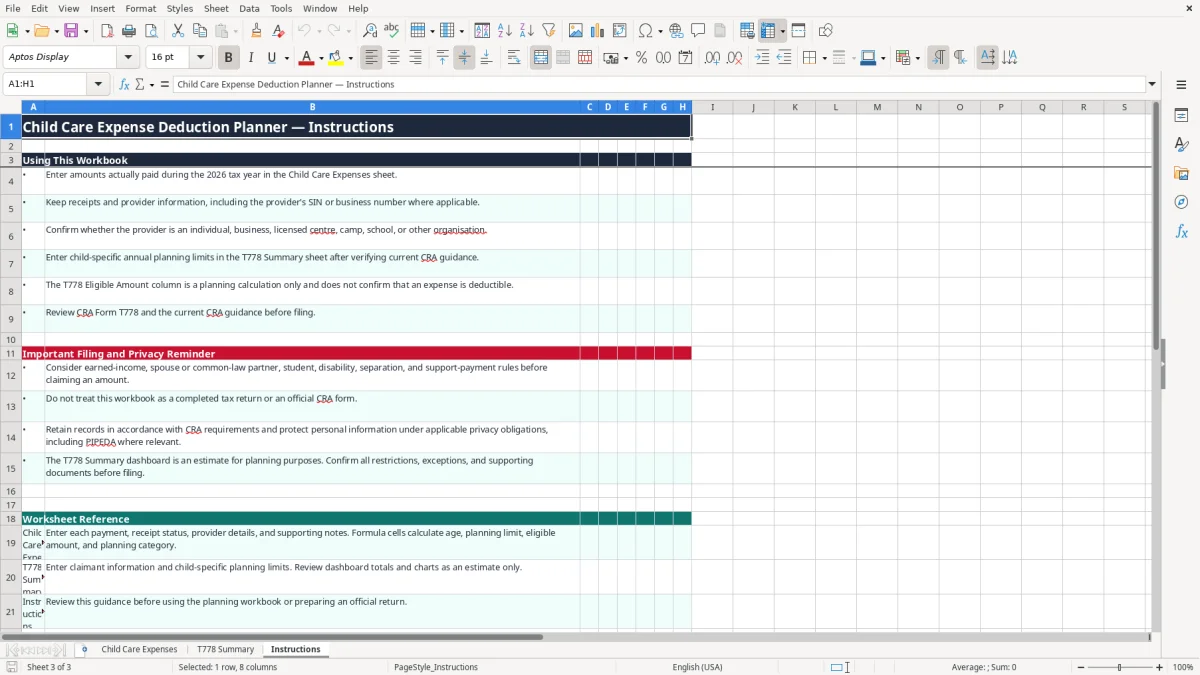
The workbook is not Form T778 and does not decide whether a payment qualifies. The CRA child care expense rules consider the child's age, disability status, the reason care was required, the claimant's earned income and the circumstances of the spouse or common-law partner. The Instructions sheet expressly tells you to verify these matters before filing.
Enter the applicable annual limit beside each child on T778 Summary rather than relying on a hard-coded number. The file's sample planning limits are $2,500, $2,000 and $1,800, but they are replaceable inputs, not a statement of the 2026 legal limits. The summary's estimated eligible amount is capped at the entered child limit through MIN.
In a simple example, $3,400 of payments assigned to one child and a $2,500 planning limit produce no more than $2,500 in the workbook's eligible amount column. A receipt marked No produces $0.00 for that row, but a Yes entry alone does not prove deductibility.
Keep receipts and provider information, including the provider's SIN or business number where applicable. CRA generally requires tax records and supporting documents to be retained for six years from the end of the relevant tax year. Protect names, birth dates and provider identifiers as personal information under applicable obligations, including PIPEDA where relevant.
Child care expenses are reported through your personal return and the official T778 process, not through a business GST/HST claim. The workbook includes a province or territory field, but it does not calculate provincial tax credits, support payments, separation rules or special disability and student rules.
The most expensive mistakes I see are not Excel errors; they are incomplete evidence and incorrect claimant assignments. A parent enters $14,400 of daycare payments but cannot produce three monthly receipts. If $3,600 is unsupported, the file may show the payment while the claim cannot rely on it.
The sample workbook contains separate planning examples for different claimants and children. Leaving all of them in place can turn a real $1,250 payment into a misleading total that includes someone else's $1,185 and $650 entries. Before using the dashboard, delete unrelated rows and check that each Expense ID, child name and claimant name belong to the same return.
Double entry is also common when a parent records a monthly provider statement and then records the individual card transactions. Twelve $1,000 payments should total $12,000; duplicating the statements makes the dashboard report $24,000 and can distort the limit comparison.
A blank receipt number, wrong provider identifier or a payment marked Yes without an actual receipt creates a poor audit trail. The sheet accepts provider SIN or business number as text, so verify the value from the provider's document instead of copying a shortened number.
Another trap is overwriting calculated cells in columns F, O, P and T. If the age formula is replaced with a typed number, a date correction will not flow through. If the planning limit is wrong, a $2,500 payment can be shown as fully eligible when the correct child-specific limit is lower.
The easiest routine is to update the file when you pay the provider, not when you prepare your return. Set aside 10 minutes on the last Friday of each month: enter the payment, save the receipt with the same receipt number, and mark Receipt Available? as Yes only when the document is actually filed.
Use the drop-down lists instead of typing variations such as daycare, Day Care and licensed daycare. Consistent values allow the summary's SUMIF calculations and expense-type chart to group payments correctly.
This workbook is suitable for a household with a manageable number of payments and one annual filing review. If you are processing 300 provider transactions a month, managing several families, or storing receipts for many years, use accounting software or a document system with access controls and a reliable backup process.
Keep one untouched copy of the original template and work from a dated copy for each tax year. The workbook contains no automated receipt storage, tax-return submission, CRA validation or cloud backup, so those controls must sit outside the file.