
Ontario Trillium Benefit Excel Template (2026)
4
Free download
Budget maternity and parental leave top-ups with employee inputs, payroll burden, contingency, status and dashboard totals for Canadian employers.
Download template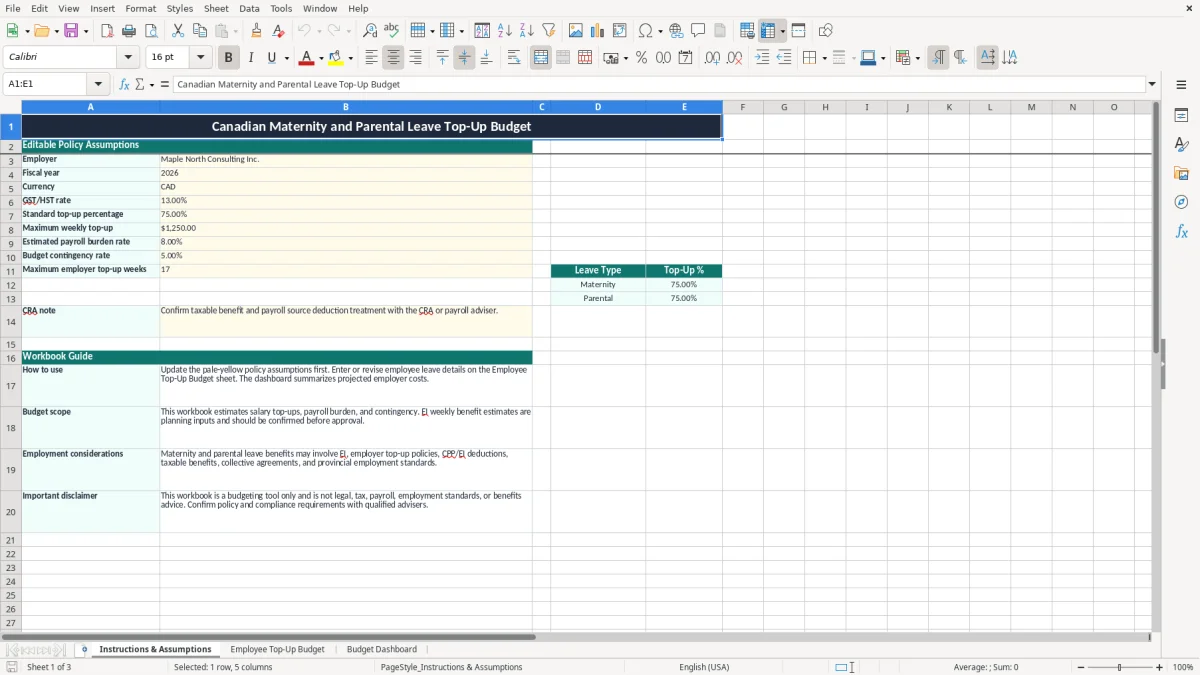
This maternity leave top-up Excel spreadsheet estimates an employer's cost for maternity and parental leave benefits in Canada. It contains editable policy assumptions, 100 employee budget rows, automatic weekly and total cost calculations, and a dashboard summarizing employees, provinces, leave types and cost components.
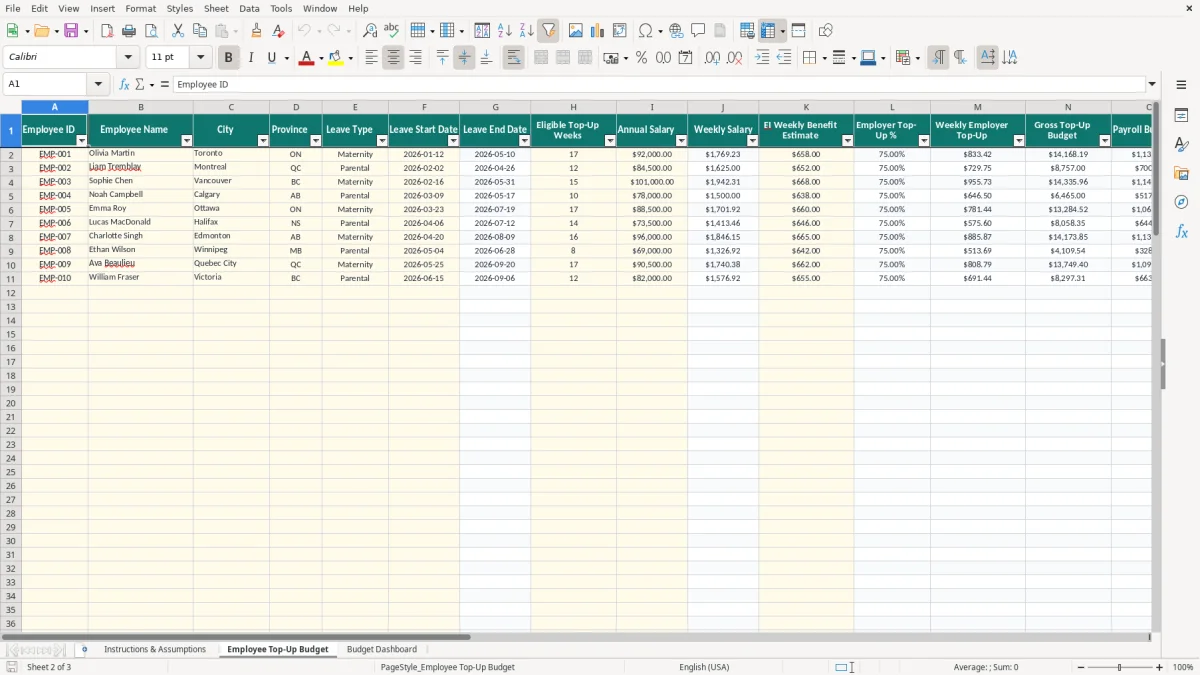
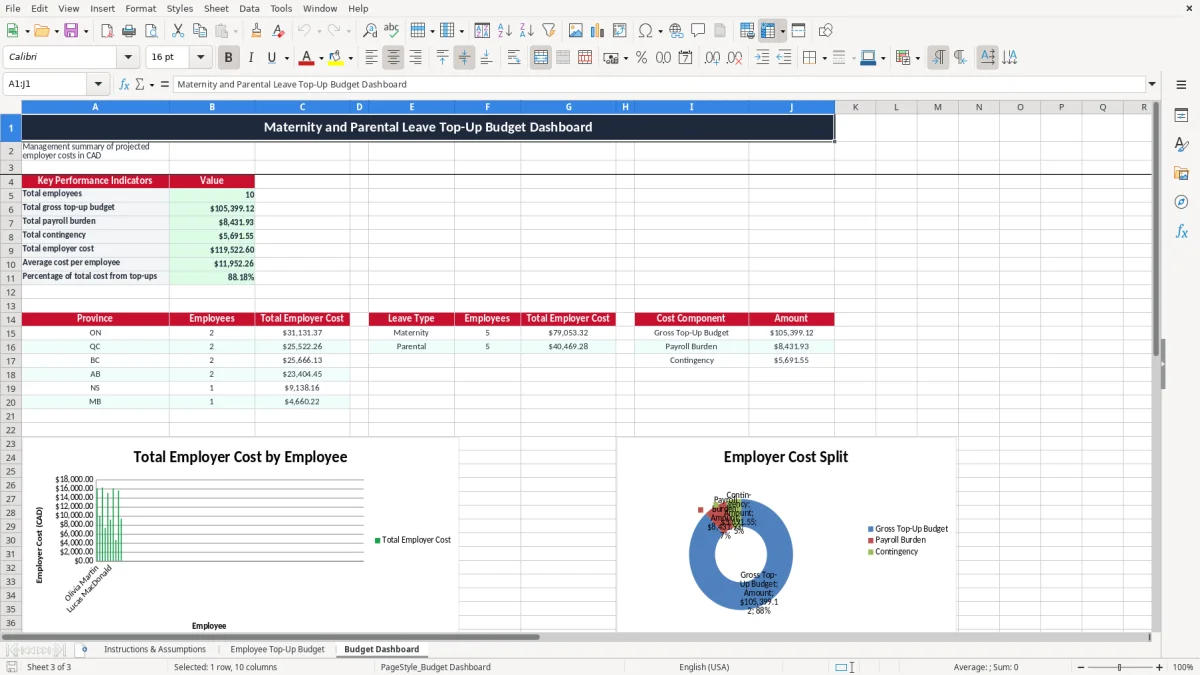
Enter employee details on the Employee Top-Up Budget sheet, including salary, leave dates, weeks, estimated EI benefit and top-up type. The workbook calculates the employer's gross top-up, payroll burden, contingency and total cost; image 1 shows the assumptions sheet, image 2 shows the employee table, and image 3 shows the dashboard.
An HR manager at an incorporated business usually opens this spreadsheet when an employee gives formal notice of maternity or parental leave. A payroll bookkeeper may also use it during the annual budget cycle, when several employees are expected to be away in the same fiscal year. The file is designed for projected employer cost, not for processing an EI claim.
Image 1, Instructions & Assumptions, is where you record the policy basis. The sample employer is Maple North Consulting Inc., the fiscal year is 2026, the currency is CAD, and the sample assumptions include a 75% standard top-up, a $1,250 weekly maximum, an 8% payroll burden and a 5% contingency. These are populated examples, not universal Canadian policy terms.
Image 2, Employee Top-Up Budget, has 20 columns. The input side records employee ID, name, city, province, leave type, start date, eligible weeks, annual salary, EI weekly benefit estimate, manager and notes. The calculation side derives the end date, weekly salary, employer percentage, weekly top-up, gross budget, payroll burden, contingency, total employer cost and status.
For example, the sample Olivia Martin row uses a $92,000 salary, 17 weeks and a $658 EI estimate. Weekly salary is $92,000 divided by 52, or about $1,769.23. With a 75% top-up, the unadjusted gap calculation is approximately ($1,769.23 - $658) × 75% = $833.42 per week, below the $1,250 cap; the sheet then multiplies that amount by 17 weeks.
Image 3, Budget Dashboard, reports the count of employee IDs beginning with EMP-, total gross top-up, payroll burden, contingency, total employer cost, average cost per employee and the percentage of total cost from top-ups. It also groups totals by selected provinces and by Maternity or Parental leave, which is useful when a manager must reserve funds for the next payroll cycle or fiscal year-end.
EI maternity and parental benefits are administered under Canada's Employment Insurance program, while an employer's top-up is governed by its written policy, employment agreement or collective agreement. The weekly EI amount entered in column K is explicitly a planning estimate. Do not treat the sample $658 or $652 values as a 2026 entitlement; verify the employee's actual notice and approved benefit information before payroll approval.
The workbook's formula is a budgeting convention: it takes weekly salary less the EI estimate, multiplies the result by the selected employer top-up percentage, floors negative results at zero and applies the $1,250 weekly maximum. With weekly salary of $1,769.23, EI of $658 and a 75% rate, the result is about $833.42. A written policy that promises 75% of salary, rather than 75% of the gap, would require a different calculation, so settle that wording first.
A top-up can affect CPP, EI and income-tax withholding depending on how the benefit is structured and paid. The assumptions sheet specifically tells you to confirm taxable-benefit and payroll source-deduction treatment with the CRA or a payroll adviser. The workbook estimates an 8% payroll burden, but that percentage is not a CRA rate and must not replace the payroll calculation.
Employment standards also matter. The federal Canada Labour Code applies to federally regulated employers; provincial employment standards apply to many other workplaces. Ontario, Quebec, British Columbia and the other provinces can differ in job-protection and leave administration. A top-up budget cannot determine eligibility, required notice, benefit continuation or whether a collective agreement imposes a more generous obligation.
Keep the approved policy, employee notice, EI estimate, payroll calculations and payment record with the budget version. If the employer is a corporation, the cost belongs in its payroll and financial records; it is not a GST/HST input tax credit. The spreadsheet's 2026 fiscal-year label is an administrative input, not a filing deadline or legal classification.
The most expensive mistake I see is confusing a top-up to a target income with a percentage of the salary-EI gap. Suppose weekly salary is $2,000 and EI is $668. A policy paying 75% of the gap produces $999 per week; a policy paying 75% of salary produces $1,500 before any cap. Over 17 weeks, that difference is $8,517.50. The employer must decide which promise its policy actually makes before relying on the workbook total.
This file uses the gap method and caps the weekly result at the assumption in B8. Changing the policy rate or cap changes every populated row. A manager who leaves the sample 75%, $1,250 and 17 weeks in place can understate or overstate the approved budget without any formula error.
EI depends on the employee's circumstances and the applicable benefit rules. If payroll enters $658 when the confirmed weekly benefit is $695, the gap is overstated by $37. At a 75% top-up rate for 17 weeks, that creates roughly $471.75 of excess gross budget for one employee. Conversely, entering an EI estimate that is too high can leave a shortfall that appears only when payroll runs.
A $10,000 gross top-up is not necessarily a $10,000 employer cost. With the sample 8% payroll burden and 5% contingency, the workbook adds $800 and $540 respectively, producing $11,340. The dashboard separates these amounts so a finance manager can challenge the assumptions rather than treating the gross benefit as the complete reserve.
Another operational failure is entering leave weeks outside the approved policy. The sheet permits 1 to 52 weeks, but the assumptions sheet sets a maximum employer top-up of 17 weeks. Validation prevents an invalid whole-number entry below 1 or above 52; it does not decide whether 20 weeks are contractually payable. That approval still belongs in the policy and notes.
Do not wait until the first top-up appears on a payroll register. Set a review at the monthly payroll close and another before the annual budget is approved. During each review, compare leave dates, eligible weeks and EI estimates with the latest HR documentation, then record the follow-up in the Notes column rather than relying on email.
A practical routine is to have HR update employee inputs on Friday, payroll verify the benefit estimate before the next pay run, and finance review Budget Dashboard totals at month-end. For three planned leaves costing $9,000, $6,500 and $12,000 in gross top-ups, the dashboard should make the $27,500 reserve visible before payroll commits cash.
The Employee Top-Up Budget sheet contains an Excel table from A1:T101, frozen at row 2, with filters on the headers. That makes it practical to locate an employee or review notes, but it is still a spreadsheet rather than a payroll system. The dashboard contains three charts and formulas for fixed province and leave-type summary rows; it is not a live payroll or benefits integration.
Use a payroll or HR system when you need actual pay calculations, employee self-service, audit trails, benefit administration, or secure access for many users. The workbook is a good planning layer for a small Canadian employer, but it should not become the system of record for sensitive employee information. Limit access, protect the file and dispose of old copies under your privacy policy.