
Provincial Tax Excel Template – Free (2026)
6
Free download
Track taxable sales, PST collected, and exempt amounts with a BC remittance sheet and summary for filing.
Download template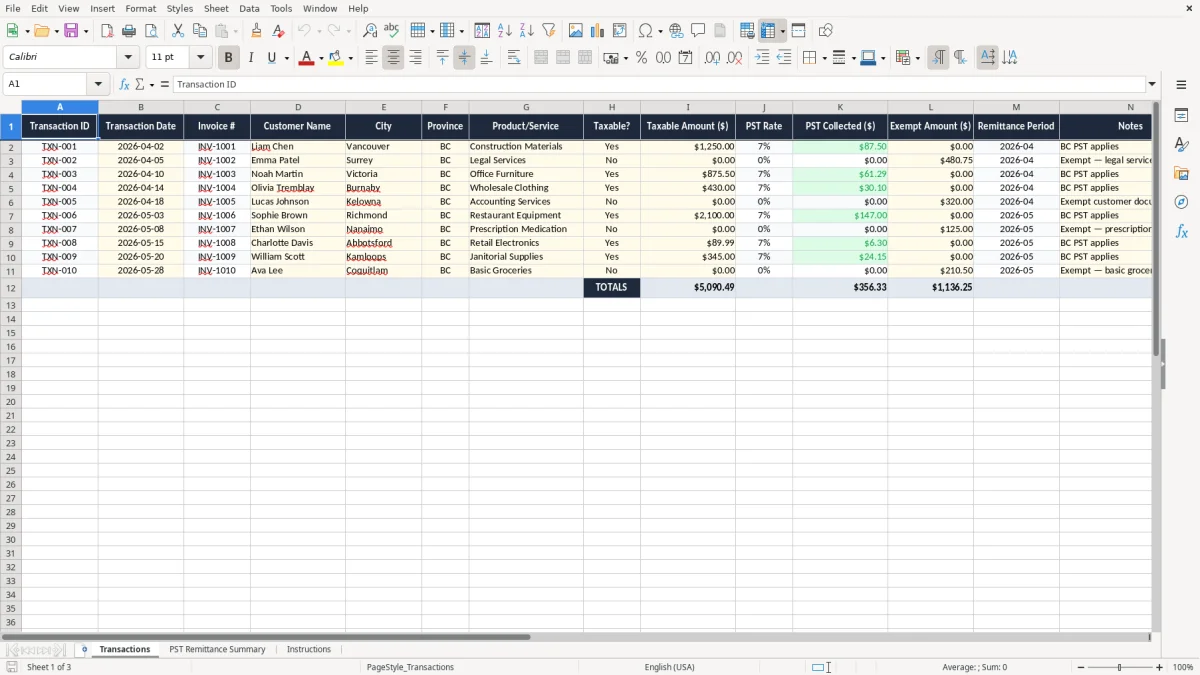
This PST remittance BC Excel template helps you track taxable sales, PST collected, and exempt amounts in one workbook. It includes a Transactions sheet, a PST Remittance Summary, and Instructions so you can total the figures you need for your filing period.
Use it when you want a clean record before you file your provincial sales tax return in British Columbia. The layout is built for small businesses, bookkeepers, and sole proprietors who need a simple control sheet instead of juggling receipts and calculator totals.
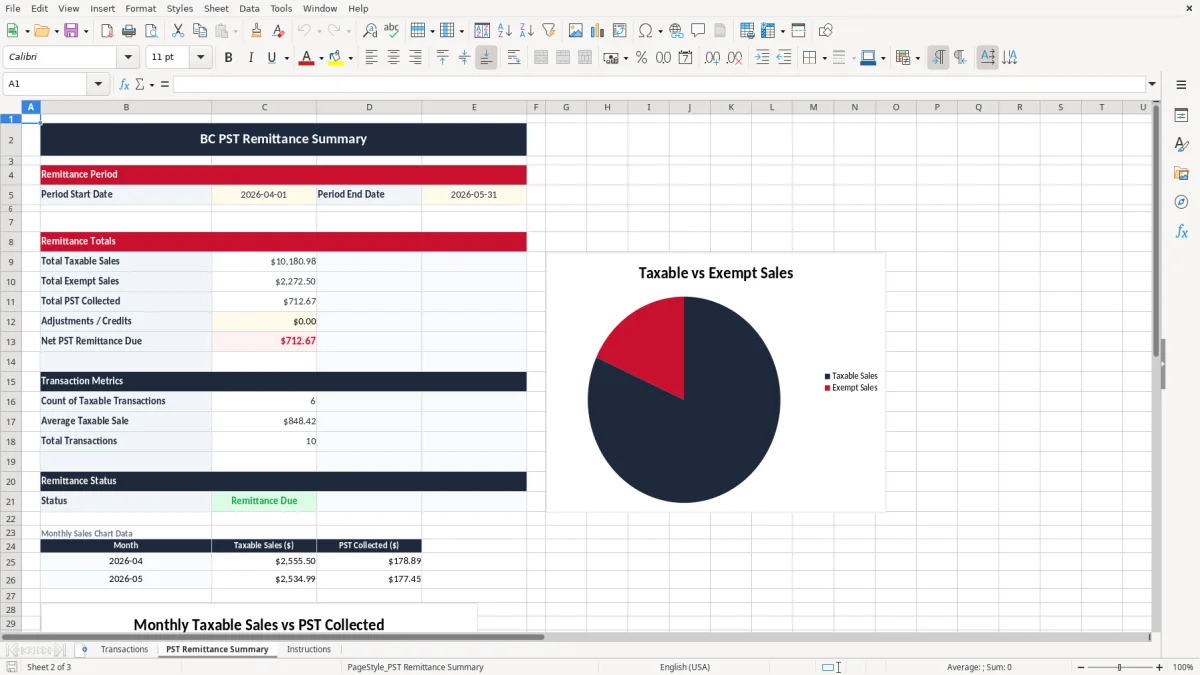
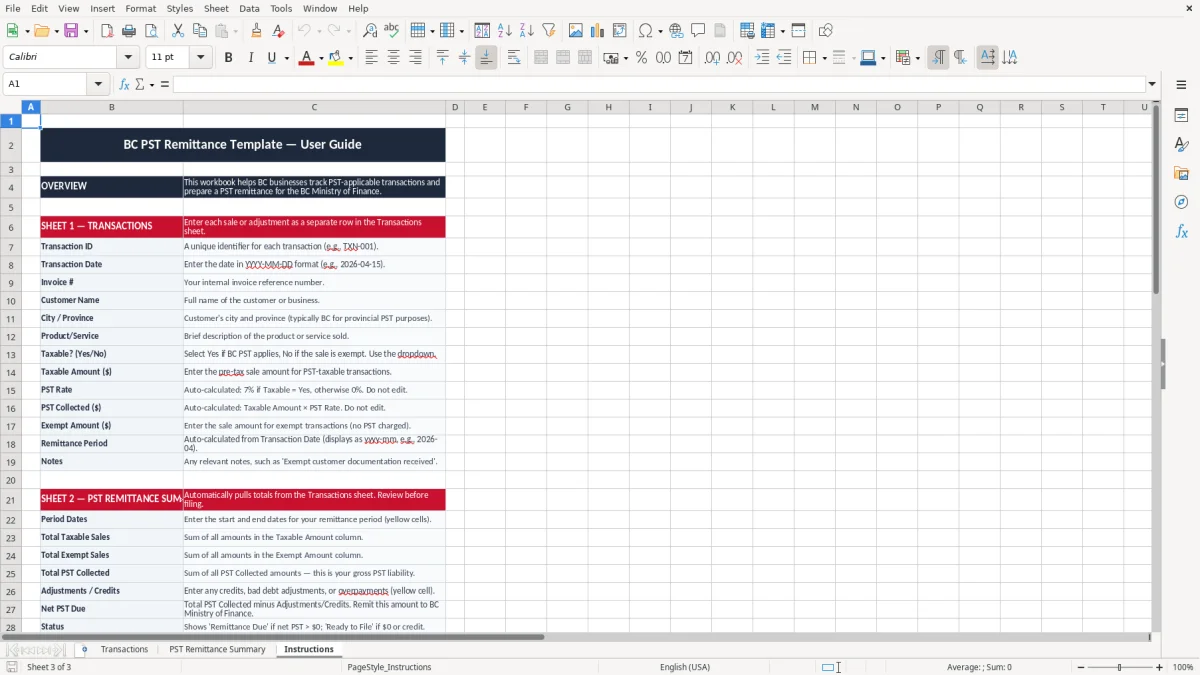
The workbook is set up around the fields you actually need: transaction date, invoice number, customer, province, taxable amount, PST rate, PST collected, and remittance period. Image 1 shows the entry sheet, image 2 shows the remittance summary, and image 3 gives you the step-by-step instructions.
You usually need this workbook when you are collecting PST on taxable sales in British Columbia and want a clear running total before the return goes in. A sole proprietor with 40 invoices a month can enter each sale as it happens, while a bookkeeper at a trades company can use it to prepare a month-end summary in under an hour.
An office manager at a plumbing shop might use it after each weekly invoice run, especially if the shop sells parts, fixtures, and labour on separate lines. A non-profit selling tickets or merchandise can use the same structure to separate taxable and exempt amounts before a season-end remittance check.
If you bill 120 taxable invoices in a quarter at an average of $180.00, that is $21,600.00 of taxable sales. At 7% PST, the remittance total is $1,512.00, and a sheet like this gives you a row-by-row record to back that number up.
The Transactions sheet in image 1 keeps the taxable amount, PST rate, and PST collected in separate columns, which is much easier to audit than burying everything in a memo. The summary in image 2 then gives you the filing total without forcing you to rebuild the math by hand.
In British Columbia, the PST rate is generally 7% on taxable goods and services, so you need to keep the tax shown separately instead of blending it into the sale price. If you sell $1,250.00 of taxable materials, the PST collected is $87.50, and that belongs in your remittance records as a distinct line.
If your business is registered to collect PST, you need records that support each return period and the amounts reported. This workbook helps you separate taxable sales from exempt amounts, which matters when you file monthly or other required periods through your provincial account.
The CRA’s six-year record-retention rule is the standard you should work around for business records, and a neat spreadsheet is easier to keep than loose paper slips. If you have 300 transactions in a quarter, a searchable sheet is the difference between finding one invoice in two minutes and spending half a day sorting folders.
The PST rate column in image 1 is useful even when you mostly charge the same rate, because it shows what was actually applied on each transaction. If one exempt sale slips in, the separate exempt amount column prevents you from overstating tax collected by mistake.
The most expensive mistake is mixing taxable and exempt sales in one total and then remitting too much or too little tax. If you collect PST on $18,000.00 of sales but accidentally include another $4,000.00 of exempt revenue, your filing total is wrong before you even start the return.
Another problem is leaving the PST rate blank and trying to fix it from memory later. That works on 10 rows; it falls apart on 200 rows, especially when you have mixed transactions such as materials, shipping, and services on the same invoice.
Double-entered invoices can inflate your remittance total by hundreds of dollars. For example, duplicate a $950.00 invoice at 7% and you overstate PST by $66.50, then spend time untangling which sale was real.
If you cannot explain why a sale was exempt, the missing note becomes a problem at review time. A clean notes column and a separate exempt amount field are much easier to defend than a spreadsheet full of merged totals and blank cells.
Those same notes also line up with a business expense record when you need to separate mixed invoices into deductible costs and taxable amounts.
The easiest way to keep this workbook alive is to tie it to one fixed task, such as your month-end close or your remittance deadline. If you process sales every Friday, spend 10 minutes that afternoon updating the Transactions sheet instead of waiting until the end of the quarter.
If you are handling 500 or more taxable invoices a month, a spreadsheet starts to feel tight. At that point, accounting software with tax codes and locked audit trails is usually the better move, while the workbook still works well as a review tool.
That same workbook can still serve as a review tool, while the quick HST calculation sheet keeps the remittance figures easy to check.