
Condo Board Operating Budget Excel Template Canada
9
Free download
Track T2125 business expenses with GST/HST, business-use %, deductible amounts, and CRA line references in Excel.
Download template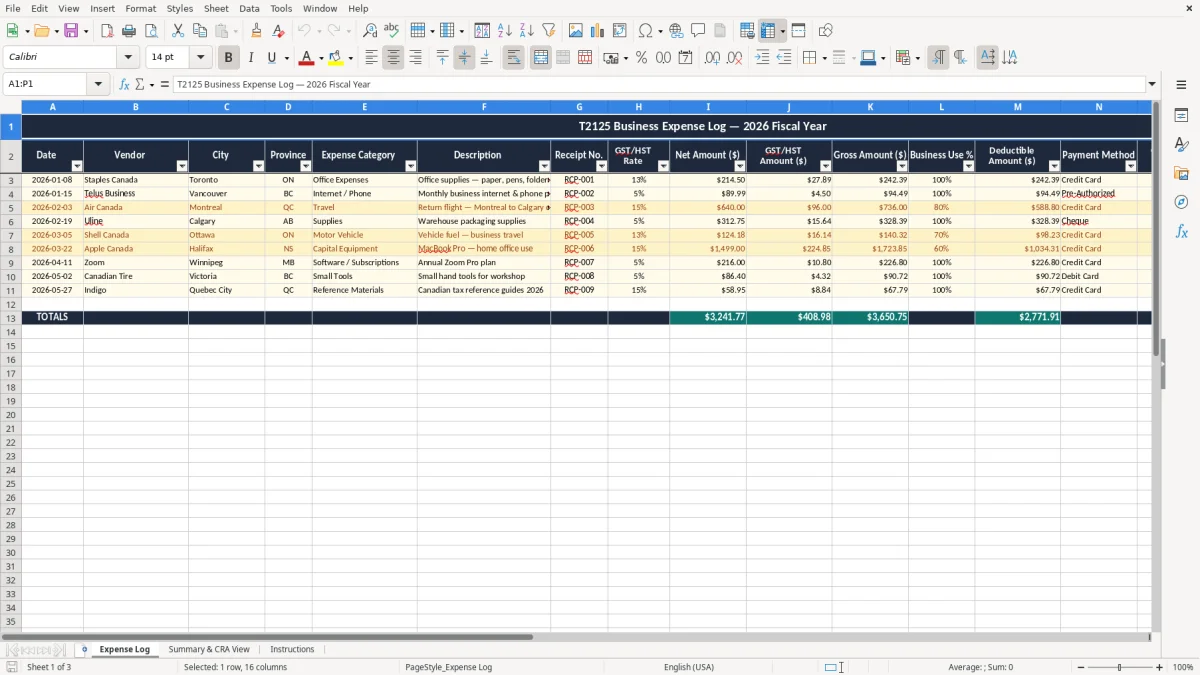
This T2125 business expenses Excel template helps you record deductible business costs for your self-employment return, calculate the business-use portion, and keep your GST/HST amounts tied to each receipt. It includes an Expense Log, a Summary & CRA View, and Instructions.
Use it when you are preparing your T2125, sorting receipts for your year-end, or checking what belongs in your books before you file. The sheet is set up for Canadian expenses with date, vendor, province, GST/HST rate, gross amount, deductible amount, and a CRA/T2125 line reference.
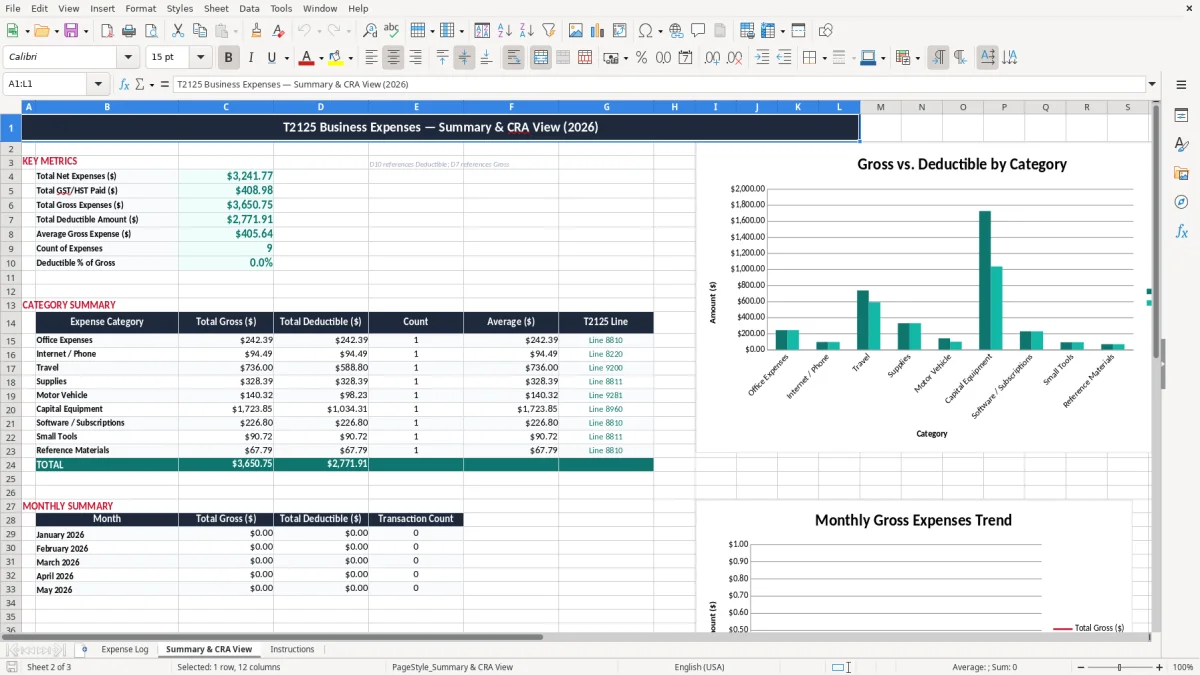
If you are a sole proprietor, a bookkeeper helping a small client, or a contractor with mixed personal and business spending, this keeps the numbers in one place instead of scattered across receipts and bank statements. Image 1 shows the entry sheet; image 2 shows the summary view you can use at filing time.
If you are a sole proprietor, you usually need a clean list of expenses long before you enter the numbers into your tax return. This template is built for the point in the year when the receipts are piling up, the year-end is close, and you need a working file that shows what was paid, what was taxable, and what is deductible.
A contractor with 4 employees may have $18,000 a month in materials, mileage, and subcontractor costs, while a freelance designer may only have 22 receipts in a quarter. In both cases, the same problem shows up: if you wait until filing time, you lose time matching bank lines to receipts and checking which costs belong on the T2125.
Image 1 shows the Expense Log sheet with a single row per expense and clear columns for Date, Vendor, City, Province, Expense Category, Receipt No., GST/HST Rate, Net Amount, GST/HST Amount, Gross Amount, Business Use %, Deductible Amount, Payment Method, CRA/T2125 Line Reference, and Notes. That layout works well for a bookkeeper at an incorporated business too, especially when the owner is still sending mixed personal and business charges.
The Summary & CRA View is the part you use when you want a quick total for rent, office, vehicle, meals, or supplies. If you have 300 orders a month in an online business, the summary saves you from rebuilding a subtotal every time you need to answer a tax question or prepare for instalments.
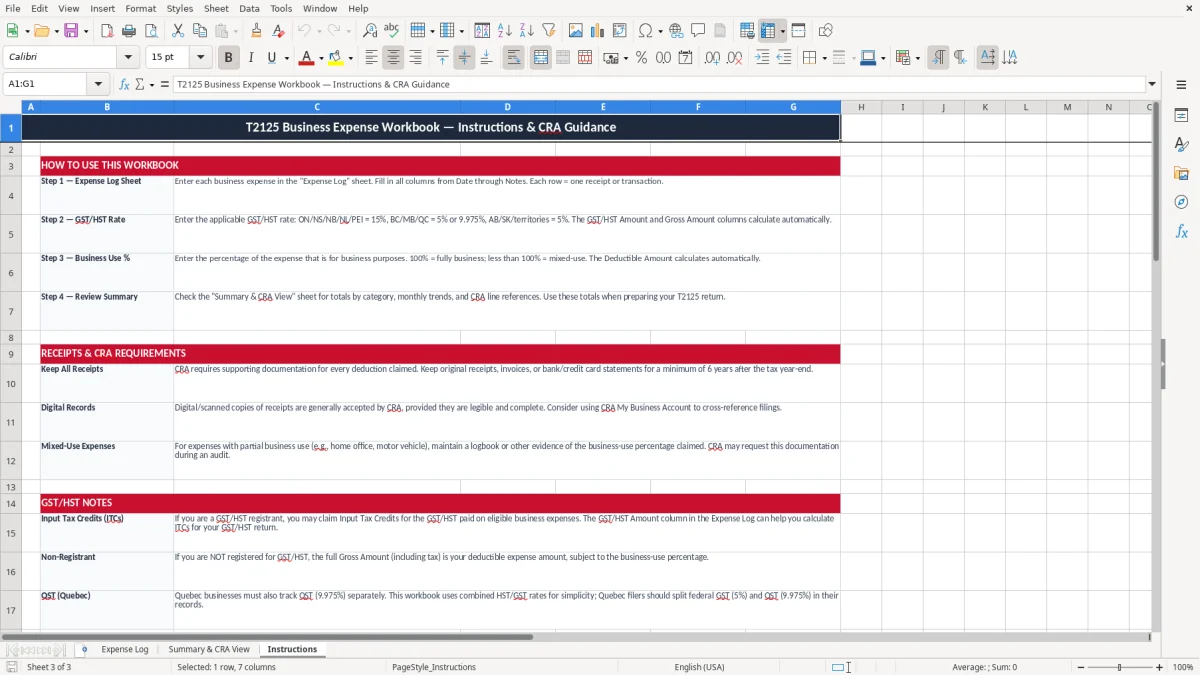
The CRA expects you to keep source documents that support each deduction, and the retention period is six years after the end of the tax year. If you claim a home office expense, a vehicle cost, or a mixed-use phone bill, the entry needs enough detail to show how you got from the receipt total to the deductible amount.
In Canada, GST is 5% federally. In Ontario the HST is 13%, and in the Atlantic provinces it is 15%; in provinces with PST or QST, the tax treatment needs to be tracked carefully so you know what is tax, what is expense, and what may be recoverable. A $113.00 invoice in Ontario, for example, contains $100.00 before tax and $13.00 of HST.
The template’s GST/HST rate and amount columns let you record the tax separately instead of burying it in one gross figure. That matters when you are preparing input tax credits for a registrant and when you are reconciling business expenses against a BN RT account.
For a self-employed filer with $42,000 of taxable revenue, the record set needs to be solid enough that you can defend each expense line if the CRA asks. The worksheet gives you the line reference field, which helps you map entries to the common T2125 sections without rebuilding the file from memory.
The most expensive mistake is treating every receipt as fully deductible when only part of it is business use. A $240 cell phone bill with 60% business use should usually be entered as $144.00 deductible; if you claim the full amount, you may be overstating expenses by $96.00 on that one line.
Another common failure is combining several payments into one lump note with no receipt number. If you have 18 meals over a quarter and only 7 of them are tied to actual business meetings, you will spend hours later sorting what belongs in the file and what should stay out.
People also misread tax-inclusive numbers. A $226.00 receipt in British Columbia is not the same as a $226.00 receipt in Ontario, because the tax split changes the deductible amount and the GST/HST treatment. One wrong tax line can throw off a month-end total by enough to confuse your cash flow forecast or your instalment planning.
If you lose 40 receipts at $35 each, that is $1,400 of support you may not be able to prove at review time. The time cost is worse: a clean spreadsheet takes 20 minutes to scan, but a messy one can eat an entire Saturday before your filing deadline.
That same receipt trail is what feeds a rental income statement when you need to separate deductible expenses from the amounts that remain taxable.
The sheet only works if you use it on a schedule. The easiest habit is to update it on the same day you do your bank feed review, your payroll run, or your monthly GST/HST check, so the file stays current instead of turning into a year-end rescue project.
If you are tracking hundreds of rows a month, or if you need multi-user approval, a basic spreadsheet will start to feel tight. At that point, move to accounting software with expense capture and receipt imaging, but keep the spreadsheet as your review sheet for the T2125 totals.
A 10-minute weekly update is easier than a 3-hour scramble before filing. That simple habit also makes your income statement and year-end review much cleaner because the expense file is already organized by category and tax treatment.
La actualización semanal de 10 minutos encaja muy bien con el cálculo rápido de HST en Excel, porque mantiene separadas las categorías y el tratamiento fiscal antes del cierre mensual. También deja más limpio el resumen de ingresos y la revisión de fin de año.