
CNESST Remittance Excel – Free Template (2026)
0
Free download
Track T4 data, compare totals, and review summary figures before filing your CRA slips.
Download template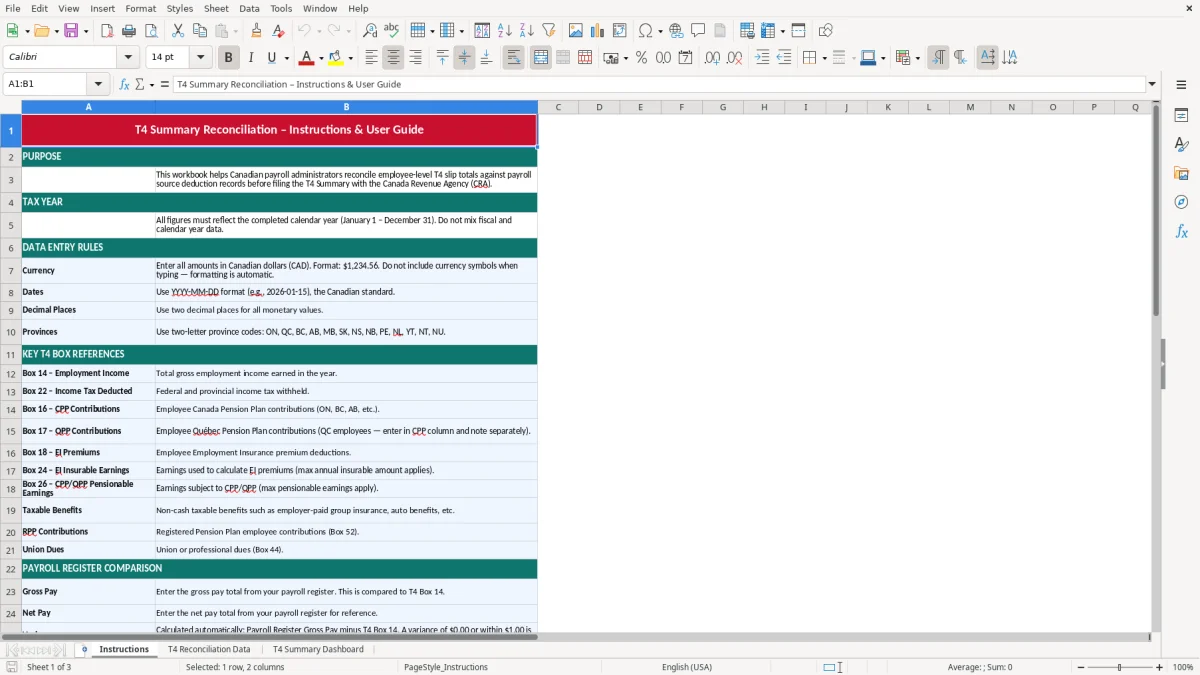
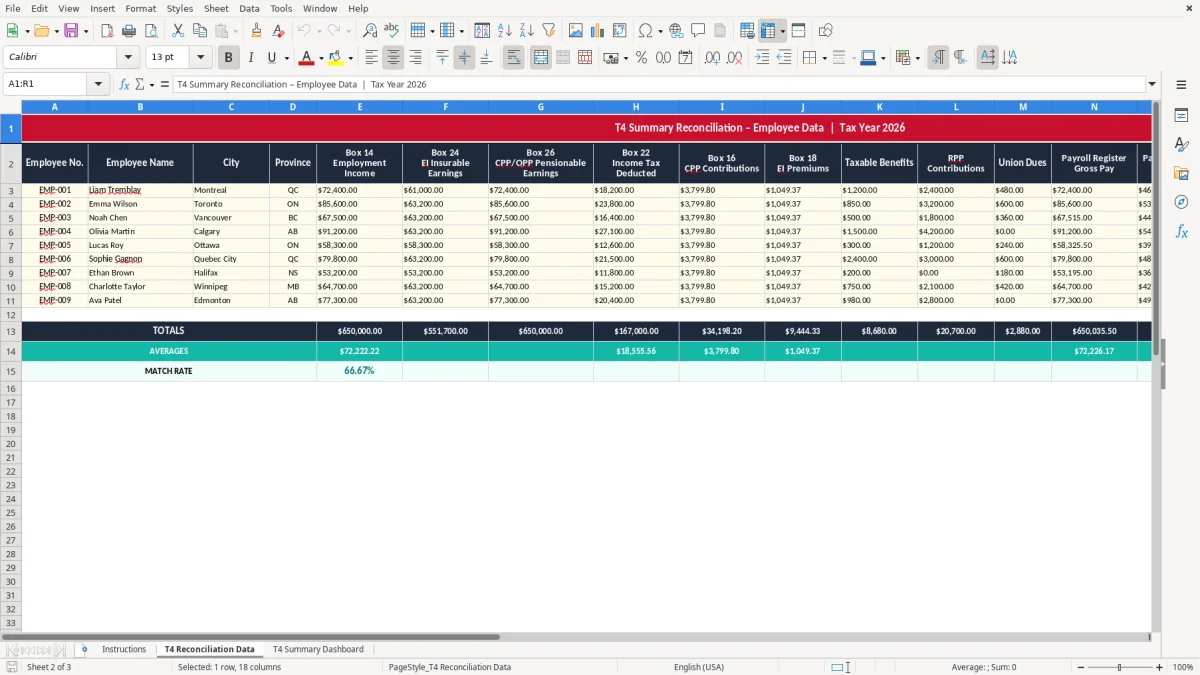
This T4 summary reconciliation Excel template helps you check payroll totals before you file your T4 slips and T4 Summary with the CRA. It gives you a place to compare payroll data, spot mismatches, and keep the reconciliation trail in one workbook.
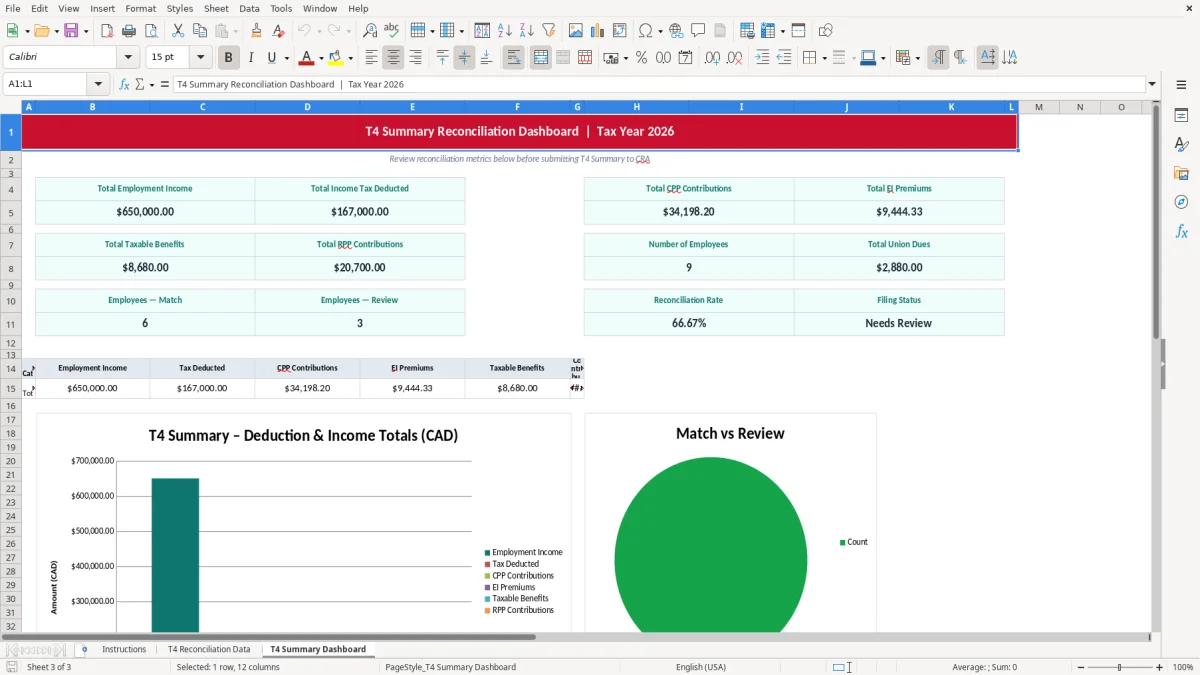
The template includes three sheets: Instructions, T4 Reconciliation Data, and T4 Summary Dashboard. You can enter the payroll figures you want to compare, then use the dashboard to review the totals and see where the numbers line up or need a second look.
If you are the bookkeeper, payroll clerk, or owner trying to close year-end, this is the sort of spreadsheet that saves you from chasing down a $12.34 difference after everyone else has moved on.
You use this workbook when payroll has to tie out before filing time. That usually means a small business owner doing the books, a payroll clerk at an incorporated company, or an office manager at a trades shop where 4 to 20 employees all have different earnings, deductions, and taxable benefits.
The timing is usually year-end, but the pressure starts earlier if you run payroll weekly or biweekly. If one employee’s taxable benefit is off by $18.00 or a bonus is posted twice on a $52,000 payroll file, the mismatch shows up in the T4 totals and forces a manual check.
A bookkeeper might use it after the last December payroll run to compare annual wages, CPP, EI, and taxable benefits. A treasurer at a non-profit may use it when 8 employees and a few casual staff members need clean year-end slips, while a payroll clerk may use it right before filing the T4 Summary with the CRA.
If your payroll system says 12 slips were issued but your accounting records only show 11, you want that caught before filing. A simple spreadsheet that shows totals by line can save an hour of tracing, and in a small office that hour often comes on the worst day of the month.
The CRA expects your payroll records to support the figures you report on T4 slips and the T4 Summary. That means the wages, taxable allowances, deductions, and employer remittances in your records should line up with the slips you issue and the summary you file.
For payroll remittances, you are dealing with source deductions such as CPP, EI, and income tax. If you have 10 employees paid $4,000 each in a pay period, the gross payroll is $40,000 before deductions, and a small mismatch in taxable benefits or pensionable earnings can throw off the annual summary totals.
The CRA keeps the six-year record-retention expectation in the background, so your reconciliation workbook should make it easy to show how the annual figures were built. If you ever need to trace a line back to source records, the workbook should point you to the amount, the employee, and the period without guesswork.
The point is not just neatness. If your summary shows $182,450 in employment income but the individual slips add to $182,397, you have a $53 difference that needs to be explained before filing, and that kind of gap usually comes from a missed adjustment, not a major payroll problem.
The most common break point is a small adjustment that never makes it from payroll notes into the final numbers. A bonus, a retroactive pay correction, or a taxable benefit such as a personal use amount can be entered in one place and forgotten in another, leaving the summary short by $75 or overstated by $125.
Another frequent problem is double-counting an employee after a rehire, merger, or name change. If you have 14 active workers and one person is accidentally entered twice, the slip count might look fine at first glance while the wages and deductions totals are wrong by thousands of dollars.
A mismatch does not usually mean disaster, but it does mean time. One payroll clerk can easily spend 2 hours pulling reports, checking registers, and comparing the T4 slips to the general ledger when a $19 rounding issue appears on the dashboard.
The worst errors are the ones that look harmless. A $1.00 difference per employee across 28 staff members is only $28, but if that difference sits in the wrong box it can make the whole year-end package look sloppy and force a second review by the bookkeeper or controller.
The easiest way to keep this workbook alive is to tie it to a fixed payroll task. Use it on the same day you prepare the final December remittance or the same morning you review T4 slips, so it becomes part of the rhythm instead of a separate project.
If you have 60 or more employees, multiple pay groups, or repeated amendments, the workbook will still help, but you may outgrow it as the main system. At that point, you want payroll software and a formal close process, with the spreadsheet used as the check rather than the source of truth.