
Condo Board Operating Budget Excel Template Canada
9
Free download
Quick Method HST calculator for Canadian sales, remittance, ITCs, and a summary by invoice and province.
Download template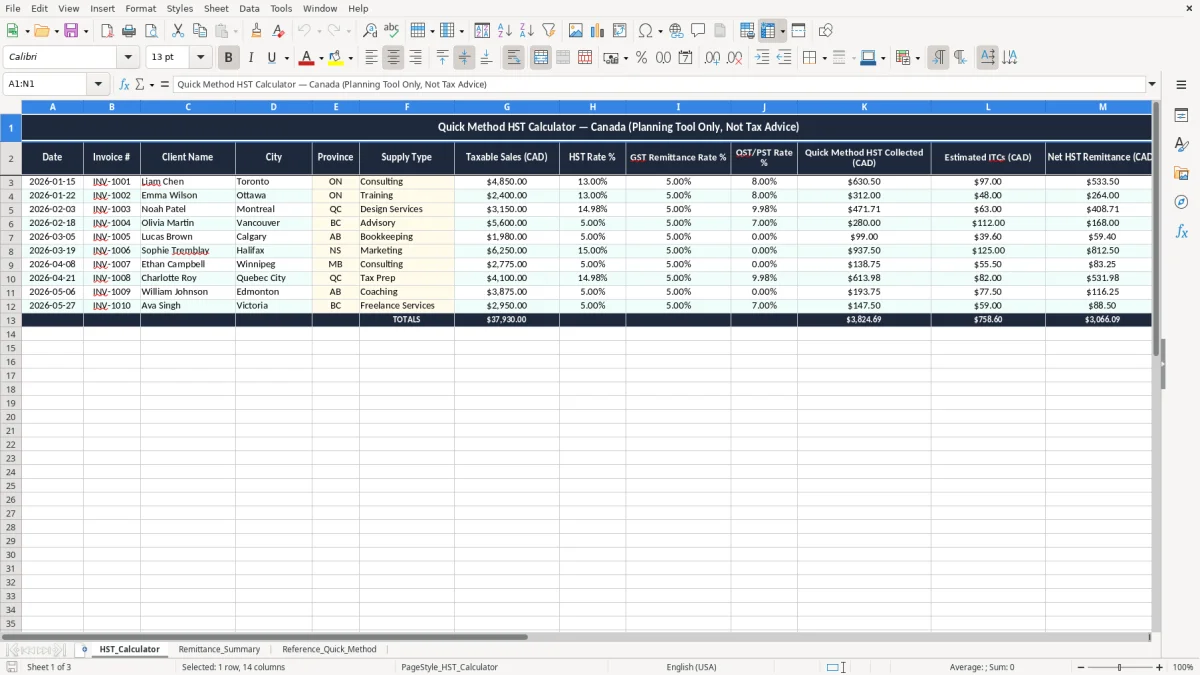
This Quick Method HST Calculation Excel spreadsheet helps you estimate the HST you collect, compare it with your remittance amount, and track estimated input tax credits (ITCs) in one place. It includes an entry sheet, a remittance summary, and a quick method reference sheet for Canadian users.
Use it when you need a simple planning tool before a GST/HST filing, especially if you are a sole proprietor, bookkeeper, or small business owner handling taxable sales in multiple provinces. The template is built around invoice-level entries, so you can see the tax effect on each sale instead of guessing at month-end.
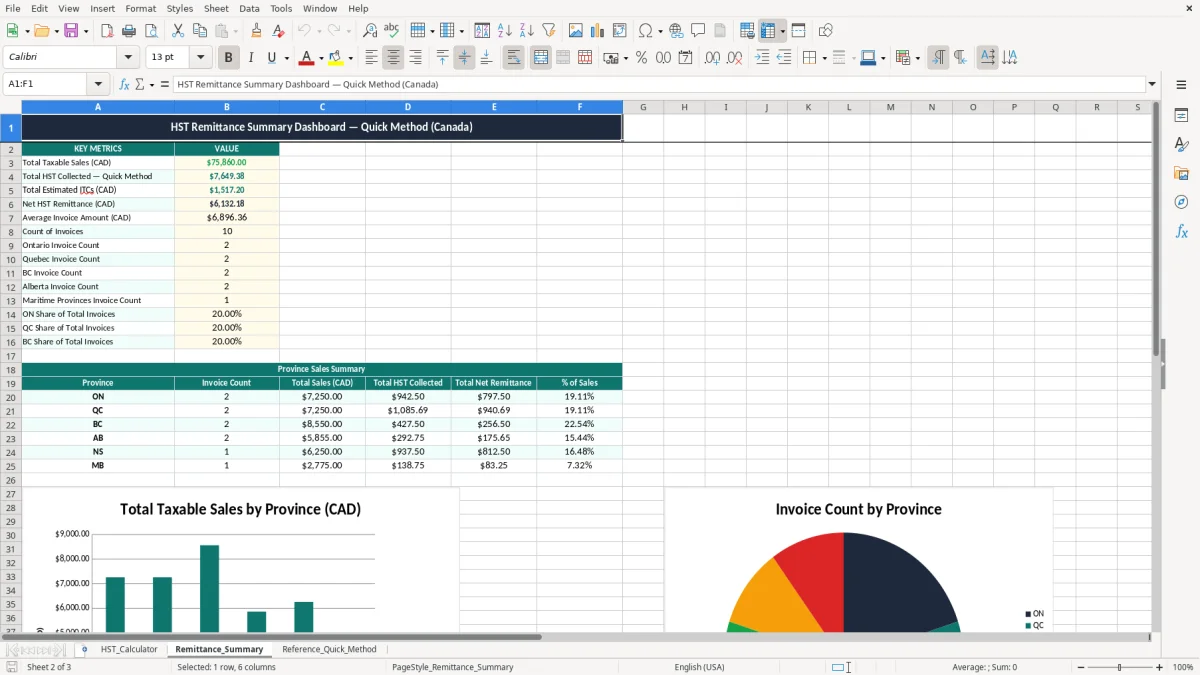
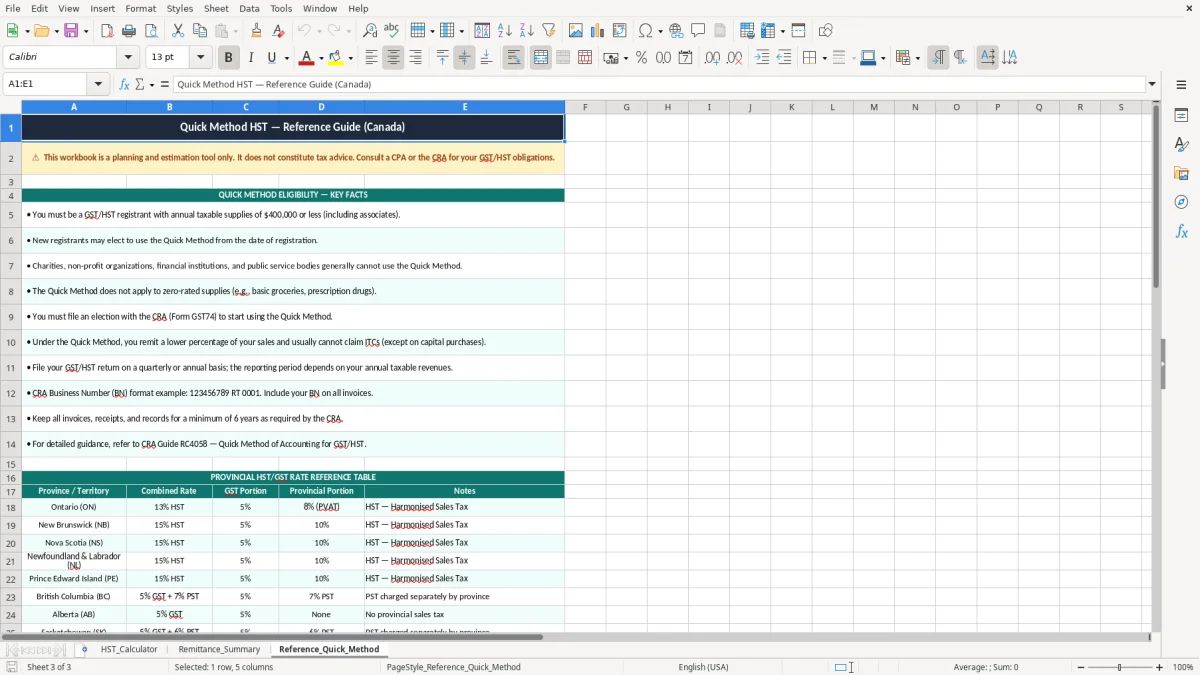
The screenshot set shows three sheets: HST_Calculator for the working log, Remittance_Summary for totals, and Reference_Quick_Method for the rate guide. That makes it easier to compare collected tax, remittance rates, and the net amount you should set aside.
If you are a sole proprietor in Ontario, a bookkeeper at an incorporated contractor, or an office manager at a trades shop, this is the kind of spreadsheet you reach for before a GST/HST filing. It is most useful when you have steady invoice flow — for example, 40 invoices a month at $250 each, or an online store with 300 orders a month that need tax reviewed.
Most people use it near the end of the filing period, then again when they reconcile the bank account. A contractor with 4 employees can use the HST_Calculator sheet to review taxable sales by invoice instead of waiting until the accountant asks for totals.
If you are handling your own books, the spreadsheet keeps the tax math visible line by line. If you are supporting a non-profit treasurer or a small retail owner, it also gives you a simple check before you post the remittance journal entry or transfer money to the tax account.
The two practical numbers matter most: the collected tax and the estimated remittance. When you can see a $1,000 sale turning into $130 collected HST and a $100 remittance amount, you can plan the difference instead of guessing at month-end.
The CRA expects you to keep enough support to show how you calculated your remittance, and the usual record-retention period is six years. That matters because a quick method worksheet is not just a planning tool — it is part of the support for your GST/HST numbers.
The small-supplier threshold for mandatory GST/HST registration is $30,000 in taxable revenue over four consecutive quarters. Once you register, you also need a BN with an RT program account, and your filing frequency may be monthly, quarterly, or annual depending on your revenue and filing setup.
For many small businesses below roughly $400,000 in taxable revenue, the quick method is simpler because you remit at a prescribed rate instead of tracking every input tax credit. If you have heavy expenses with a lot of recoverable tax, the regular method usually gives you more precise ITCs; if your overhead is light, the quick method often saves time and bookkeeping effort.
Example: if you collect $13,000 of HST on sales and your quick method remittance rate is 10%, you remit about $10,000 before ITCs. If you have $1,200 of estimated ITCs, your net remittance drops to about $8,800, which is the figure you want sitting in your tax account before the filing deadline.
The biggest mistake is mixing up the rate used on the invoice with the rate used for remittance. If you charge 13% HST in Ontario but calculate the remittance as if every sale were at the same provincial rate, you can be off by hundreds of dollars on a modest month of sales.
A second problem is sloppy invoice detail. If 10 out of 100 rows are missing province codes, client names, or dates, you waste time tracing them back through email, bank deposits, and packing slips before you can trust the summary sheet.
Another common error is spending the HST you collected. On $50,000 of taxable sales, even a small remittance mismatch can leave you short by $1,000 or more when the return is due, and that turns into a cash flow problem fast. It is much easier to set aside the net amount every week than to find it all at filing time.
The other costly mistake is forgetting estimated ITCs that should reduce the remittance. If you paid $600 of HST on software, supplies, and fuel during the period, leaving that out means you overpay the CRA and then spend extra time fixing the return later.
Those software, supplies, and fuel amounts also belong in a business expense tracker, so the ITCs and deductible costs stay aligned with the return instead of being rebuilt later.
The spreadsheet works best when you tie it to a fixed habit. Most small businesses should update it on the same day as bank reconciliation, payroll, or the last Friday before the filing deadline, so the work happens before the pressure builds.
If you are handling hundreds of invoices, multiple sales channels, or a more complex GST/HST structure, a spreadsheet starts to feel stretched. At that point, you should move to accounting software with tax codes and stronger audit tracking instead of forcing a manual workbook to do everything.
That same handoff is also the point where a rental income statement becomes the right next record, especially when your spreadsheet is tracking property receipts alongside GST/HST activity.