
Provincial Tax Excel Template – Free (2026)
6
Free download
Bill snow-plowing and salting routes by client, date, hours and province, with HST, payment status and overdue tracking for Canadian operators.
Download template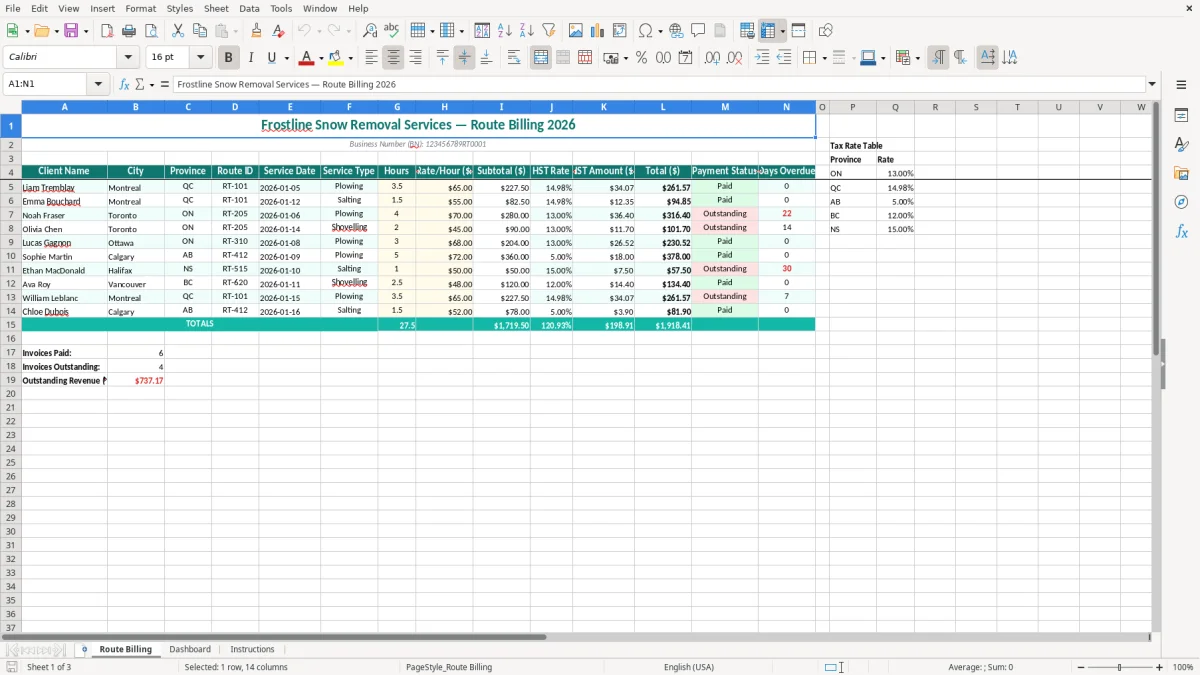
This snow removal billing Excel spreadsheet records each client visit, route, service date, service type, hours and hourly rate, then calculates the subtotal, HST, total and days overdue. It is built for Canadian plowing and salting contractors who need one practical record for invoicing and collections.
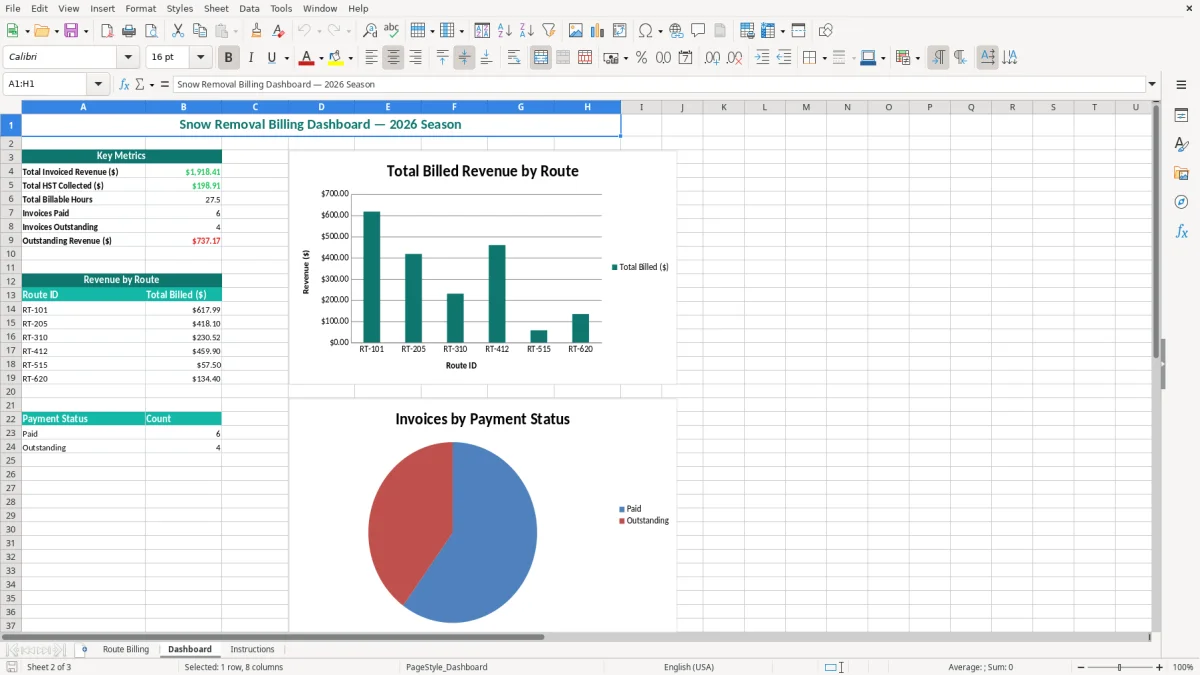
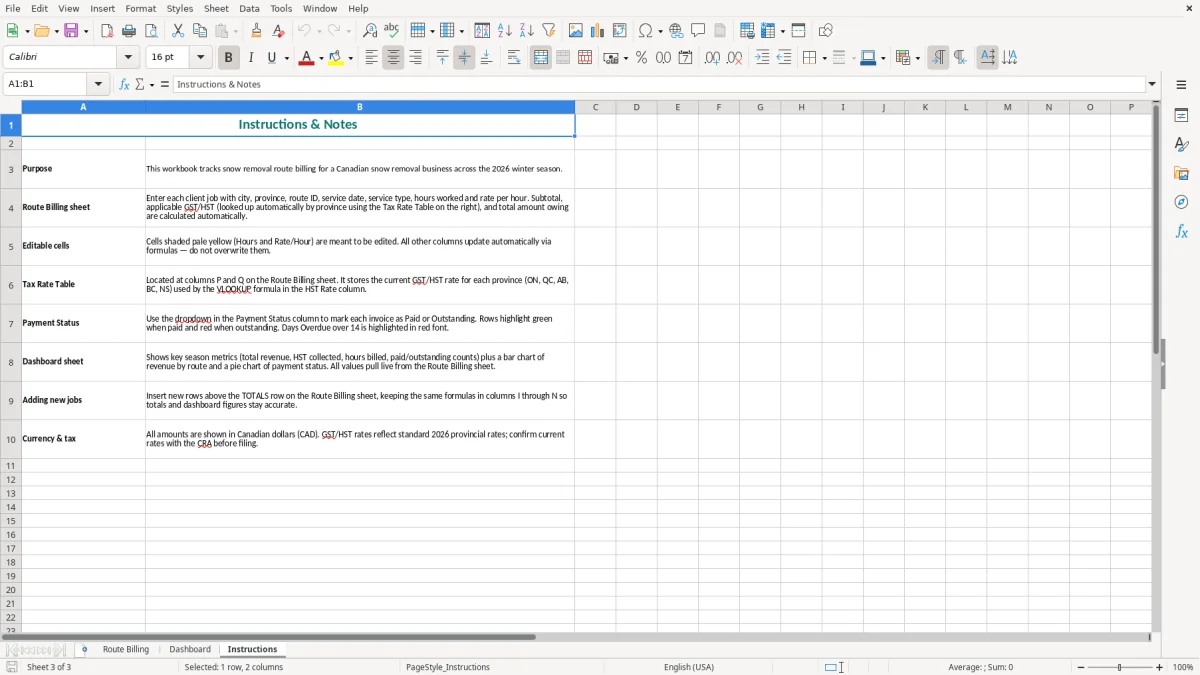
The Route Billing sheet contains the transaction table, while the Dashboard summarizes route activity and billing results. The Instructions sheet explains the intended workflow, and image 1 shows the teal-formatted billing table with input cells and calculated columns.
A small snow-clearing contractor usually needs this file twice: immediately after a storm and again when invoices are prepared. The owner may finish a 4:00 a.m. plowing run, return for salting at noon, and still need to remember which commercial lots were serviced. Entering each visit on the Route Billing sheet creates a usable record while the details are fresh.
An office manager at a landscaping or trades company can use Route ID to group work by crew and territory. For example, RT-101 might cover five Montreal properties while RT-205 covers Toronto customers. A row showing 3.5 hours at $65.00 gives a $227.50 subtotal before tax; a separate 1.5-hour salting visit at $55.00 gives $82.50. Combining those figures manually on a busy billing day is an easy way to miss a service.
Use one row per client visit rather than one row for the whole storm. That approach matters when a customer disputes a charge or asks which date the crew attended. The Client Name, City, Province, Route ID and Service Date columns provide the audit trail, while Service Type distinguishes plowing from salting.
At the end of the week, filter or review Outstanding rows and compare them with deposits received. A contractor with 40 visits at an average $250 subtotal has $10,000 of service revenue before tax; losing three unrecorded visits would leave roughly $750 unbilled. The Dashboard, shown in image 2, provides a quick management view, but the Route Billing sheet remains the detailed source.
For a sole proprietor, this is a practical bridge between field notes and bookkeeping software. For an incorporated snow contractor, the bookkeeper can use the completed rows to support sales invoices, bank reconciliation and the seasonal revenue review.
Snow removal is generally a taxable service when supplied by a GST/HST registrant. The federal GST rate is 5%; HST is 13% in Ontario and 15% in New Brunswick, Nova Scotia, Prince Edward Island, and Newfoundland and Labrador. Quebec generally uses 5% GST plus QST, while British Columbia, Saskatchewan and Manitoba generally use GST plus PST where the provincial rules apply.
Mandatory registration normally starts when worldwide taxable revenue exceeds $30,000 over four consecutive calendar quarters, or exceeds $30,000 in a single quarter. Once registered, you need a business number with an RT program account, such as BN 123456789RT0001, and must show the GST/HST number and tax separately on invoices. The BN displayed in this template is an example: replace it with your actual account.
Suppose an Ontario commercial visit is 4 hours at $70.00. The subtotal is $280.00, HST at 13% is $36.40, and the customer total is $316.40. A $280.00 Quebec subtotal would normally show $14.00 GST before any applicable QST treatment. Entering the province and HST Rate separately makes that review visible instead of burying tax inside a total.
The CRA generally expects business records and supporting documents to be retained for six years from the end of the relevant tax year. Keep service records, invoices, bank deposits and expense receipts together. The file supports the sales side of a GST/HST return, but it does not replace the return or calculate input tax credits for fuel, repairs, salt, insurance and equipment.
For most small operators, the regular GST/HST method is the clearest choice when vehicle, equipment and salt costs are substantial because eligible input tax credits can be tracked. The Quick Method may be simpler for an eligible business, but compare the remittance result before choosing it; the spreadsheet itself should still show the tax charged to customers.
The most expensive errors usually happen between the truck cab and the office. A driver writes RT-205 on a paper card, the office types RT-250 into the workbook, and the visit disappears from the route review. With 20 missed entries at $180 each, the business has left $3,600 of service revenue unbilled before considering HST.
Snow work is not one uniform service. Plowing, salting, sanding and a return visit can have different rates and different contractual triggers. If a $70-per-hour plowing rate is used for 4 hours instead of the agreed $55 salting rate for 1.5 hours, the incorrect subtotal is $280.00 rather than $82.50. That $197.50 difference can turn a routine invoice into a customer complaint.
Another common problem is entering a monthly contract as one vague amount without retaining the service dates. A property manager may ask for proof after a storm. The Service Date, Service Type and Route ID columns give you a defensible starting record, but only if the operator completes them on the day of service.
Applying Ontario's 13% HST to a Quebec customer without checking the place-of-supply treatment can distort both the invoice and the return. On $12,000 of monthly billings, a 3-percentage-point error represents $360 of tax difference. The correction then requires an amended invoice, a customer explanation and a bookkeeping adjustment.
Payment Status is also easy to neglect. If 12 invoices of $450 remain marked Paid after only 10 cheques arrive, the receivable is understated by $900. Days Overdue should be updated from the invoice due date and payment evidence, not guessed from the last storm. A spreadsheet can expose the issue, but it cannot fix a bank reconciliation that was never performed.
Do not overwrite calculated subtotal, HST or total cells with typed amounts. Doing so breaks the arithmetic for that row and makes a later review much slower. Keep the original workbook, a dated export and the invoice copies for the CRA's six-year record period.
When those records include rental receipts, the same documentation can feed a rental income statement for the year-end return.
The file works best when entry is tied to a fixed operational event. Have the crew lead submit completed route cards by 10:00 a.m. after each storm, then have the office manager enter the rows before lunch. Waiting until Friday turns 30 visits into a memory exercise and increases the chance that hours, service types or payment details are wrong.
Use the Dashboard in image 2 as a meeting screen rather than as a substitute for the detailed table. The Dashboard can show the pattern of billing activity, while the Route Billing sheet answers the questions: which client, which route, which date and how many hours?
Keep the column headings unchanged and use the existing formatting when adding rows. Enter dates consistently as YYYY-MM-DD, use province codes such as ON and QC consistently, and avoid creating a second spelling for the same client. Save a copy after each weekly close; a file named with the service week is easier to restore than a sequence of files called Final and Final2.
Move to dedicated field-service or accounting software when several crews enter data at once, you exceed roughly 500 rows per season, customers require automated recurring invoices, or you need real-time payment integration. Until then, a disciplined 15-minute Friday review is usually more reliable than an elaborate system nobody updates.
That same weekly review is also the right point to note half-year depreciation for new assets, so the books stay aligned when equipment is put into service midyear.