
Maternity Top-Up Excel Template – Free (2026)
2
Free download
FHSA contribution ledger and dashboard template for tracking room, growth, withdrawals, and balances in Canada.
Download template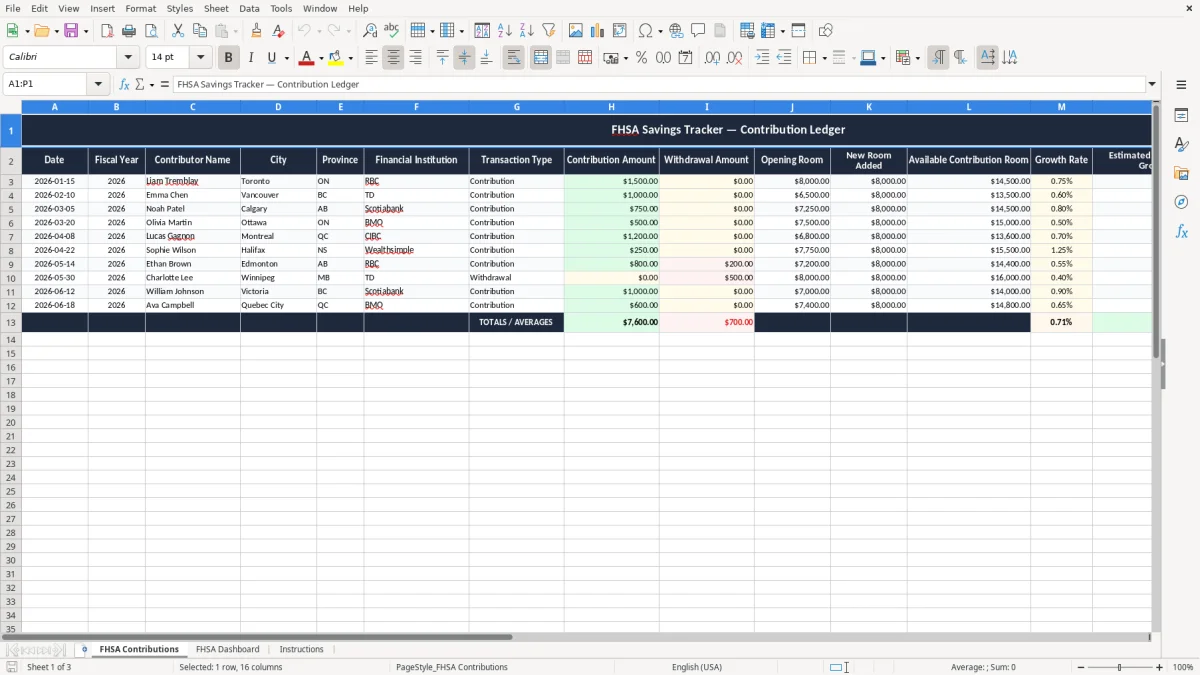
This FHSA savings tracker Excel spreadsheet helps you record contributions, withdrawals, available room, and estimated growth in one place. It includes the FHSA Contributions ledger, an FHSA Dashboard, and an Instructions sheet.
Use it to stay under your available contribution room, watch your closing balance, and keep a clean record for your first-home savings plan. The layout is built for Canadian users who want a simple workbook they can update after each deposit or withdrawal.
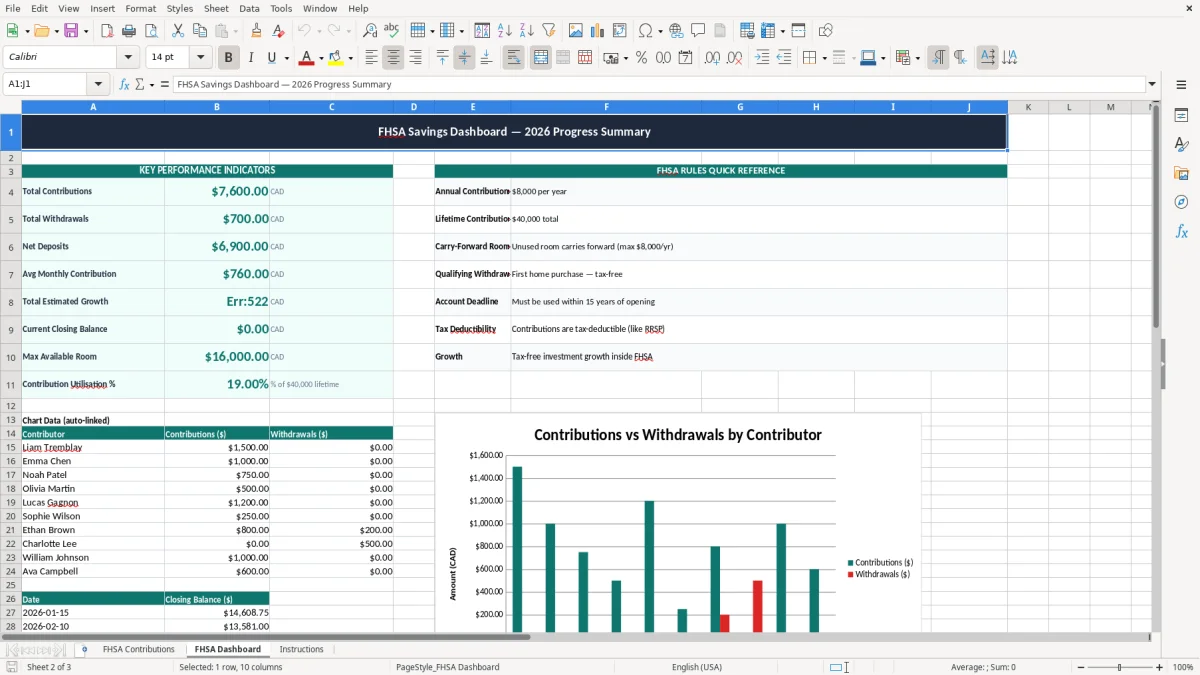
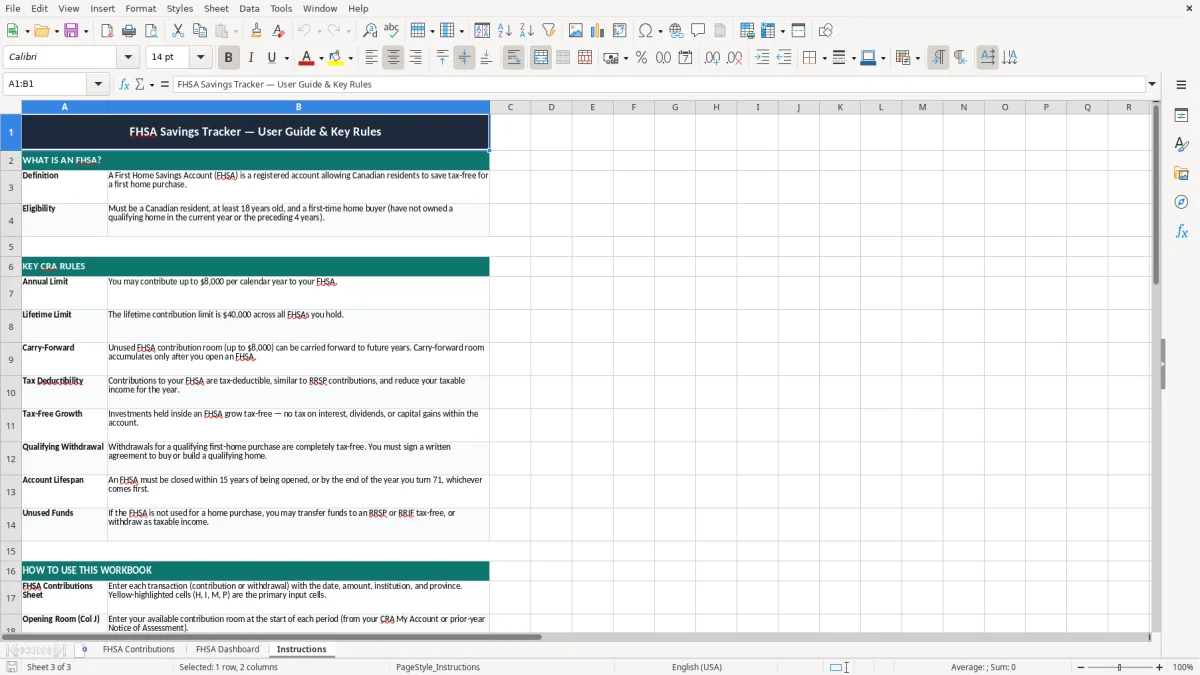
Image 1 shows the transaction ledger, image 2 shows the dashboard view, and image 3 contains the setup notes. The workbook is structured so you can enter one contribution at a time and see the effect on your balance without doing the math yourself.
This spreadsheet is for the person who wants to keep an FHSA accurate without opening a full accounting system. A first-time homebuyer can use it after each paycheque deposit, while a couple can keep separate lines for two accounts and compare balances before a house hunt starts.
A salaried employee might add $300 every two weeks, then check the dashboard at month-end to see whether the account is on pace for a $16,000 target. A self-employed person can use the same file to record a $2,000 lump-sum contribution after a strong quarter and keep the paper trail in one place.
The FHSA Contributions sheet matches the way people actually save: one line per transaction, one balance after another, no hidden logic to guess through. The FHSA Dashboard is there for the quick answer when you want to know, in ten seconds, how much room you have left and how much your account is worth today.
The FHSA is a registered savings plan, so your record-keeping should be specific, not casual. In 2026, the annual contribution limit is $8,000 and the lifetime limit is $40,000, so a tracker like this helps you spot when a $5,000 deposit still leaves room or when two deposits have already used most of the annual cap.
If you put in $8,000 in January and another $1,000 in March, you are over the annual limit by $1,000 before you even look at investment growth. That is the kind of mistake this sheet prevents, because it shows opening room, new room added, and available room on the same row.
You do not need a heavy system for an FHSA, but you do need clean support for your deposits and withdrawals. Keep the workbook with your tax files for at least the CRA’s six-year retention window so you can answer questions about timing, amounts, and any deduction you claimed.
Those same files become part of your annual support package, and a balance sheet template can keep the year-end figures organized alongside the FHSA records you retain for CRA review.
The most common error is recording the contribution date loosely and then losing track of which tax year the deposit belongs to. If you make a $4,000 deposit on 2026-12-30 but only enter it in January, your year-end numbers can look fine on paper while your deduction claim and contribution room no longer line up.
Another mistake is treating growth like a guess and never updating the rate. If a $10,000 balance grows at 5.0% instead of 2.0%, the estimated year-end value differs by about $300 after one year, which is enough to distort your saving target if you are planning a home purchase.
People also forget to record withdrawals separately, then wonder why the balance in the bank and the balance in the sheet do not match. If you withdraw $3,500 for a down payment-related transfer and leave it out, the tracker can overstate your available funds by exactly that amount until you fix the row.
That same record-keeping becomes even more important when the withdrawal is meant to be offset later, because an RRSP room tracker keeps the contribution and withdrawal side of the plan aligned.
The easiest way to keep this file alive is to update it on the same day you move money into the FHSA. For most people, that means one set date each month, or the same day you review your paycheque and savings transfers.
Once you have enough transactions that the balance no longer explains itself, you have outgrown a simple tracker and should move to a more complete portfolio or tax system. Until then, this file is enough for a clean, practical FHSA routine.