
Ice Fishing Hut Rental Log Excel – Free Template (2026)
8
Free download
Track firewood orders, cords, pricing, delivery fees, taxes and payment status with a Canadian Excel sales spreadsheet and dashboard.
Download template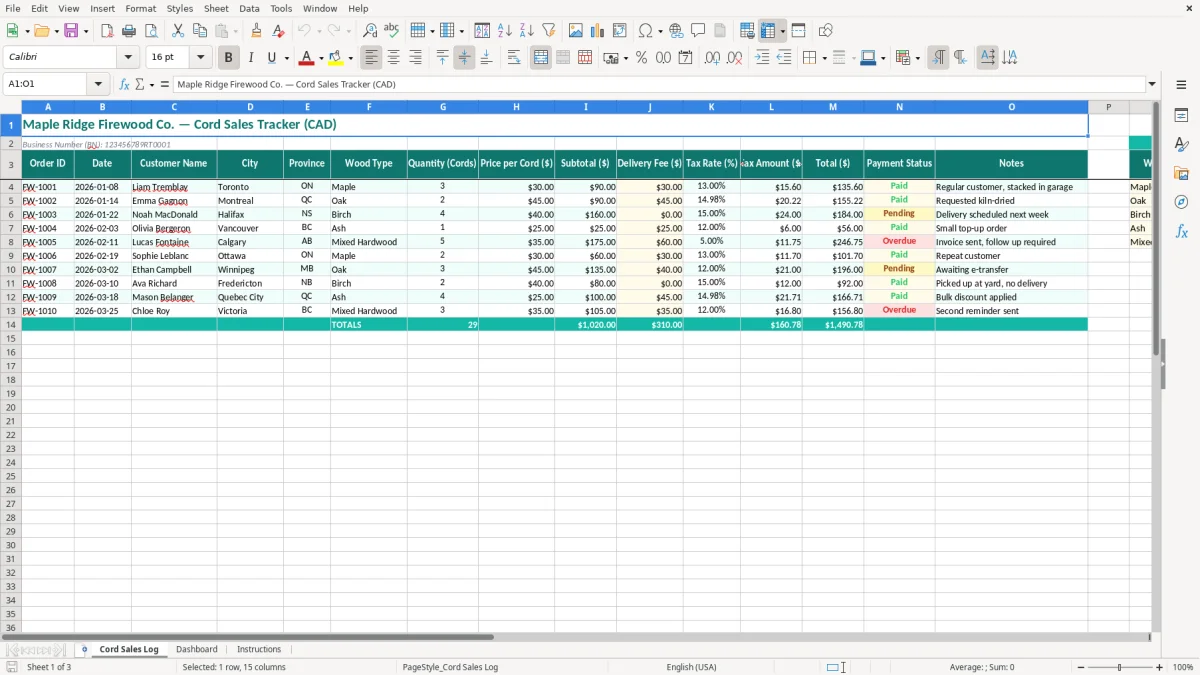
This firewood cord sales tracker Excel template records each order, customer, location, wood type, cord quantity, price, delivery fee, tax and payment status. It includes a Cord Sales Log for entry, a Dashboard for reviewing sales activity and an Instructions sheet to guide setup.
Use it for a small firewood operation selling maple, oak, birch or ash by the cord across Canada. The log includes Order ID, Date, Customer Name, City, Province, Wood Type, Quantity (Cords), Price per Cord, Subtotal, Delivery Fee, Tax Rate, Tax Amount, Total, Payment Status and Notes.
A firewood cord sales spreadsheet suits the operator who cuts and delivers seasonally, the family business selling from a roadside yard and the incorporated wood supplier with a few delivery trucks. The need usually becomes urgent in September and October, when repeat customers place winter orders, or after the first cold week, when a weekend of phone calls produces more orders than you can remember.
Image 1 shows the Cord Sales Log. Its 15 columns run from Order ID and Date to Customer Name, City, Province, Wood Type, Quantity (Cords), Price per Cord, Subtotal, Delivery Fee, Tax Rate, Tax Amount, Total, Payment Status and Notes. That layout is more useful than a simple customer list because it preserves the details that affect both the invoice and the delivery.
Suppose a contractor sells 3 cords of maple at $180 per cord and charges $35 for delivery. The wood subtotal is $540, and the pre-tax customer charge is $575. If the sale is subject to 13% HST in Ontario, the tax is $74.75 and the total is $649.75. Entering those parts separately makes the calculation auditable when the customer asks why the total is different from the wood price.
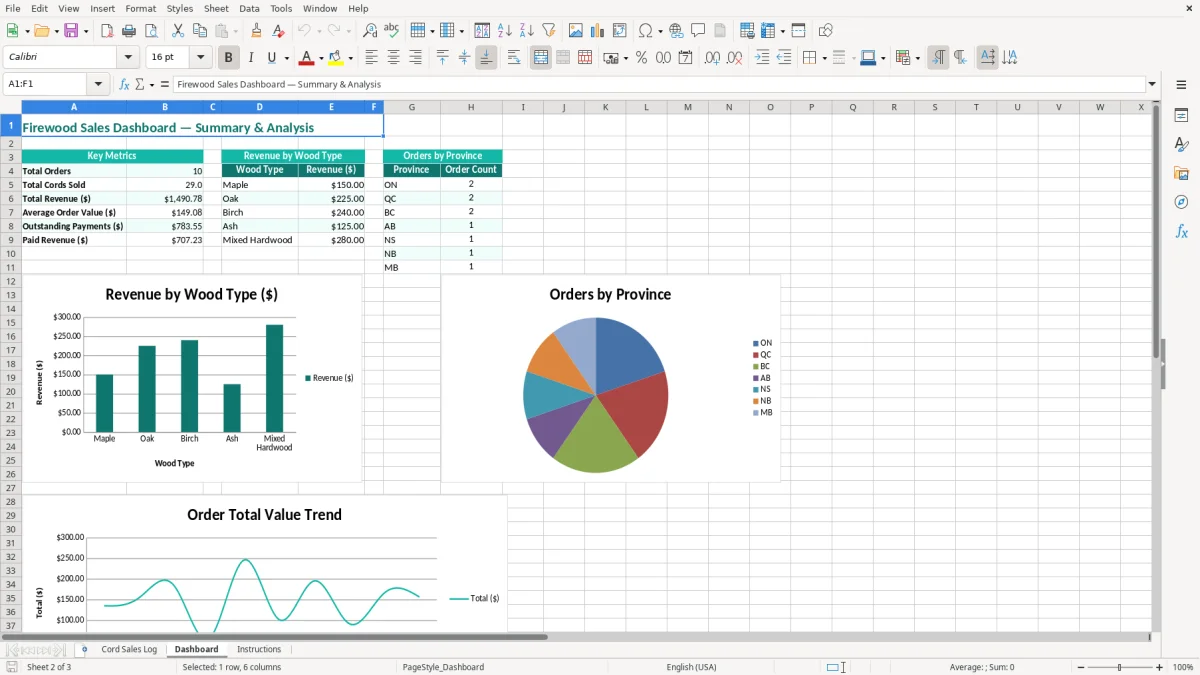
A sole proprietor can enter orders immediately after taking payment by phone. An office manager at a landscaping or heating company can use the same log during a busy delivery week, while a bookkeeper at an incorporated business can export or reconcile the totals later. Image 2 shows the Dashboard, which gives you a quicker view of the sales entered than scanning dozens of customer rows.
Use it before a delivery route is loaded, after a cash or e-transfer payment is received and at month-end. A non-profit treasurer running a community wood fundraiser can also use the Province, Payment Status and Notes fields to see which of 40 orders are complete and which still require collection.
Tax treatment starts with registration, not with the spreadsheet. A business generally must register for GST/HST once worldwide taxable revenue passes $30,000 over four consecutive calendar quarters, or immediately when it exceeds $30,000 in a single quarter. If you are registered, show the tax separately and keep the order total consistent with your filed return.
For a registered seller, the common rates are 5% GST, 13% HST in Ontario and 15% HST in New Brunswick, Nova Scotia, Prince Edward Island, and Newfoundland and Labrador. Quebec uses 5% GST plus 9.975% QST in many taxable transactions; British Columbia, Saskatchewan and Manitoba commonly combine GST with provincial sales tax rules. The customer's place of supply and the nature of the delivery determine the correct treatment, so the Tax Rate column should be selected deliberately rather than copied blindly from the previous order.
For example, 25 Ontario orders at $240 each produce $6,000 of taxable sales. At 13% HST, the collected tax is $780 and the customer total is $6,780 before any separate delivery charge. If delivery is part of the taxable supply, include it in the taxable amount; do not assume that calling it a fuel charge removes it from HST.
Your CRA business number uses program accounts such as RT for GST/HST, RP for payroll and RC for corporate income tax. Replace the sample BN shown in the workbook with your own information, and retain invoices, receipts, delivery records and supporting calculations for the CRA's six-year record-retention period.
For eligible small businesses, the GST/HST Quick Method reduces bookkeeping by using a prescribed remittance rate instead of claiming every input tax credit. My practical preference is the regular method when fuel, equipment, repairs and purchased inventory create substantial GST/HST; the Quick Method can be simpler when input costs are low. The Excel log records sales tax, but it does not replace your GST/HST return or determine your filing frequency.
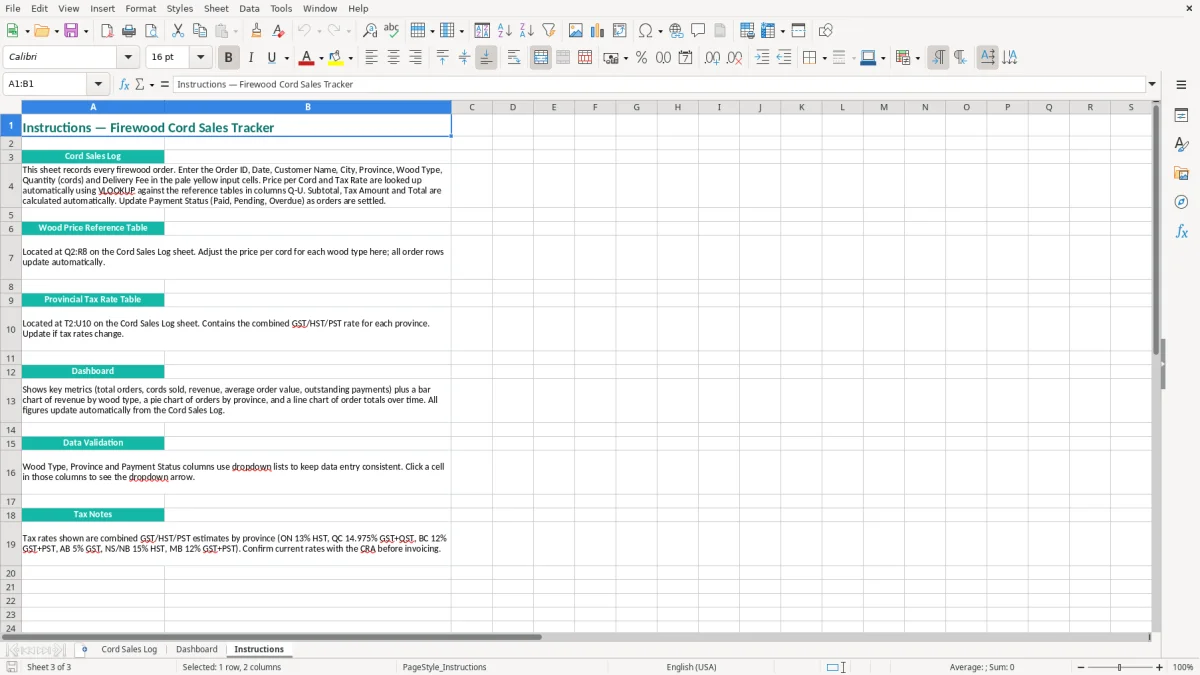
A sole proprietor normally reports firewood income and expenses on Form T2125 with the personal T1 return. An incorporated seller records the activity in its corporate books and files a T2. Image 3, the Instructions sheet, is the right place to document your chosen rate and entry process for anyone helping with the books.
The most expensive errors in firewood sales are usually small entry mistakes repeated across a busy season. A seller enters 3 instead of 0.3 cords, types $180 as the total price rather than the price per cord, or records a delivery fee in Notes where it never reaches the customer total. One misplaced decimal on 20 orders can turn $3,600 of intended sales into $36,000 in reported wood revenue.
Customers use cord, face cord, rack, tote and truckload inconsistently. If your price is $220 per full cord, a customer receiving two face cords cannot automatically be charged $440 unless your business has defined that unit as equivalent. The log's Quantity (Cords) field is a useful control only when you convert every sale to the same unit before entry.
Another common problem is mixing delivered and stacked measurements. A driver may report that a truck was full, while the customer expects 4 by 8 by 4 feet of tightly stacked wood. Put the agreed quantity, wood type and any stacking instruction in the row or Notes, and keep the signed delivery confirmation with the order record.
A pending e-transfer is not the same as a paid order. If 12 orders total $4,800 and two $400 orders remain Pending, the Dashboard can make the apparent sales picture look complete while $800 is still outstanding. Mark the status at the time of collection and avoid deleting unpaid rows simply because the delivery has already happened.
Tax errors also accumulate quickly. Applying 13% HST to a Quebec order without checking the supply details can overcharge a $500 customer by $15 compared with a 5% GST calculation, while omitting tax from 10 Ontario orders of $250 each leaves $325 uncollected. Keep the Tax Rate visible and review unusual provinces before issuing the invoice.
Finally, do not rely on the workbook as the only evidence. A spreadsheet row does not prove that the wood was delivered, paid for or measured correctly. Keep invoices, receipts, e-transfer confirmations, fuel records and delivery notes together; that documentation is what makes the figures defensible during a CRA review or a customer dispute.
For the same reason, mileage records belong with the receipts and delivery notes, because a CRA review often turns on whether every trip and load can be substantiated.
The spreadsheet will work only if the entry happens close to the sale. Set a fixed 15-minute block after the final delivery each day, or enter the order immediately after confirming the customer's payment. Waiting until the end of the month turns 60 orders into a reconstruction exercise, especially when several customers ordered the same wood at different prices.
At the Friday close, filter or review the log for Pending orders and compare the paid totals with your bank deposits. If 18 deliveries produced $7,200 in customer totals but deposits show only $6,400, the $800 difference should be explained by pending payments, a deposit timing issue or an entry error before the next route.
Keep the original workbook as a clean master and save a working copy for the season. Image 2 shows why the Dashboard is useful for a quick weekly review, while image 3 provides the instructions that a seasonal employee can follow without changing the layout. Add a backup after each major delivery week and restrict editing of formula cells if several people share the file.
Use a consistent tax-rate convention and do not insert ad hoc columns inside the log without checking the Dashboard references. If your operation reaches hundreds of orders per month, has multiple drivers, tracks inventory by species and moisture grade, or needs customer statements and purchase orders, move to bookkeeping or point-of-sale software. The spreadsheet remains a good order register, but it should not become the dispatch system, inventory ledger and full accounting file at the same time.