
Ice Fishing Hut Rental Log Excel – Free Template (2026)
8
Free download
Track Canadian landscaping contracts, visits, deposits, tax, balances and status with a three-sheet Excel template for seasonal service businesses.
Download template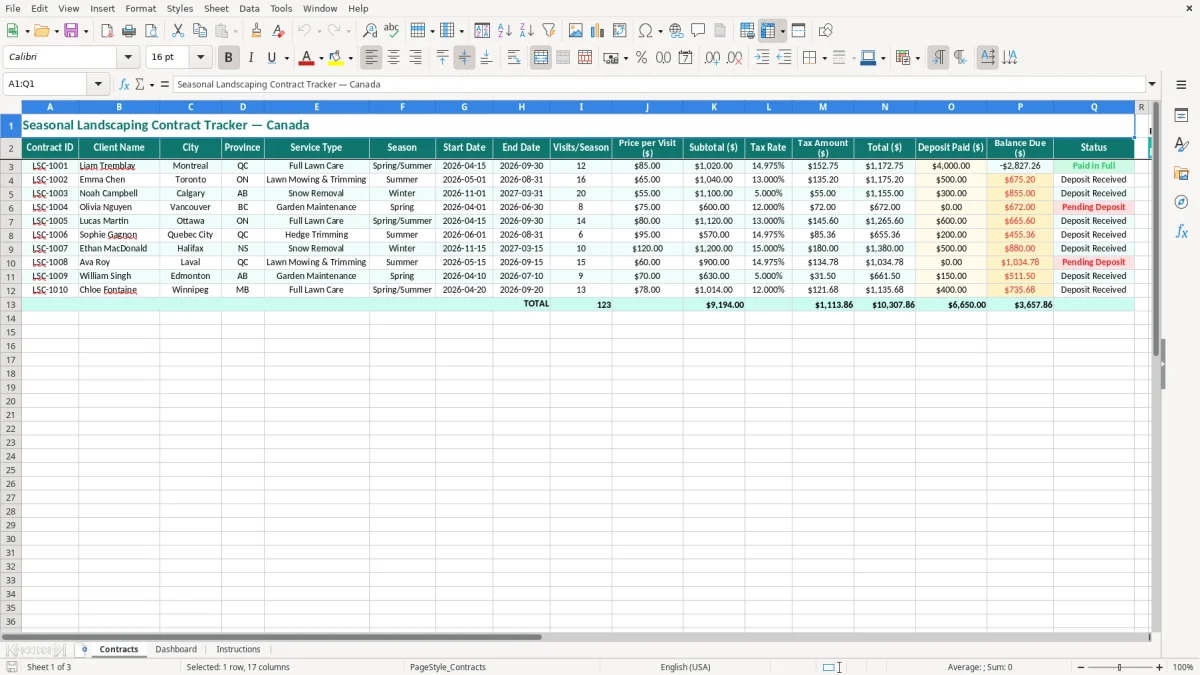
This seasonal landscaping contract Excel template tracks each Canadian client's service dates, visit count, price, tax, deposit and outstanding balance. It includes a Contracts sheet with 17 practical columns, a Dashboard for reviewing the portfolio, and Instructions for setting up your records.
Use it for lawn care, garden maintenance, snow removal and other recurring work. The sample records show clients in Montreal, Toronto, Calgary, Vancouver and Ottawa, so you can see how province, season and tax treatment fit into one working register.
A landscaping owner usually opens this tracker when spring quoting begins, not when the first mower starts. A sole proprietor may have 25 lawn-care agreements to renew, while an office manager at a four-employee trades company may be coordinating mowing, garden maintenance and snow removal across several crews.
The Contracts sheet, shown in image 1, puts the commercial details beside the operating details. Its columns run from Contract ID, Client Name, City and Province through Service Type, Season, Start Date, End Date, Visits/Season and Price per Visit ($). The second half records Subtotal ($), Tax Rate, Tax Amount ($), Total ($), Deposit Paid ($), Balance Due ($) and Status.
For a spring launch, enter a Toronto mowing agreement from 2026-05-01 to 2026-08-31 with 16 visits at $65.00. That is $1,040.00 before tax if every visit is completed. A Montreal full-lawn-care contract might show 12 visits, a $4,000.00 subtotal and a separate deposit, giving you a different collection profile from a small recurring mowing job.
Winter work needs the same discipline even though the season crosses calendar periods. A Calgary snow-removal agreement can have a November start, a March end and 20 planned visits; keeping those dates in one row prevents the contract from disappearing when you close the calendar-year books.
The owner can use Status to see which agreements are ready for crew scheduling. A bookkeeper at an incorporated company can use the totals and deposits when preparing invoices and the income statement. A non-profit property manager or condominium administrator can keep the client, city and service commitment visible without maintaining separate paper schedules.
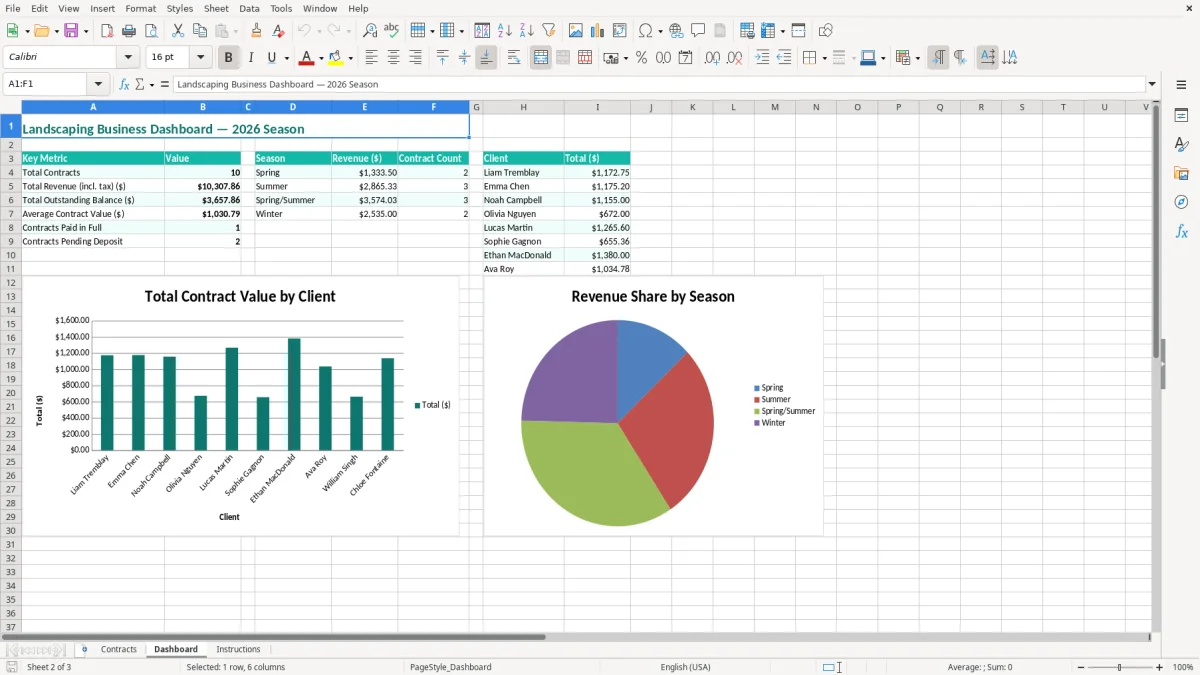
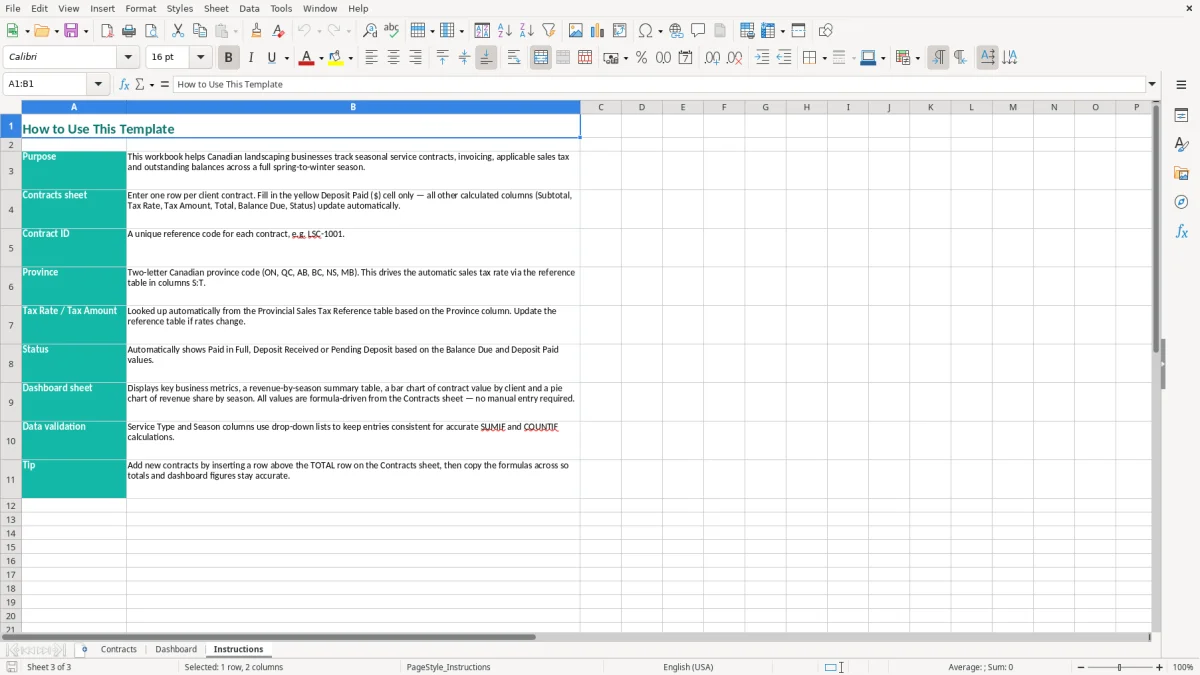
Image 2 shows the Dashboard sheet, which is intended for the summary view rather than detailed entry. Image 3 contains Instructions, useful when a seasonal employee or replacement bookkeeper takes over the file.
Tax must be determined from the customer location, the service and your registration status. A landscaping business that exceeds $30,000 of worldwide taxable revenue over four consecutive quarters must register for GST/HST; once registered, it generally operates with a CRA business number and an RT program account.
For a registered supplier, the standard federal GST rate is 5%. The HST rate is 13% in Ontario and 15% in New Brunswick, Nova Scotia, Prince Edward Island, and Newfoundland and Labrador. British Columbia, Saskatchewan and Manitoba commonly involve 5% GST plus provincial sales tax, while Quebec uses 5% GST plus QST. Enter the rate actually applicable to the supply instead of copying the rate from the previous client.
Suppose an Ontario maintenance contract has a $2,400.00 subtotal. At 13% HST, the tax is $312.00 and the customer total is $2,712.00. If the customer pays a $1,000.00 deposit, the remaining balance is $1,712.00; the deposit does not reduce the tax rate, it reduces the amount still to collect.
Use the Tax Rate, Tax Amount ($) and Total ($) columns as a review trail, then issue an invoice that shows the supplier name and address, invoice date, sequential invoice number, customer details, the GST/HST number and tax separately. Keep the contract, invoice and payment evidence together for the CRA's six-year record-retention requirement.
Record tax collected as a liability, not as landscaping revenue. The subtotal belongs in sales; the tax amount is remitted on your GST/HST return, and eligible business purchases may produce input tax credits. A sole proprietor will generally report business activity on form T2125, while an incorporated company reports through its corporate records and T2 process.
My practical preference is to use the regular GST/HST method when equipment, fuel and subcontractor costs are substantial, because input tax credits matter. The Quick Method can be simpler for a smaller service operation, but compare the remittance before choosing it; the spreadsheet records the rate and customer total but does not replace the CRA return.
The same discipline applies to a home savings tracker, where annual contributions and room totals need to be recorded separately from the tax return.
The most costly errors are usually small at entry and large at billing. A crew completes 16 Toronto visits, but the office records 15; at $65.00 per visit, $65.00 disappears from the invoice. Across 40 customers, the same one-visit error can reduce billings by $2,600.00 in one summer.
Another common failure is recording a deposit in an email or bank note but leaving Deposit Paid ($) blank in the contract register. A $500.00 deposit on a $4,000.00 contract should leave $3,500.00 before tax, or $3,955.00 after 13% HST if the full subtotal is taxable. If the deposit is missed, staff may ask for money twice or leave the account under-collected.
Do not confuse a quoted price per visit with the whole-season subtotal. A row showing 12 visits at $85.00 suggests $1,020.00 of visit pricing, while a negotiated $4,000.00 seasonal subtotal is a different commercial agreement. Decide which figure controls the signed contract and investigate any mismatch before issuing an invoice.
Copying an Ontario 13% rate into a Quebec row can overcharge a client because Quebec generally uses 5% GST and QST rather than Ontario HST. Copying a summer end date into a winter contract can also make an active snow-removal agreement appear finished before the crew has performed the work.
Status errors create operational costs rather than accounting adjustments. If a completed agreement remains active, the scheduler may send a crew unnecessarily; if a signed agreement remains pending, a customer can be missed during the first snowfall. For a four-employee contractor, one missed commercial property can mean several unbillable hours, fuel and a difficult client conversation.
Finally, keep evidence for deposits, approved scope changes and completed visits. The CRA's six-year retention rule applies to supporting records, and a spreadsheet row without the related invoice or payment trail is weak evidence during a review.
Those supporting records also feed the business expense records needed to trace deposits, invoices and payment trails during a review.
A seasonal file survives when updating it is attached to work you already do. Set a fixed Friday review before the crew schedule is published: update Status, confirm upcoming Start Date and End Date, and compare planned Visits/Season with visits completed in your field notes.
For example, an owner with 30 contracts can review 10 rows each Friday instead of trying to reconstruct all 30 at the end of September. At five minutes per row, that is 50 minutes weekly and a much smaller cleanup than 150 rows at year-end.
Keep the column headings unchanged so formulas, sorting and the Dashboard remain dependable. Use the pale input cells for new information, enter dates consistently as YYYY-MM-DD, and use one row per contract rather than adding several clients into one cell. Before making a major change, save a dated backup copy.
This workbook is a good fit while the business has a manageable number of seasonal agreements and one person controls updates. Move to job-management or accounting software when several crews need simultaneous mobile updates, you exceed roughly 100 active contracts, or you need route optimization, automated recurring invoices, timesheets and customer portals. At that point, use this tracker as an opening data list, not as the permanent dispatch system.