
Firewood Cord Sales Excel Template – Free (2026)
10
Free download
Track ice hut bookings, nights, provincial tax, deposits and balances with a Rental Log, Dashboard and Instructions sheet for Canadian operators.
Download template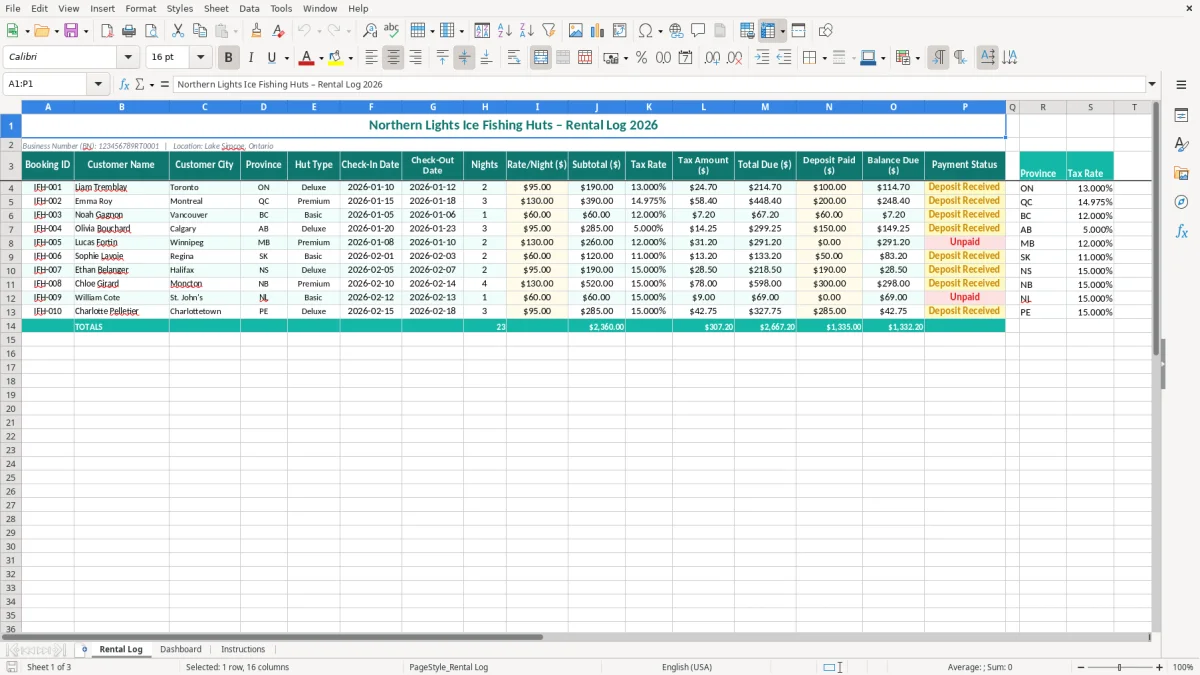
This ice fishing hut rental log Excel template records each booking, customer, province, hut type, check-in and check-out dates, nights, rate, tax, deposit, balance and payment status. It also includes a dashboard for reviewing rental activity and an Instructions sheet for setup.
Use the Rental Log for day-to-day bookings, then review the Dashboard before a weekend rush or month-end. The workbook is set up for a Canadian operator at Lake Simcoe, Ontario, with a Business Number (BN) and provincial tax-rate lookup table already visible beside the main log.
An ice hut operator usually reaches for this spreadsheet at the moment bookings start arriving faster than the paper calendar can handle. A sole proprietor on Lake Simcoe may be answering messages during the fall season, while an office manager at a northern Ontario outfitter may be entering reservations for several huts before the ice is safe for customers.
The Rental Log is built for that working situation. Image 1 shows the wide booking table with Booking ID, Customer Name, Customer City, Province, Hut Type, Check-In Date, Check-Out Date, Nights and Rate/Night ($) on the left. The second half records Subtotal ($), Tax Rate, Tax Amount ($), Total Due ($), Deposit Paid ($), Balance Due ($) and Payment Status.
Suppose a customer books a two-night hut at $225 per night. The log gives you a $450 subtotal before tax; at Ontario's 13% HST, tax is $58.50 and total due is $508.50. When the customer sends a $200 deposit, the outstanding balance is $308.50, which is much safer to confirm than relying on a text message or memory.
A volunteer treasurer for a winter fishing club can use the same structure when members reserve huts for a tournament weekend. Customer City and Province help distinguish similarly named customers, while Hut Type shows whether the reservation is for a basic two-person hut or a larger heated unit.
Use the log before each weekend to check Payment Status and Balance Due. After a group checks out, keep the booking in the same table rather than deleting it; the historical record helps reconcile deposits, prepare revenue totals and answer a customer question about a $75 balance from six weeks earlier.
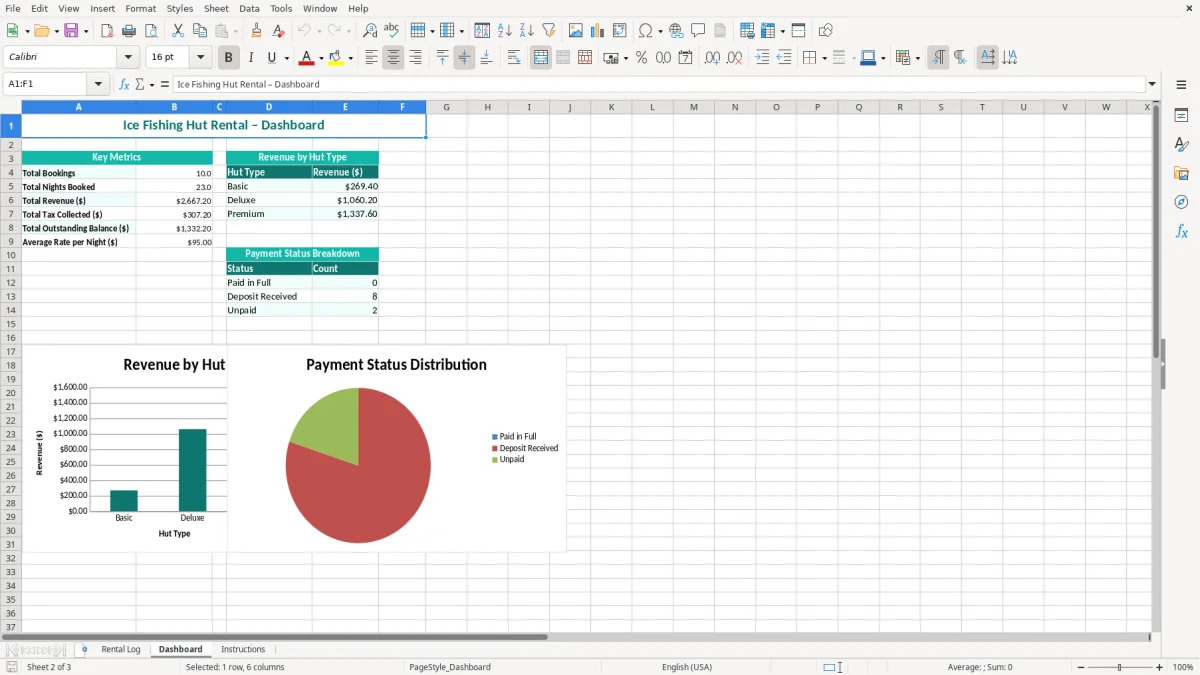
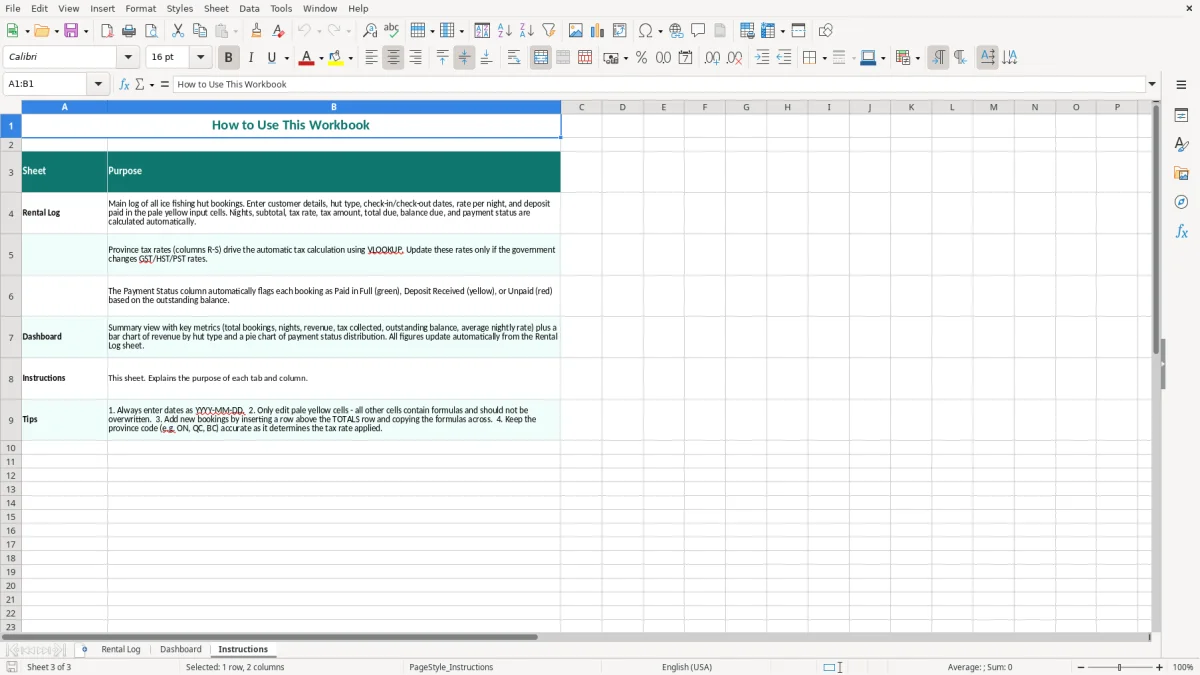
Image 2 shows the Dashboard, which gives you a quicker management view than the transaction table. Image 3 is the Instructions sheet, useful when a seasonal worker or family member takes over data entry during the busiest part of the winter.
The same recordkeeping also extends to payroll reconciliation, where historical payments and balances have to line up cleanly at year-end.
The tax column must reflect the tax that applies to the supply, not simply the customer's home province. The workbook displays a lookup table with ON at 13%, QC at 14.975%, BC and MB at 12%, SK at 11%, AB at 5%, and Atlantic entries at 15%. Treat those rates as a starting point for the workbook and verify the place-of-supply treatment for your accommodation, equipment and bundled services before filing.
Under the GST/HST small-supplier rule, mandatory registration generally begins when worldwide taxable revenue passes $30,000 over four consecutive calendar quarters or in a single quarter. A hut business with $9,000 in December, $12,000 in January and $11,000 in February has reached $32,000 across the relevant period, so it should not continue treating tax as optional.
Once registered, the operator has a BN with an RT program account. Ontario bookings generally involve 13% HST, while a taxable supply in Alberta generally involves 5% GST. For a $1,000 Ontario rental, the invoice total is $1,130; for a $1,000 Alberta rental, it is $1,050, before any separate taxable charges.
The log is not a substitute for an invoice, receipt or accounting ledger. Keep the booking confirmation, payment evidence, supplier invoices and tax calculations together for the CRA's six-year record-retention requirement. If you charge for a hut, auger hire, bait or transportation as separate items, document each item and its tax treatment rather than hiding everything in one nightly rate.
For most small operators, the regular GST/HST method is the clearer choice when equipment, fuel and repairs generate meaningful input tax credits. The Quick Method can reduce bookkeeping, but it does not automatically produce the lowest result: $4,000 of tax collected with $1,500 of eligible input tax credits may make the regular method worth comparing before you elect.
That same comparison often extends to vehicle expense tracking, where fuel, repairs and business kilometres need to be logged against the method you choose.
The expensive errors I see with winter rentals rarely begin with a complicated formula. They begin when a booking is written as Lake 4, Friday, $300 in a phone note and later entered without a customer city, province, check-out date or payment status. By February, the operator cannot tell whether the $300 was a deposit, a full payment or the rate for one night.
A one-night reservation entered with a check-out date one day too early can understate a three-night stay by $225 at a $225 nightly rate. The opposite mistake may block a hut for an extra night, causing a lost booking worth $225 or more during a sold-out weekend.
Deposits cause a second problem. If a $500 booking has a $150 deposit but the spreadsheet records $150 as the total paid without updating the balance, the customer may arrive believing nothing more is due. The operator then has to collect money at the shoreline in poor weather, or absorb the shortfall.
Choosing the customer's province instead of the actual supply location can apply the wrong rate. A $600 reservation calculated at 5% instead of Ontario's 13% produces $30 of tax instead of $78, a $48 difference on one booking. Ten similar bookings leave a $480 gap before interest, corrections or a CRA review.
Duplicate Booking IDs also undermine the record. If two reservations are both called HUT-18, a deposit can be applied to the wrong customer, and a dashboard total may still look reasonable while the detailed evidence is wrong.
Do not erase cancelled rows. Mark the booking clearly and retain the correspondence, because deleting it makes a later refund or chargeback look like unexplained missing revenue. The safest operating stance is simple: one row per booking, one unique ID, and a payment update every time money changes hands.
A rental spreadsheet works when it is attached to a fixed event, not when you promise to update it later. Set one 15-minute review after each booking block and another review before the Friday arrival window. For an operator with 30 active reservations, that small routine is enough to catch a missing check-out date or unpaid $200 deposit before access instructions go out.
Use data validation for Province and Payment Status if you extend the workbook, so ON is not entered once as Ontario and once as Ont. Conditional formatting can flag a positive Balance Due or a check-out date earlier than the check-in date. These controls prevent drift when a seasonal employee enters 20 reservations in one afternoon.
This template is a good fit for a single operator or a modest fleet where one person controls the booking record. Move to dedicated booking software when several staff edit at once, customers need live availability, online payments must update automatically, or the log exceeds roughly 1,000 active and historical rows.
Keep the Excel file as an export or backup even after moving systems. The practical goal is not to create a complicated process: update one row at booking, one row at payment, and one dashboard review each week throughout the 2026 ice season.